- Products
- Learn
- Local User Groups
- Partners
- More

MVP 2026: Submissions
Are Now Open!
What's New in R82.10?
Watch NowOverlap in Security Validation
Help us to understand your needs better
CheckMates Go:
Maestro Madness
Hi,
I have two basic questions regarding clusterXL HA.
1. It is still not clear to me which command is used to interchange the active/standby on a clusterXL HA cluster. I have read that from clish the following command can be used:
clusterXL_admin down
Does this mean I have to use the above command on the active member in order to make it the standby? And will this cause the standby to become the active in return automatically?
2. Futher I think I have once read somewhere that before switching active/standby in a HA clusterXL which is running in production, a so called delta sync should be performed? Is this correct and if so, which command do I use initiate the delta sync?
Thanks a lot,
Mark
Have a look into this where is everything explained very well:
ClusterXL R77 Versions Administration Guide
Best Practices - Manual fail-over in ClusterXL
clusterXL_admin down brings ClusterXL "down" on the node.
Assuming the other node(s) are up, this should cause the cluster to fail over to the other node(s).
Delta sync is something that should happen automatically and should not need to be triggered.
Does this mean I have to use the above command on the active member in order to make it the standby? And will this cause the standby to become the active in return automatically?
Yes if you do this the other member becomes the active.
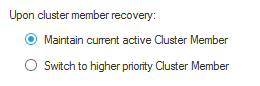
But you have to run clusterXL_admin up to not leave the gateway down, and the behavior when you do this depends of what option you chose in ClusterXL configuration here:

2. Futher I think I have once read somewhere that before switching active/standby in a HA clusterXL which is running in production, a so called delta sync should be performed? Is this correct and if so, which command do I use initiate the delta sync?
Delta syncs are constantly being done automatically, there is nothing to do.
Worth to mention that issuing command "clusterXL_admin down" on a node will bring node into DOWN state. In order to put it back to STANDBY (to be available for further failover) you need to issue "clusterXL_admin up".
We are using following one-line command to perform failover from EXPERT mode (bash):
clusterXL_admin down;clusterXL_admin up
to be precise:
clusterXL_admin down -p
clusterXL_admin up -p
clusterXL_admin down ;sleep 2;cphaprob stat;clusterXL_admin up ;sleep 2;cphaprob stat;
Leaderboard
Epsum factorial non deposit quid pro quo hic escorol.
| User | Count |
|---|---|
| 16 | |
| 15 | |
| 7 | |
| 5 | |
| 5 | |
| 5 | |
| 4 | |
| 4 | |
| 4 | |
| 4 |
Tue 16 Dec 2025 @ 05:00 PM (CET)
Under the Hood: CloudGuard Network Security for Oracle Cloud - Config and Autoscaling!Thu 18 Dec 2025 @ 10:00 AM (CET)
Cloud Architect Series - Building a Hybrid Mesh Security Strategy across cloudsTue 16 Dec 2025 @ 05:00 PM (CET)
Under the Hood: CloudGuard Network Security for Oracle Cloud - Config and Autoscaling!Thu 18 Dec 2025 @ 10:00 AM (CET)
Cloud Architect Series - Building a Hybrid Mesh Security Strategy across cloudsAbout CheckMates
Learn Check Point
Advanced Learning
YOU DESERVE THE BEST SECURITY