- Products
- Learn
- Local User Groups
- Partners
- More

MVP 2026: Submissions
Are Now Open!
What's New in R82.10?
10 December @ 5pm CET / 11am ET
Improve Your Security Posture with
Threat Prevention and Policy Insights
Overlap in Security Validation
Help us to understand your needs better
CheckMates Go:
Maestro Madness
Kind of in a jam and need to get a tunnel up and running in short order. To make it worse its a non Checkpoint firewall with a dynamic outside interface. Now in the Juniper SRX world we accomplished this using aggressive mode.
One side is a large Checkpoint cluster running R80.10 . Obviously the outside interface has a static ip.
On the other side is a small Fortinet 60E-POE that will be in someones house. The WAN interface plugs into a Frontier DSL Modem ( ARRIS ) . The WAN interface will get a 192.168 address and be NAT'ed when it goes to the Internet.
I need a route based VPN setup between these two. Anyone do anything similar ? Have any guidance? Thanks.
I believe it'll require a certificate-based setup between peers:
I was able to get the tunnel up . Had to create a certificate in the Checkpoint PKI export it and import it into Fortinet device. Also had to run the below solution to change what the CP presents when as the peer id when it connections.
(PS I didn't have to reboot as it says, just had to run the below)
Command will be “source $CPDIR/tmp/.CPprofile.sh”
I had to import the Checkpoint CA Cert into the Fortinet and add the Subject as CN = MyFirewallCertificate Name
Anyway, not P1 and P2 is up but I'm having a routing issue. I have a route that points the 192.168.0.0/16 network inside but the external VPN network is 192.168.51.0/24 . Since this is a more specific route it should take precedence but traffic is ping-ponging. Hitting the firewall and then being sent back in. I didn't create a specific static route as I assumed the connected VPN would create a dynamic one.
Any pointers on how to troubleshoot ?
I believe that even if /24 is a more specific route, it is not necessarily a preferred one over "Connected" route.
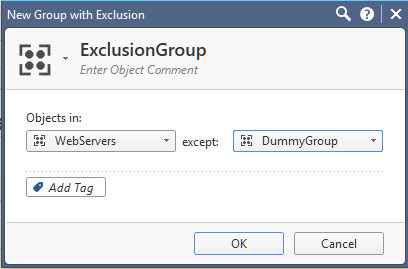
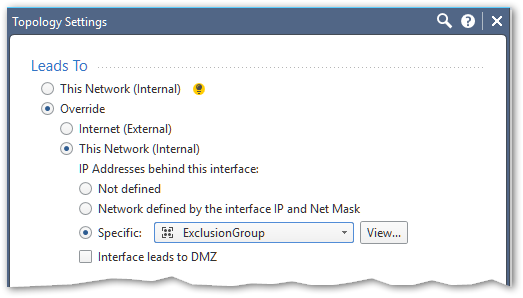
Try modifying the topology of your gateway by creating a Network Group with Exclusions, (create two simple groups in advance, one containing 192.168.0.0/16 network and the other one containing 192.168.51.0/24):

And see if this'll do the trick.
Thank you very much, that actually worked in resolving the routing issue. The tunnel was actually up for a while and traffic was working in one direction. I believe it was probably some policy problem that wasn't getting it to work in the other direction. Now for some reason I don't understand the tunnel is failing to authenticate again. It's during the certificate authentication phase on the Fortinet side.
Validating X.509 certificate
peer cert, subject='CP-PROD VPN Certificate', issuer='-G-V'
peer ID does not match cert
certificate validation failed
We did the steps where you edit the .CPProfile.sh and instruct the firewall to send the FQDN as the peer id. Not sure if that helped or not.
Any other assistance is greatly appreciated. Thanks.
Hi Copper,
Can you guide me how did you configured the VPN between SRX and checkpoint? Our SRX routers we did configured aggressive mode with preshared keys but not sure which object in Checkpoint will go with this. We have tried interoperable device but if we select dynamic address it only accepts certificate based vpn. We are kinda stuck in this stage..
Thanks..
Adnan
We do not support the use of pre-shared keys with a dynamic IP site-to-site VPN Endpoint, certificate Authentication must be used in this case.
Can you please direct me to a document describing configuration for certificate based site-to-site VPN with 3rd party vendor (Fortigate in our case) because it seems I'm not able to find related documentation..
Leaderboard
Epsum factorial non deposit quid pro quo hic escorol.
| User | Count |
|---|---|
| 17 | |
| 12 | |
| 11 | |
| 7 | |
| 6 | |
| 5 | |
| 4 | |
| 4 | |
| 4 | |
| 4 |
Fri 12 Dec 2025 @ 10:00 AM (CET)
Check Mates Live Netherlands: #41 AI & Multi Context ProtocolTue 16 Dec 2025 @ 05:00 PM (CET)
Under the Hood: CloudGuard Network Security for Oracle Cloud - Config and Autoscaling!Fri 12 Dec 2025 @ 10:00 AM (CET)
Check Mates Live Netherlands: #41 AI & Multi Context ProtocolTue 16 Dec 2025 @ 05:00 PM (CET)
Under the Hood: CloudGuard Network Security for Oracle Cloud - Config and Autoscaling!Thu 18 Dec 2025 @ 10:00 AM (CET)
Cloud Architect Series - Building a Hybrid Mesh Security Strategy across cloudsAbout CheckMates
Learn Check Point
Advanced Learning
YOU DESERVE THE BEST SECURITY