- Products
- Learn
- Local User Groups
- Partners
- More

Policy Insights and Policy Auditor in Action
19 November @ 5pm CET / 11am ET
Access Control and Threat Prevention Best Practices
Watch HereOverlap in Security Validation
Help us to understand your needs better
CheckMates Go:
Maestro Madness
Hi Guys,
I'm preparing for CCSA R80 and when I try to change the SSL-Port from Gaia through clish, the following output is given:
cp-mgmt> set web ssl-port 4434
WARNING This command is for initial use. SSL port should be set through SmartCon
sole. Changing the port may cause inconsistency with the settings on the SmartCo
nsole.
Are you sure you want to continue?(Y/N)[N]
n
I cannot find any option to set the ssl-port for a GAIA system from SmartConsole.
The SecurityManagement Guide for R80.20 got no hits, when searching for "ssl-port"
Does anyone know where to find that option?
Best Regard
Johannes
Johannes, the command set web ssl-port <port number> is correct and, remember, after execute this command you need to save this configuration with "save config". To verify you could run " grep 'httpd:ssl_port' /config/db/initial "
sk91380
"WARNING This command is for initial use. SSL port should be set through SmartDashboard. Changing the port may cause inconsistency with the settings on the SmartDashboard. Are you sure you want to continue?(Y/N)
[N]
"It is recommended to change the port using the Platform Portal section of the object in SmartDashboard.
Add the port to the end of the Main URL and push policy. "show web ssl-port" should now display the port in the Main URL
For Security Gateway:
In SmartConsole, perform:For Security Management Server:
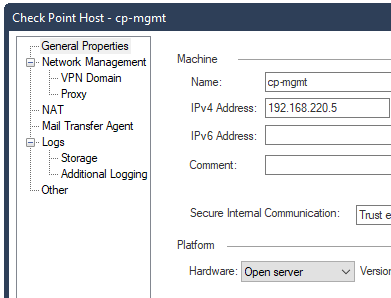
Here we go: Platform portal under GW object.

Now, the main question is, why do you want to change SSL portal port from the default one?
yeah, that looks good.
But it seems, that you cannot change the default port for a mgmt server.

I guess you still need to change the admin-port from 443 to 4434 like in R77 when configuring CaptivePortal or sth. which also uses port 443.
But strange - when I add a new Gateway, the menu looks like the one in the picture, no Platform Portal branch
Yes and no.
In your example, you are on SMS. There is no Captive portal or any other GW side functionality, so no need to change SSL port. You still have Platform Portal option for GWs, as shown above.
On SMS/MDM the Gaia Port can be defined using the clish command „set web ssl-port“.
This is then default port for Gaia, Smartview, REST-API.
On gateways and clusters the platform portal is defining the Gaia Port but you can define different ports for UserCheck, MAB, IA CaptivePortal and maybe I forgot others.
In background everything is handled by multi-portal daemon which forwards requests on relevant port and path to relevant daemon/functionality listening on high-port.
Johannes, the command set web ssl-port <port number> is correct and, remember, after execute this command you need to save this configuration with "save config". To verify you could run " grep 'httpd:ssl_port' /config/db/initial "
sk91380
"WARNING This command is for initial use. SSL port should be set through SmartDashboard. Changing the port may cause inconsistency with the settings on the SmartDashboard. Are you sure you want to continue?(Y/N)
[N]
"It is recommended to change the port using the Platform Portal section of the object in SmartDashboard.
Add the port to the end of the Main URL and push policy. "show web ssl-port" should now display the port in the Main URL
For Security Gateway:
In SmartConsole, perform:For Security Management Server:

Isn't there a way to run GAIA on only the Management interface, and run other Portals on External/Internal interfaces?
Seems like that would be the simpler solution to this problem.
Anyone seen this issue?
Updated R81.10 ssl port from 443 to 4434 (on a new manager with migrated data) after this I get the following message when attempting to access the GAIA portal:
HTTP Status 404 - Not Found
Type Status Report
Description The origin server did not find a current representation for the target resource or is not willing to disclose that one exists.
Apache Tomcat/9.0.71
---
# grep 'httpd:ssl_port' /config/db/initial
httpd:ssl_port 4434
Port looks set correct looking at the above
TAC provided the solution, its known that when upgrading Endpoint Server from R80.40 or less to R81.x or above the httpd/httpd2 ports can get mixed up.
Resolution to this is documented in SK172485
#$UEPMDIR/system/install/gaia_apache_conf_regenerate 4434
#uepm_apache.sh port 443
Leaderboard
Epsum factorial non deposit quid pro quo hic escorol.
| User | Count |
|---|---|
| 24 | |
| 14 | |
| 10 | |
| 6 | |
| 6 | |
| 5 | |
| 4 | |
| 3 | |
| 3 | |
| 3 |
Tue 11 Nov 2025 @ 10:00 AM (CET)
Your First Response: Immediate Actions for Cyber Incident Containment- EMEATue 11 Nov 2025 @ 06:00 PM (COT)
San Pedro Sula: Risk Management al Horno: ERM, TEM & Pizza NightTue 11 Nov 2025 @ 06:00 PM (COT)
San Pedro Sula: Risk Management al Horno: ERM, TEM & Pizza NightTue 11 Nov 2025 @ 10:00 AM (CET)
Your First Response: Immediate Actions for Cyber Incident Containment- EMEAThu 13 Nov 2025 @ 10:00 AM (CET)
Cloud Architect Series - Guarding Generative AI: Next-Gen Application Security with CloudGuard WAFFri 14 Nov 2025 @ 10:00 AM (CET)
CheckMates Live Netherlands - Veriti, Threat Exposure ManagementWed 19 Nov 2025 @ 11:00 AM (EST)
TechTalk: Improve Your Security Posture with Threat Prevention and Policy InsightsTue 11 Nov 2025 @ 06:00 PM (COT)
San Pedro Sula: Risk Management al Horno: ERM, TEM & Pizza NightTue 11 Nov 2025 @ 06:00 PM (COT)
San Pedro Sula: Risk Management al Horno: ERM, TEM & Pizza NightAbout CheckMates
Learn Check Point
Advanced Learning
YOU DESERVE THE BEST SECURITY