- Products
- Learn
- Local User Groups
- Partners
- More
MVP 2026: Submissions
Are Now Open!
What's New in R82.10?
Watch NowOverlap in Security Validation
Help us to understand your needs better
CheckMates Go:
Maestro Madness
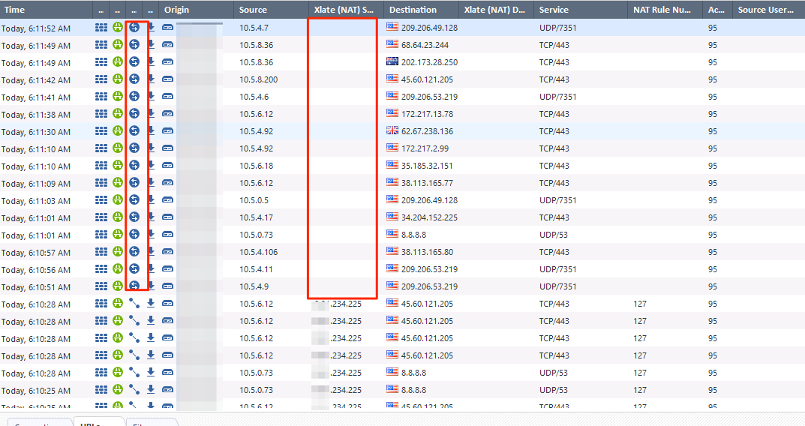
I have recently had some customers that have had challenges with the connection based logging. With connection based logging the number of logs are sometimes in multiples of 8-10 more than session based logging depending on the traffic. One of the things I have gotten in the habit of doing is changing all connection based logging to session based. Especially if turning on new blades and log storage is an issue. This recently bit me because all of a sudden there was no NAT appearing in the logs and the only way that NAT is visible is if you do log connections. This seems like an important thing to be logging, but if you are trying to conserve space you are out of luck. I have also seen another example of where the clean-up rule was session based and therefore not logging and only after cussing a bit and pulling my hair out did I do a zdebug drop and see the traffic dropping? Am I off base here? Shouldn't there be a happy medium between session and connection based logging, log storage, and getting all of the information you need?
Here is an example. The highlighted log shows my traffic as I would expect. Not until I turned back to connection based logging did I see the erroneous NAT. Hours of time troubleshooting other pieces of the network because Check Point is not providing me something that thy have provided me for the past 20 years.
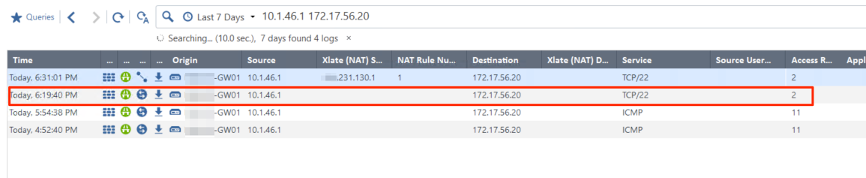
Below is the output while nothing shows up with session based cleanup logging:

There has to be a happy medium between getting the information you need and blowing up your disk. When you talk to TAC about this you get a snarky "you should have read the upgrade guide before you upgraded." OK. Fair enough. You should read the upgrade guide. But who would think that an upgrade is going to quadruple your logs or even more. A lot of my customers can't afford to redo their logging architecture because of an upgrade so they are stuck with getting some of what they need in the logs because they can't afford the space.
I write today because I hope I'm wrong and I'm just overlooking something. Maybe I'm configuring it wrong? I am constantly second guessing Check Point logs now because I'm unsure of what I'm seeing is actually what the firewall is doing and that's clearly not good.
I welcome any feedback.
Thanks,
Paul
I checked a couple of customers with 80.30 and it appears to be working. I sent back to 80.10 JHF252 and its not working. I also have a JHF272 customer with the same problem. Below was the JHF252 test.
I had a ticket opened for this in March. I'll PM you the SR# so you can look to see what TAC said. When we resolved they didn't put any publicly facing notes in the ticket.
Hey Dameon. I opened another ticket for this (6-0002076094) after I upgraded the the customer to 8030/8030. They are saying there is not NAT reference in session logs. Does that make sense to you? I just don't get it. Like I explained originally an exponential amount of logging increase and if you change to session to try to account for that you don't get all the data you need. For real? Open an RFE? 😞
Thanks,
Paul
Hi Paul,
I've opened an RFE & doing my best to push such a fix.
Appreciate your support. Seems to me its the next most important field right after src ip 🙂 when you are troubleshooting.
I am experiencing a similar situation where we had to switch to session logging from connection logging to reduce disk consumption. After migrating our MDM to R80.30 JHF 215 we are not receiving any session logs. Switching to connection base logging to troubleshoot a problem afterwards is not conducive to troubleshooting. Has there been any progress towards a fix?
thanks,
geoff
Are you referring to missing NAT info in Session logs, forcing you to move to connection based logging to troubleshoot after issues occurs, which ofcourse is very problematic?
Sadly, I cannot report any progress yet.
Please confirm you're requesting the same NAT info in Session logs & I'll do my best to push for such a fix.
Hello Dror,
Yes, I am experiencing the same issue where the NAT info is not displaying in the session logs. Appreciate you pushing this towards a solution.
thanks,
geoff
Leaderboard
Epsum factorial non deposit quid pro quo hic escorol.
| User | Count |
|---|---|
| 16 | |
| 15 | |
| 7 | |
| 5 | |
| 5 | |
| 5 | |
| 4 | |
| 4 | |
| 4 | |
| 4 |
Tue 16 Dec 2025 @ 05:00 PM (CET)
Under the Hood: CloudGuard Network Security for Oracle Cloud - Config and Autoscaling!Thu 18 Dec 2025 @ 10:00 AM (CET)
Cloud Architect Series - Building a Hybrid Mesh Security Strategy across cloudsTue 16 Dec 2025 @ 05:00 PM (CET)
Under the Hood: CloudGuard Network Security for Oracle Cloud - Config and Autoscaling!Thu 18 Dec 2025 @ 10:00 AM (CET)
Cloud Architect Series - Building a Hybrid Mesh Security Strategy across cloudsAbout CheckMates
Learn Check Point
Advanced Learning
YOU DESERVE THE BEST SECURITY