Hi All,
VSX environment:
- MGMT server on R81.10 Gaia version,
- VSXHA cluster (active/standby) which consists of two GW's. GW's are running on R80.30 Gaia version with the latest Jumbo Take installed.
- VSX Cluster has three virtual contexts:
- VS (virtual firewall)
- VSX context
- Virtual router (external)
I wanted to upgrade our VSXHA cluster to recommended R81 version and an issue arose at the very first step 🙂
vsx_util tool on MGMT server failed to upgrade VS's configuration to wanted R81 version.
It failed at upgrading virtual router step. Final vsx_util upgrade result is - Policy compilation failed. Upgrade operaton (before this error) in first two steps, previously finished successfully (for another virtual devices (virtual firewall and for VS0/VSX context)).
In vsx_util upgrade log there were errors for one virtual device - virtual router:
- Invalid installation target received - Target gateway External_vRouter is not in the specific targets list for policy package Cluster_VSX_polisa
- Policy verification failed - messages from member VSX_FW1_External_vRouter / VSX_FW2_External_vRouter
The problematic output part is:
firewall_application Policy installation/compilation for External_vRouter: Invalid installation target received. Target gateway External_vRouter is not in the specific targets list for policy package Cluster_VSX_polisa( message from member VSX_FW2_External_vRouter ) firewall_application Policy installation/compilation for External_vRouter: Policy verification failed.( message from member VSX_FW2_External_vRouter ) firewall_application Policy installation/compilation for External_vRouter: Invalid installation target received. Target gateway External_vRouter is not in the specific targets list for policy package Cluster_VSX_polisa( message from member VSX_FW1_External_vRouter ) firewall_application Policy installation/compilation for External_vRouter: Policy verification failed.( message from member VSX_FW1_External_vRouter ) **** Policy compilation failed ---- Finished upgrade operation. ---- Regenerating VSs ---- Finished VSs regeneration. Database saved successfully. ===================== SUMMARY ===================== **** Upgrade operation finished with errors. **** Please resolve errors above. **** NOTE: If gateway/cluster member was upgraded using clean installation, run 'vsx_util upgrade' again in order to complete the operation. VS name: External_vRouter Errors: firewall_application Policy installation/compilation for External_vRouter: Invalid installation target received. Target gateway External_vRouter is not in the specific targets list for policy package Cluster_VSX_polisa( message from member VSX_FW2_External_vRouter ) firewall_application Policy installation/compilation for External_vRouter: Policy verification failed.( message from member VSX_FW2_External_vRouter ) firewall_application Policy installation/compilation for External_vRouter: Invalid installation target received. Target gateway External_vRouter is not in the specific targets list for policy package Cluster_VSX_polisa( message from member VSX_FW1_External_vRouter ) firewall_application Policy installation/compilation for External_vRouter: Policy verification failed.( message from member VSX_FW1_External_vRouter ) Logging details are available at /opt/CPsuite-R81.10/fw1/log/vsx_util_20210922_23_35.elg |
After failed vsx_util upgrade operation, status of GW/VS objects in Smart Dashboard was as in following picture:

It is strange that virtual route object was on new R81 version, even though virtual router was complying - policy compilation failed error log. This does not match with error log messages. Only VSX (VS0) context was on old R80.30 version.
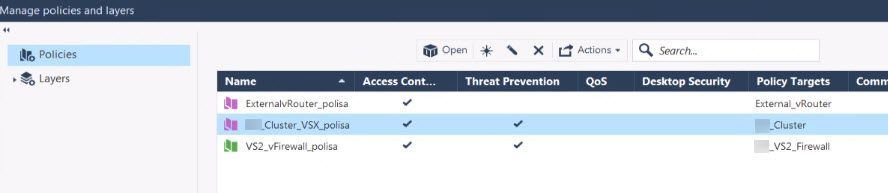
I checked policy installation target colomn in Smart dash and it seems like Okay:
- virtual router policy have policy installation target defined as virtual router object
- VSX cluster policy have policy installation target defined as VSX cluster object
- Virtual firewall policy have policy installation target defined as virtual firewall object
This part from logs - messages from VSX_FW1_External_vRouter and VSX_FW1_External_vRouter is not understandable. We do not have these object names defined in smart dash, for non of the GW's/objects under Gateways and Servers tab.
MGMT server is reverted from snapshot to state as was before vsx_util operation problems, and is working with defined objects as follows:
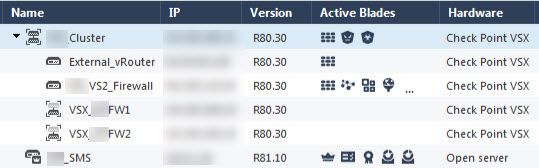
All policies are installed and all setup is AS-Before.
Any thoughts are welcome 🙂
Milos