- Products
- Learn
- Local User Groups
- Partners
- More

MVP 2026: Submissions
Are Now Open!
What's New in R82.10?
10 December @ 5pm CET / 11am ET
Announcing Quantum R82.10!
Learn MoreOverlap in Security Validation
Help us to understand your needs better
CheckMates Go:
Maestro Madness
Hi,
Trying to test mail from sendmail to mailserver. Syntax used is
./sendmail -s 'SmartView' -t MAILSERVER -f SENDER_EMAIL_ADDRESS RECEIVER_EMAIL_ADDRESS
I have used fwmonitor to capture output and opened it in Wireshark. It goes like this:
220 answer from mailserver
HELO mgmt.mydomain.com
250 reply from mailserver
And then it stops. The next thing should be something like this from sendmail
MAIL FROM: me@mydomain.com but it never happens.
Anyone knows why and if there is something wrong with the syntax used?
On security gateways I have used the following command in the past:
echo -e "Subject: Mail test\r\n\r\nTest.\r\n" | sendmail --domain=example.com -f no-reply@example.com -v user@example.com --host=<ipaddress_of_mta>
Thank you Niels but this is sendmail from a management server r80.10 and it looks like it doesn't support the parameters you are using:

On a R77.30 gateway there seems to be at least two versions of sendmail:
The one I was using is /usr/sbin/sendmail.
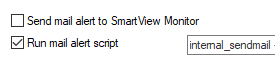
You are correct, there are two. The one I was trying was $FWDIR/bin/sendmail since I'm trying to run a mail alert script and are supposed to use internal_sendmail. I hope someome can confirm that internal_sendmail is $FWDIR/bin/sendmail

The other one should work like this:
echo "Test" | $FWDIR/bin/sendmail -s 'SmartView' -t MAILSERVER -f SENDER_EMAIL_ADDRESS RECEIVER_EMAIL_ADDRESS
When using echo I could send send mail.
Solution to my problem was to use $FWDIR/bin/sendmail -s 'SmartView' -t MAILSERVER -f SENDER_EMAIL_ADDRESS RECEIVER_EMAIL_ADDRESS
instead of
internal_sendmail -s 'SmartView' -t MAILSERVER -f SENDER_EMAIL_ADDRESS RECEIVER_EMAIL_ADDRESS
in the Global properties configuration.
HI ,
Can you please help me how can I send an attachment over same email.
I have scheduled MDS backup and want to send a report when it is completed with logs files attached.
I am using below script to send email and using R80.30 OS
echo -e "Subject: Mail test\r\n\r\nTest.\r\n" | sendmail --domain=abc.com -f server@abc.com -v Receipient@abc.com --host=smtp.abc.com
Unfortunately, the sendmail client on the Check Point devices has been slimmed down and cannot have attachments. I ran into the same problem and this is something my SE told me.
Python Script if you have to attach a file
___________
#! /usr/bin/python
import smtplib
from email.mime.multipart import MIMEMultipart
from email.mime.text import MIMEText
from email.mime.base import MIMEBase
from email import encoders
import argparse
parser = argparse.ArgumentParser(description="Send emails with attached files",
formatter_class=argparse.ArgumentDefaultsHelpFormatter,argument_default=argparse.SUPPRESS)
parser.add_argument("-s", "--smtp", help="Mailrelay IP",required=True)
parser.add_argument("-r", "--fromm", help="from",required=True)
parser.add_argument("-d", "--to", help="to",required=True)
parser.add_argument("-t", "--Subject", help="Subject",required=True)
parser.add_argument("-x", "--file", help="file to attacha",required=True)
args = parser.parse_args()
sender_email = args.fromm
receiver_email = args.to
message = MIMEMultipart()
message["From"] = args.fromm
message['To'] = args.to
message['Subject'] = args.Subject
file = args.file
attachment = open(file,'rb')
obj = MIMEBase('application','octet-stream')
obj.set_payload((attachment).read())
encoders.encode_base64(obj)
obj.add_header('Content-Disposition',"attachment; filename= "+file)
message.attach(obj)
my_message = message.as_string()
email_session = smtplib.SMTP(args.smtp,25)
email_session.starttls()
email_session.sendmail(sender_email,receiver_email,my_message)
email_session.quit()
___________
chmod +x mail.py
./mail.py -s x.x.x.x -r test@test.com -d elpana@siva.com -t "test email " -x file.csv
Leaderboard
Epsum factorial non deposit quid pro quo hic escorol.
| User | Count |
|---|---|
| 16 | |
| 13 | |
| 8 | |
| 7 | |
| 6 | |
| 4 | |
| 3 | |
| 3 | |
| 2 | |
| 2 |
Fri 12 Dec 2025 @ 10:00 AM (CET)
Check Mates Live Netherlands: #41 AI & Multi Context ProtocolFri 12 Dec 2025 @ 10:00 AM (CET)
Check Mates Live Netherlands: #41 AI & Multi Context ProtocolTue 16 Dec 2025 @ 05:00 PM (CET)
Under the Hood: CloudGuard Network Security for Oracle Cloud - Config and Autoscaling!About CheckMates
Learn Check Point
Advanced Learning
YOU DESERVE THE BEST SECURITY