- Products
- Learn
- Local User Groups
- Partners
- More

MVP 2026: Submissions
Are Now Open!
What's New in R82.10?
Watch NowOverlap in Security Validation
Help us to understand your needs better
CheckMates Go:
Maestro Madness
Dear Team
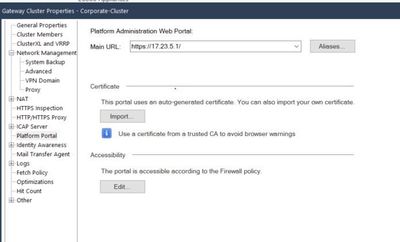
I cannot understand a platform portal feature on Cluster XL.
Please tell me when to use the platform portal setting of Cluster XL.
Could you give us an example cases of how to use it if possible?
Exactly! So say you have below setup (just as an example)
master fw -> 10.10.10.1
backup fw -> 10.10.10.2
virtual IP -> 10.10.10.3 (which would be the IP listed there in field you pointed out).
What happens is if you navigate to that IP, it will always associate with whatever member is active at the time. Also, I always tell people to change that port to something other than 443 (say 4434 or 10443), so if you ever enable mobile access blade, there is no conflict, but it also wont conflict with anything VPN related.
I just gave example with internal IP addresses, but you probably got correct one there, though you can always set any other inerface to be configured as mgmt one to manage this portal through.
Hope that helps.
Andy
It is your Gaia WebUI portal for local management of your GWs. For more details, look into the Quantum Gateway admin guide.
Thank you for the reply.
What happens when I set it in Cluster XL?
When I connect to a configured URL, will it connect to the active quantum?
I want to know what different between normal and Cluster XL case.
Thank you in advance.
Exactly! So say you have below setup (just as an example)
master fw -> 10.10.10.1
backup fw -> 10.10.10.2
virtual IP -> 10.10.10.3 (which would be the IP listed there in field you pointed out).
What happens is if you navigate to that IP, it will always associate with whatever member is active at the time. Also, I always tell people to change that port to something other than 443 (say 4434 or 10443), so if you ever enable mobile access blade, there is no conflict, but it also wont conflict with anything VPN related.
I just gave example with internal IP addresses, but you probably got correct one there, though you can always set any other inerface to be configured as mgmt one to manage this portal through.
Hope that helps.
Andy
Thank you for the reply.
I understood.
Thanks.
Glad we could help you. By the way, one thing I forgot to mention...IF you change the port in there, MAKE SURE you have proper rules in place to access the portal, as it will automatically change to option "according to the firewall policy" and that will be greyed out, until you revert it to default port 443.
Hope that helps.
Have a great day/afternoon/evening : - )
Andy
Leaderboard
Epsum factorial non deposit quid pro quo hic escorol.
| User | Count |
|---|---|
| 12 | |
| 10 | |
| 9 | |
| 8 | |
| 6 | |
| 3 | |
| 2 | |
| 2 | |
| 2 | |
| 1 |
Tue 16 Dec 2025 @ 05:00 PM (CET)
Under the Hood: CloudGuard Network Security for Oracle Cloud - Config and Autoscaling!Thu 18 Dec 2025 @ 10:00 AM (CET)
Cloud Architect Series - Building a Hybrid Mesh Security Strategy across cloudsTue 16 Dec 2025 @ 05:00 PM (CET)
Under the Hood: CloudGuard Network Security for Oracle Cloud - Config and Autoscaling!Thu 18 Dec 2025 @ 10:00 AM (CET)
Cloud Architect Series - Building a Hybrid Mesh Security Strategy across cloudsAbout CheckMates
Learn Check Point
Advanced Learning
YOU DESERVE THE BEST SECURITY