- Products
- Learn
- Local User Groups
- Partners
- More

MVP 2026: Submissions
Are Now Open!
What's New in R82.10?
10 December @ 5pm CET / 11am ET
Announcing Quantum R82.10!
Learn MoreOverlap in Security Validation
Help us to understand your needs better
CheckMates Go:
Maestro Madness
I have been trying to find the file or parameter responsible for monitoring of power supply status on Check Point firewalls.
In F5 products, it can be modifies using /etc/alertd/alert.conf file, However, I cannot find any option for Check Point.
Purpose is generate syslog message and not to use cp_monitor or snmp monitoring for power supply failure.
More elegant one-Liner:
if cpstat os -f power_supply | grep -qi "down"; then logger -s -p kern.crit -t kernel 'PSU is down !!! Please replace faulty PSU.'; fi
This command will check if output of "cpstat os -f power_supply" contains string "down" (not case sensitive) and in case yes, issue command logger with facility kern and priority crit to print desired text in /var/log/messages in order to be caught by any Syslog server as critical message (or check it some other way within logs).
Just schedule this one line using cron job every day and you have monitoring of PSU in place 🙂
Please note that there are some exceptions where PSU is considered as down, but not really:
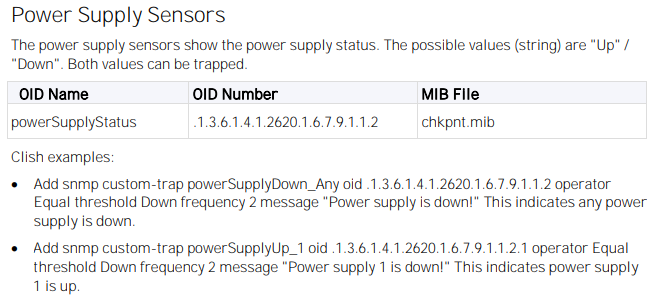
Another solution is to use snmpwalk to get status of PSUs, or create trap for it:
OID Name: powerSupplyStatus
OID Number: 1.3.6.1.4.1.2620.1.6.7.9.1.1.2
Afaik such a feature is based on hardware sensor information, e.g. see sk111273 for using SNMP where Smart-1 25, 50 and 150 hardware does not support sensors for power supply and RAID failure. So please specify where you need that!
You could use GAiA's job scheduler to monitor it via a simple One-Liner like this:
clish -c 'show sysenv all' | grep Power | awk '{print $3": "$4}' | sed 's/#//' | tr '\n' ' ' | sed 's/Up /Up /'
and have it sending a message to syslog if the status is not Up.
Nice One-Liner.
More elegant one-Liner:
if cpstat os -f power_supply | grep -qi "down"; then logger -s -p kern.crit -t kernel 'PSU is down !!! Please replace faulty PSU.'; fi
This command will check if output of "cpstat os -f power_supply" contains string "down" (not case sensitive) and in case yes, issue command logger with facility kern and priority crit to print desired text in /var/log/messages in order to be caught by any Syslog server as critical message (or check it some other way within logs).
Just schedule this one line using cron job every day and you have monitoring of PSU in place 🙂
Please note that there are some exceptions where PSU is considered as down, but not really:
Another solution is to use snmpwalk to get status of PSUs, or create trap for it:
OID Name: powerSupplyStatus
OID Number: 1.3.6.1.4.1.2620.1.6.7.9.1.1.2
Interesting "stattest" command which I was not aware about. But since it still uses SNMP OIDs, which is mandatory to be configured, not sure if there can be different result from snmpwalk vs. stattest.
Leaderboard
Epsum factorial non deposit quid pro quo hic escorol.
| User | Count |
|---|---|
| 16 | |
| 12 | |
| 8 | |
| 7 | |
| 6 | |
| 4 | |
| 3 | |
| 3 | |
| 2 | |
| 2 |
Fri 12 Dec 2025 @ 10:00 AM (CET)
Check Mates Live Netherlands: #41 AI & Multi Context ProtocolTue 16 Dec 2025 @ 05:00 PM (CET)
Under the Hood: CloudGuard Network Security for Oracle Cloud - Config and Autoscaling!Fri 12 Dec 2025 @ 10:00 AM (CET)
Check Mates Live Netherlands: #41 AI & Multi Context ProtocolTue 16 Dec 2025 @ 05:00 PM (CET)
Under the Hood: CloudGuard Network Security for Oracle Cloud - Config and Autoscaling!Thu 18 Dec 2025 @ 10:00 AM (CET)
Cloud Architect Series - Building a Hybrid Mesh Security Strategy across cloudsAbout CheckMates
Learn Check Point
Advanced Learning
YOU DESERVE THE BEST SECURITY