- Products
- Learn
- Local User Groups
- Partners
- More

AI Security Masters E7:
How CPR Broke ChatGPT's Isolation and What It Means for You
Blueprint Architecture for Securing
The AI Factory & AI Data Center
Call For Papers
Your Expertise. Our Stage
Good, Better, Best:
Prioritizing Defenses Against Credential Abuse
Ink Dragon: A Major Nation-State Campaign
Watch HereCheckMates Go:
CheckMates Fest
Dear Mates I have few questions that I nedd help me:
1. Is there any way to find out the all the software blades that have ever been activated and used in a Check Point solution? even if it is no longer in use
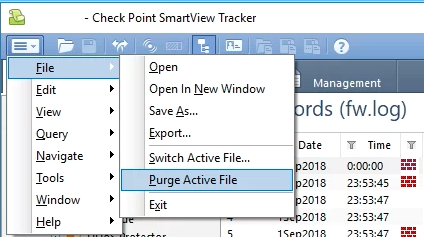
2. Is it possible for the "admin" user to delete logs on smartView Tracker in Management tab?
3. Is there any way to recover the "messages" files in /var/log/messages if it has been deleted? By recovering I mean with the old logs in there
4. Is it possible to view all the commands run in "Expert" mode after exiting the mode and re-entering again?
Your help will be appreciated.
Thanks in advance.
1. Audit Logs in SmartConsole. For example, in this case, I activated Mobile Access Blade.

2. Yes. In addition, log files can also be deleted in Expert Mode.

3. If /var/log/messages is deleted (which it does get rotated periodically), there is no recovery. You should be backing this up or configure Gaia OS to send syslog messages to an external syslog server.
4. By default, we do not log commands executed in expert mode. There are ways built into bash that will allow you to send commands executed to syslog, for example: logging - How to log all Bash commands by all users on a server? - Ask Ubuntu
Thank you very much Dameon Welch Abernathy
you can have an overview of the enable blades from the gateway with the command enabled_blades or cpview
Hi Dameon Welch Abernathy we are experiecing something strange on our environment, the file /var/log/messages contents is changing and we cannot see the previous logs. Is this normal? is there any configure that can be done to cause this.
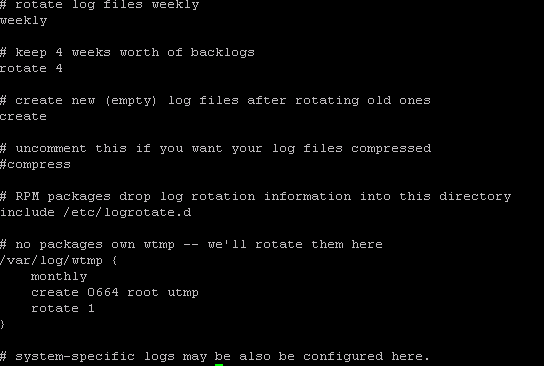
The script /etc/cron.daily/logrotate is called daily, generally at midnight.
It calls the logrotate binary, which is configured with /etc/logrotate.conf.
In the default configuration:
This, of course, can be changed.
Is it possible to see the logs of the of four weeks ago? in which file can it be retrieved

This is our configuration, and it looks like it rotates every four 4 weeks, but we want to find where the backlogs is stored after that. There are some strange changes that was done on our systems recently, and we cant find it. Your help will be appreciated.
They are deleted after the fourth week, not stored anywhere.
If you suspect foul play, it might be worth giving our Incident Response team a call.
Thanks for your help.
Leaderboard
Epsum factorial non deposit quid pro quo hic escorol.
| User | Count |
|---|---|
| 8 | |
| 8 | |
| 4 | |
| 3 | |
| 3 | |
| 3 | |
| 3 | |
| 2 | |
| 2 | |
| 2 |
Tue 28 Apr 2026 @ 06:00 PM (IDT)
Under the Hood: Securing your GenAI-enabled Web Applications with Check Point WAFThu 30 Apr 2026 @ 03:00 PM (PDT)
Hillsboro, OR: Securing The AI Transformation and Exposure ManagementTue 28 Apr 2026 @ 06:00 PM (IDT)
Under the Hood: Securing your GenAI-enabled Web Applications with Check Point WAFTue 12 May 2026 @ 10:00 AM (CEST)
The Cloud Architects Series: Check Point Cloud Firewall delivered as a serviceThu 30 Apr 2026 @ 03:00 PM (PDT)
Hillsboro, OR: Securing The AI Transformation and Exposure ManagementAbout CheckMates
Learn Check Point
Advanced Learning
YOU DESERVE THE BEST SECURITY