- Products
- Learn
- Local User Groups
- Partners
- More

MVP 2026
Inception is On!
What's New in R82.10?
10 December @ 5pm CET / 11am ET
Improve Your Security Posture with
Threat Prevention and Policy Insights
Overlap in Security Validation
Help us to understand your needs better
CheckMates Go:
Maestro Madness
Hi All,
I'm new to Checkpoint and I've been trying to learn how to setup.
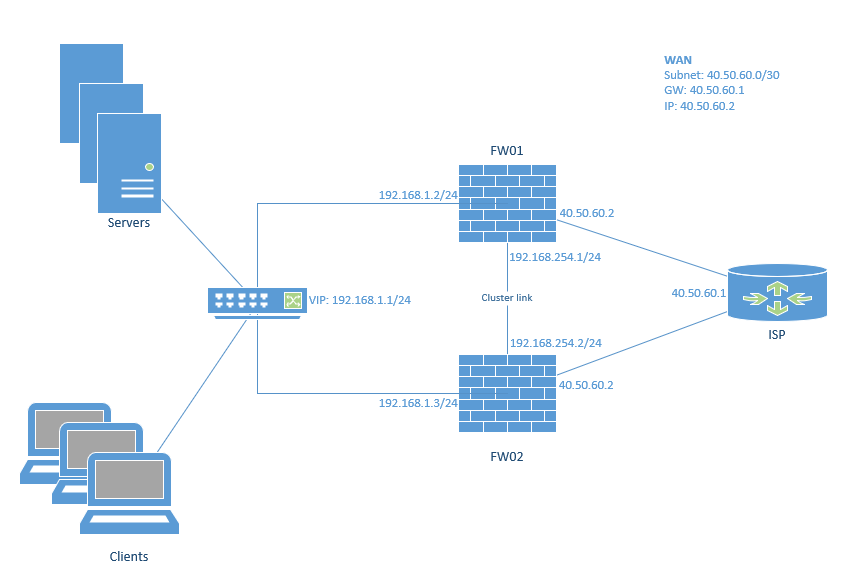
I'm trying to setup a Cluster for High Availability, but I can't seem to find definite proof that my topoligy is possible with how Checkpoint works.
Is it possible to have the same single WAN IP on the WAN interface of both the Firewalls?
Or do I need to make VIP on the WAN interfaces as well?
I only have 1 WAN IP from my ISP.
The IP addresses on the picture attached is purely fantasy. Not my real ones.
Kind Regards,
Nicolai
Your management must reach both gateways, via internal or external interfaces. If not you can't install policy.
That's a limititation if you use private IPs on different subnet for the physical cluster interfaces.
Have a look at Configuring Cluster Addresses on Different Subnets section 4. important notes:
It is not possible to manage over the Internet the Cluster when IP addresses Addresses of its members and the VIP address are configured on different subnets.
In such configuration, the IP addresses of cluster members are supposed to be configured with private IP addresses (RFC 1918), and only one Cluster VIP address is supposed to be public.
Private IP addresses (RFC 1918) are not allowed over the Internet.
As a result, communication from the external Management Server to the private IP addresses of the physical cluster members will not be possible over the Internet for services such as SIC.
Yes you can use a cluster with VIP being on a different IP network than the actual physical interfaces.
Download ClusterXL Admin guide for your version and look for "Cluster IP Addresses on Different Subnets" part in it for details.
Hi Val,
I have looked at that, but the VIP needs to be pushed from MGMT server.
But the MGMT server is externally.
As the Firewalls doesn't have internet access until the VIP is configured, then I cannot push the VIP from MGMT server?
It's contradicting.
Kind Regards,
Nicolai
Your management must reach both gateways, via internal or external interfaces. If not you can't install policy.
That's a limititation if you use private IPs on different subnet for the physical cluster interfaces.
Have a look at Configuring Cluster Addresses on Different Subnets section 4. important notes:
It is not possible to manage over the Internet the Cluster when IP addresses Addresses of its members and the VIP address are configured on different subnets.
In such configuration, the IP addresses of cluster members are supposed to be configured with private IP addresses (RFC 1918), and only one Cluster VIP address is supposed to be public.
Private IP addresses (RFC 1918) are not allowed over the Internet.
As a result, communication from the external Management Server to the private IP addresses of the physical cluster members will not be possible over the Internet for services such as SIC.
@NicolaiNielsen, what he says👆🏻
Hi Wolfgang and Val,
Thanks for the answer.
Because of the limitations, I will make a note that either plan with having the MGMT server internally behind the cluster and/or if the MGMT is externally, I will need at least 3 WAN IP's on the remote site.
Hi Wolfgang, i'm reading in detail the doc as you mention, in external ip address of both chk members i put 10.80.100.1 and 10.80.100.2 end as VIP my public ip address.
The main problem is that as soon as i try to reach internet seems that the checkpoint do not perform a correct match from internal to external network ...
if i put 3 public ip address without change the config everithing working correctly.
have you some suggest for me to solve my issues ?
Interestingly enough, in R82, this limitation should be removed when ElasticXL is implemented and all communication happens through an SMO.
Leaderboard
Epsum factorial non deposit quid pro quo hic escorol.
| User | Count |
|---|---|
| 24 | |
| 21 | |
| 8 | |
| 7 | |
| 7 | |
| 5 | |
| 4 | |
| 3 | |
| 2 | |
| 2 |
Wed 03 Dec 2025 @ 10:00 AM (COT)
Última Sesión del Año – CheckMates LATAM: ERM & TEM con ExpertosThu 04 Dec 2025 @ 12:30 PM (SGT)
End-of-Year Event: Securing AI Transformation in a Hyperconnected World - APACThu 04 Dec 2025 @ 03:00 PM (CET)
End-of-Year Event: Securing AI Transformation in a Hyperconnected World - EMEAThu 04 Dec 2025 @ 02:00 PM (EST)
End-of-Year Event: Securing AI Transformation in a Hyperconnected World - AmericasWed 03 Dec 2025 @ 10:00 AM (COT)
Última Sesión del Año – CheckMates LATAM: ERM & TEM con ExpertosThu 04 Dec 2025 @ 12:30 PM (SGT)
End-of-Year Event: Securing AI Transformation in a Hyperconnected World - APACThu 04 Dec 2025 @ 03:00 PM (CET)
End-of-Year Event: Securing AI Transformation in a Hyperconnected World - EMEAThu 04 Dec 2025 @ 02:00 PM (EST)
End-of-Year Event: Securing AI Transformation in a Hyperconnected World - AmericasAbout CheckMates
Learn Check Point
Advanced Learning
YOU DESERVE THE BEST SECURITY