- Products
- Learn
- Local User Groups
- Partners
- More

AI Security Masters
E1: How AI is Reshaping Our World
MVP 2026: Submissions
Are Now Open!
What's New in R82.10?
Watch NowOverlap in Security Validation
Help us to understand your needs better
CheckMates Go:
Maestro Madness
Hello fellow community members!
Our security vulnerability scan has flagged that there is no authentication algorithm / ciphers for connections to port 18231 on our gateways (which according to the awesome diagram from Heiko Ankenbrand is "Policy Server Login (old)").
As we're using E80.xx Endpoint protect against a separate Policy server, I'm guessing we don't use this port any more (perhaps it was for the older R75 VPN client??).
Does anyone know of a way to secure this port, either by blocking it, or by making it offer secure SSL ciphers??
Regards,
Jason
Yes, with a SYN scan you see the port as open.
If you check the TLS certificates, you see an TLS handshake.
Afterwards the Check Point communication follow.
Regards
Heiko
Thanks Dameon Welch-Abernathy.
Do you know if the E80.xx client will have any issues with setting this to TLS1.2?
Possible some older VPN clients might.
Interesting. I applied the first two options in SK132712 to my R77.30 gateways, and the nmap scan has not shown any improvement.
PORT STATE SERVICE VERSION
18231/tcp open ssl/fw1-pslogon Check Point FireWall-1 Policy Server logon
| ssl-enum-ciphers:
| TLSv1.0:
| ciphers:
| TLS_DH_anon_WITH_3DES_EDE_CBC_SHA - F
| TLS_DH_anon_WITH_AES_128_CBC_SHA - F
| TLS_DH_anon_WITH_AES_256_CBC_SHA - F
| compressors:
| NULL
| cipher preference: client
|_ least strength: F
Any update here? We also performed the actions mentioned here:
for port 18231, but the port still shows as listening.
The following line was already commented out as follows:
/*#define ENABLE_FW1_PSLOGON_NG*/
Just tried the same on 80.40 but without any apparent success either. Despite /*#define ENABLE_FWD_TOPO*/ and /*#define ENABLE_FW1_PSLOGON_NG*/ - validated on the MGR and on the two cluster members - the FW still listens on 18231 and fails basic PCI scan using Qualys.
Did you reboot or ran cpstop;cpstart after the modifying the files?
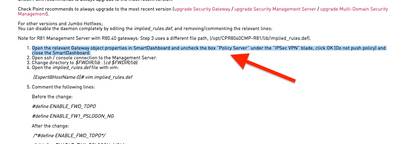
We found that the port was disabled only after unticking Policy Server box and leaving it unticked. We didn't actually need Policy Server enabled. Otherwise the port would show as listening in netstat.
Strangely enough, that too is mentioned in the sk132712 you referenced above yourself.
Anyway, I am glad you have found the solution.
Also, read by the SK, you need to run additional modifications through SmartConsole
Already did that obviously - multiple times.
But we found the issue: we had a old EXPLICIT policy rule active that allowed 18231 to connect to the FW. So the implicit rules were disabled but an explicit rule still existed.
In addition to that, the statemet in the SK "You can disable the daemon completely by editing the implied_rules.def, and removing/commenting the relevant lines:" is incorrect - all you remove is the _access_ to the daemon but the daemon is still started which you can easily ceck by running the netsat on the GW which still shows the daemon listening.
But at least the PCI scan now is ok with the FW
Leaderboard
Epsum factorial non deposit quid pro quo hic escorol.
| User | Count |
|---|---|
| 11 | |
| 9 | |
| 9 | |
| 8 | |
| 6 | |
| 3 | |
| 2 | |
| 2 | |
| 2 | |
| 1 |
Tue 16 Dec 2025 @ 05:00 PM (CET)
Under the Hood: CloudGuard Network Security for Oracle Cloud - Config and Autoscaling!Thu 18 Dec 2025 @ 10:00 AM (CET)
Cloud Architect Series - Building a Hybrid Mesh Security Strategy across cloudsTue 16 Dec 2025 @ 05:00 PM (CET)
Under the Hood: CloudGuard Network Security for Oracle Cloud - Config and Autoscaling!Thu 18 Dec 2025 @ 10:00 AM (CET)
Cloud Architect Series - Building a Hybrid Mesh Security Strategy across cloudsThu 08 Jan 2026 @ 05:00 PM (CET)
AI Security Masters Session 1: How AI is Reshaping Our WorldAbout CheckMates
Learn Check Point
Advanced Learning
YOU DESERVE THE BEST SECURITY