- Products
- Learn
- Local User Groups
- Partners
- More

MVP 2026: Submissions
Are Now Open!
What's New in R82.10?
10 December @ 5pm CET / 11am ET
Announcing Quantum R82.10!
Learn MoreOverlap in Security Validation
Help us to understand your needs better
CheckMates Go:
Maestro Madness
Hi All,
We are facing issue of authentication fail with LDAP for some of the users in Mobile SSL VPN. However other users are working fine even though they are in same group. In tracker it is showing like,
Action : Failed Log in
Reason : No Access rule defined for user
I have followed sk112374 and finally captured cvpnd.elg file for working user as well as non-working user. But there is no much difference in logs for both users. Below is the errors which is shown in cvpnd.elg
[ 4335][23 Jan 14:15:16][AUTHNMAN] [CVPN_INFO] Cvpn::AuthSession::updateLogReason: Not authenticated, reason: (No access rules defined for user) Methods: (Password)
[ 4335][23 Jan 14:15:16][AUTHNMAN] [CVPN_INFO] Cvpn::AuthSession::createGroupsCollection: User not authenticated
Error Message = >
[ 4335][23 Jan 14:15:52][CPLDAPCL] Using LDAP bind authentication
[ 4335][23 Jan 14:15:52][CPLDAPCL] Params<dn = 'CN=JSmith-Lakow,OU=Information
Gaurav,
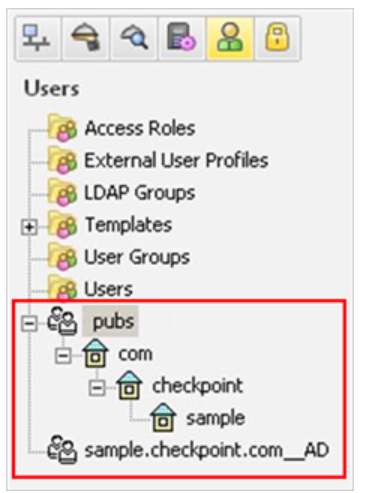
Please specify version, show the actual access rule, show the LDAP tree that contains this group, i.e.:
Participating user groups:
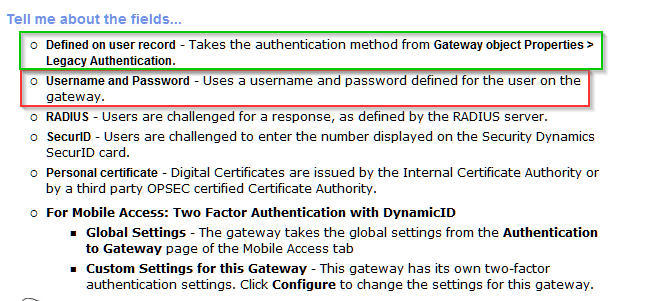
As per documentation (see text in red towards the end):
To enter the Mobile Access portal and get access to its applications, users defined in SmartConsole must authenticate to the Security Gateway. Authentication ensures that a user is who he or she claims to be. Users authenticate using one or more of these authentication schemes:
For more about configuring a Security Gateway to use a RADIUS server, see the R80.10 Security Management Administration Guide.
For more about configuring a Security Gateway to use SecurID, see the R80.10 Security Management Administration Guide.
A user who tries to authenticate with an authentication scheme that is not configured for the Mobile Access gateway will not be allowed to access resources through the gateway.
Hi Vladimir,
Checkpoint version is R77.30. I have not done LDAP integration with user directory.
During enabling of Mobile Access blade, it asks weather you want to integrate with LDAP or not. There I have put credentials of LDAP server so I am able to see LDAP users.
Do your Gateway Properties settings allow for Legacy Auth?

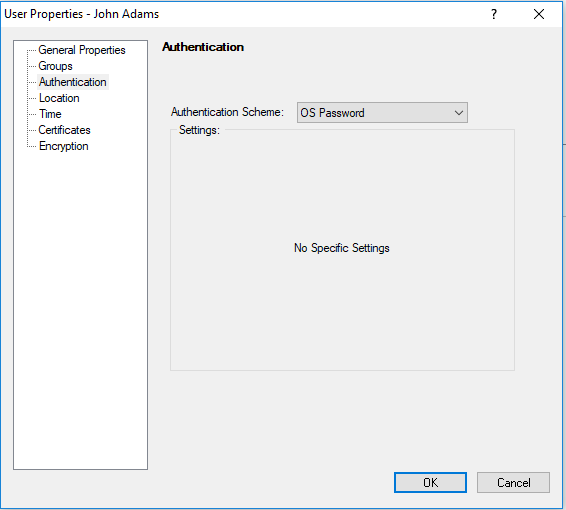
and the users themselves are configured with "OS Password" authentication?

From Documentation:
OS Password - means that users are challenged to enter their Operating System password for the Security Management Server. There are no scheme-specific parameters for this authentication scheme.
The Security Gateway can authenticate using the user name and password that is stored on the operating system of the machine on which the Security Gateway is installed. You can also use passwords that are stored in a Windows domain.
Also, please check if you are not running into situation described here:
Mobile Access and Endpoint clients LDAP nested groups are not enforced correctly
Hi,
In Gateway Properties --> Authentication --> "Username & Password" is selected.
I am having issue with some LDAP users. Local users are working fine.
If you have "Username and Password" selected, only the users defined on the gateway will be authenticated, not the LDAP users, for that you should use "Legacy Authentication" and use "OS Password" on individual user's properties:

Finally I have raised TAC case. Let see how it goes.
I will update the findings
Hi,
Finally LDAP authentication issue is resolved. There are 2 LDAP account and in which same AD server is included. In one LDAP account the password for AD server was not correct so failing users were going to this LDAP account and failing to authenticate. Now correct password is given and everything is working fine.
Hi,
To add more on this we have decided to delete additional LDAP account unit which is causing unnecessary issue. But I am not able to delete LDAP account unit, getting error "Account_Unit is used by another object" while deleting LDAP account unit.
I have followed sk111081 and removed AD users from Mobile access policy then deleted additional LDAP account unit. After that again added AD users in policy so that it will be authenticated by single AD/ LDAP account unit.
Leaderboard
Epsum factorial non deposit quid pro quo hic escorol.
| User | Count |
|---|---|
| 19 | |
| 19 | |
| 8 | |
| 7 | |
| 7 | |
| 4 | |
| 4 | |
| 3 | |
| 2 | |
| 2 |
Fri 12 Dec 2025 @ 10:00 AM (CET)
Check Mates Live Netherlands: #41 AI & Multi Context ProtocolTue 16 Dec 2025 @ 05:00 PM (CET)
Under the Hood: CloudGuard Network Security for Oracle Cloud - Config and Autoscaling!Fri 12 Dec 2025 @ 10:00 AM (CET)
Check Mates Live Netherlands: #41 AI & Multi Context ProtocolTue 16 Dec 2025 @ 05:00 PM (CET)
Under the Hood: CloudGuard Network Security for Oracle Cloud - Config and Autoscaling!Thu 18 Dec 2025 @ 10:00 AM (CET)
Cloud Architect Series - Building a Hybrid Mesh Security Strategy across cloudsAbout CheckMates
Learn Check Point
Advanced Learning
YOU DESERVE THE BEST SECURITY