- Products
- Learn
- Local User Groups
- Partners
- More

The State of Ransomware Q1 2026
Key Trends and Their Impact
AI Security Masters E8:
Claude Mythos: New Era in Cyber Security
Step Into the Future of
AI-Powered Cyber Security
Blueprint Architecture for Securing
The AI Factory & AI Data Center
Call For Papers
Your Expertise. Our Stage
CheckMates Go:
CheckMates Fest
Hello everyone,
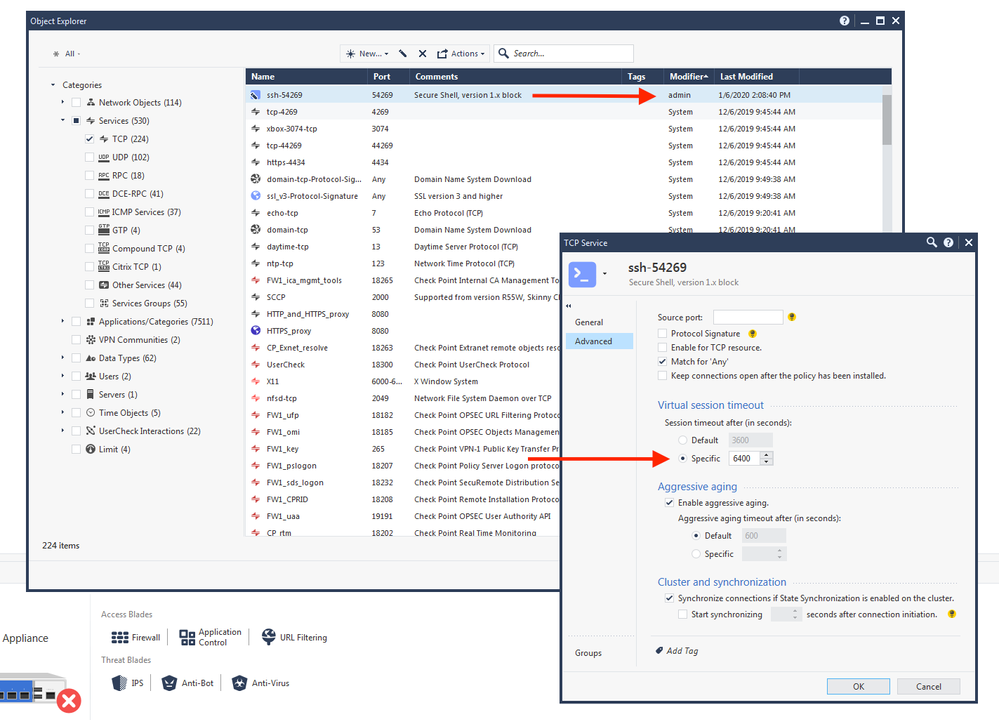
Is there a way listing TCP services with non-default tcp idle timout?
We must to put another non checkpoint firewall before the main cluster, and we need to know which tcp services has configured specific virtual session timout.
many thanks,
norbert
The third and last option is to get TCP services though API:
mgmt_cli -r true show-services-tcp details-level full
and then run it through analysis, comparing default and actual timeout on all services.
(Had to delete my original reply as it was erroneous)
Okay, so we have two different cases:
1. Timeouts are lower than global settings, .ie. aggressive aging. Should not be problematic and does not need extraction.
2. Timeouts are higher than global. That only happens if you modify the service manually. I did not find an option to query those parameter on per service basis, but there is a way:
If I find a better way, I will let you know
You can also dump all TCP services into a file with dbedit command something like:
echo -e "query services, type='tcp' \n-q\n" | dbedit -local > tcp.txt
and then search there. Or event extend command to a script comparing default and actual timeout for each server.
The third and last option is to get TCP services though API:
mgmt_cli -r true show-services-tcp details-level full
and then run it through analysis, comparing default and actual timeout on all services.
uh, it was a typo. fixed
To follow-up on @_Val_'s responses, there are two different settings within a TCP service object that might be beneficial in your search. The "use-default-session-timeout" and"session-timeout" parameters can be used with with a select statement with jq in order to filter the service objects.
[admin@vMgmt01]# mgmt_cli -s session show services-tcp details-level full -f json limit 500 | jq -r '.objects[]| select(."use-default-session-timeout"==false)|.name'
http_test1
http_test2
[admin@vMgmt01]# mgmt_cli -s session show services-tcp details-level full -f json limit 500 | jq -r '.objects[]| select(."session-timeout"<3600)|.name'
http_test1
icap
IKE_NAT_TRAVERSAL_TCP
...
[admin@vMgmt01]# mgmt_cli -s session show services-tcp details-level full -f json limit 500 | jq -r '.objects[]| select(."session-timeout">3600)|.name'
http_test
I tried to run the command, but I always get this error:
[Expert@xxxxxx:0]# mgmt_cli show services-tcp details-level full -f json limit 5 | jq -r '.objects[]| select(."session-timeout">3600)|.name'
parse error: Invalid numeric literal at line 1, column 9
Do you have any idea what i am doing wrong?
Many thanks,
norbert
You need to add authentication. Either add user / password or "-r true" at the beginning of the command
Leaderboard
Epsum factorial non deposit quid pro quo hic escorol.
| User | Count |
|---|---|
| 5 | |
| 4 | |
| 4 | |
| 4 | |
| 3 | |
| 3 | |
| 3 | |
| 3 | |
| 2 | |
| 2 |
Tue 12 May 2026 @ 10:00 AM (CEST)
The Cloud Architects Series: Check Point Cloud Firewall delivered as a serviceWed 13 May 2026 @ 11:00 AM (EDT)
TechTalk: The State of Ransomware Q1 2026: Key Trends and Their ImpactThu 14 May 2026 @ 07:00 PM (EEST)
Under the Hood: Presentando Check Point Cloud Firewall como ServicioTue 12 May 2026 @ 10:00 AM (CEST)
The Cloud Architects Series: Check Point Cloud Firewall delivered as a serviceTue 19 May 2026 @ 06:00 PM (IDT)
AI Security Masters E8 - Claude Mythos: New Era in Cyber SecurityAbout CheckMates
Learn Check Point
Advanced Learning
YOU DESERVE THE BEST SECURITY