- Products
- Learn
- Local User Groups
- Partners
- More

MVP 2026: Submissions
Are Now Open!
What's New in R82.10?
Watch NowOverlap in Security Validation
Help us to understand your needs better
CheckMates Go:
Maestro Madness
Hi Guys, Need a help with the ClusterXL issue. We have High Availability between 2 firewalls(ClusterXL). In the active firewall the output of 'cphaprob stat' shows Active/Down, however in the standby firewall shows Active/Standby. In the tracker when i checked the information contains CCP we got these packets with the info (cluster_info: (ClusterXL) CCP was not heard from member 2 on ifn ethx.xxx. Please check network configuration.) Could you please help us in fixing this issue.
Hi @Sanjay_S ,
Check this on both members:
- is the OS version the same (fw ver)
- check 32/64 bit (uname -all)
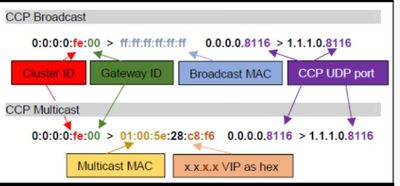
- check the cluster id (tcpdump -vv -nn -e -i <ethX> port 8116)
- check ccp (broadcast, multicast, unicast). (cphaprob-a if)
- check interface issues (cphaprob -a if)
- check CoreXL (cpconfig > CoreXL)
- check long cluster error message (cpstat ha -f all)
More infos to cluster id and ccp can you found here:
R80.x - cheat sheet - ClusterXL
On the active meber
output of cphaprob -a if
output of cphaprob -ia list
did you try to cpstop ; cpstart problematic memeber yet?
Hi Sanjay, How did you guys resolve this issue??? We've two 23800's configured in Cluster running on R80.10 Take-42 since December-2017. Recently we discovered the same issue as yours, In the active firewall the output of 'cphaprob stat' shows Active/Down, however in the standby firewall shows Active/Standby.We tried cpstop & cptstart and rebooted problematic one, but that doesn't resolved our issue.
Hi Sanjay, How did you guys resolve this issue??? I've two appliance configured in Cluster running on R80.30 Take-200. Recently we discovered the same issue as yours, I tried cpstop & cptstart and rebooted problematic one, but that doesn't resolved our issue.
Can you tell me the SK where it is said how to solve the problem?
Hi
It's interesting
Which version are you running ?
Are you able to do failover successfully?
update the below output.
cphaprob stat
cphaprob -a if
cphaprob -ia if
fwaccel stat
fw ctl affinity -l -r
Wither cluster ID or CoreXL are not the same on both members.
Hi @Sanjay_S ,
Check this on both members:
- is the OS version the same (fw ver)
- check 32/64 bit (uname -all)
- check the cluster id (tcpdump -vv -nn -e -i <ethX> port 8116)
- check ccp (broadcast, multicast, unicast). (cphaprob-a if)
- check interface issues (cphaprob -a if)
- check CoreXL (cpconfig > CoreXL)
- check long cluster error message (cpstat ha -f all)
More infos to cluster id and ccp can you found here:
R80.x - cheat sheet - ClusterXL
Leaderboard
Epsum factorial non deposit quid pro quo hic escorol.
| User | Count |
|---|---|
| 18 | |
| 12 | |
| 9 | |
| 8 | |
| 4 | |
| 4 | |
| 3 | |
| 3 | |
| 2 | |
| 2 |
Fri 12 Dec 2025 @ 10:00 AM (CET)
Check Mates Live Netherlands: #41 AI & Multi Context ProtocolTue 16 Dec 2025 @ 05:00 PM (CET)
Under the Hood: CloudGuard Network Security for Oracle Cloud - Config and Autoscaling!Fri 12 Dec 2025 @ 10:00 AM (CET)
Check Mates Live Netherlands: #41 AI & Multi Context ProtocolTue 16 Dec 2025 @ 05:00 PM (CET)
Under the Hood: CloudGuard Network Security for Oracle Cloud - Config and Autoscaling!About CheckMates
Learn Check Point
Advanced Learning
YOU DESERVE THE BEST SECURITY