Create a Post
cancel
Showing results for 
Search instead for 
Did you mean: 
Marcel_Gramalla
Advisor
Jump to solution

Check Point DPD (Dead Peer Detection) - Questions

Hi all,

I have two questions regarding the Dead Peer Detection between our Check Point Cluster and other existing VPN connections to non-Check Point Gateways.

1. Does enabling DPD (Responder Mode) has any impact on existing VPN connections? Can I enable it "on-the-fly" without having any disconnects to the VPN? I haven't found an answer on that yet.

2. If I change a VPN community with non-Check Point Gateways to "Permanent Tunnels" in order to active DPD with GuiDBedit does this have any impact on existing connections?


Thanks in advance for any help

0 Kudos
1 Solution

Accepted Solutions
Nick_Doropoulos
Advisor

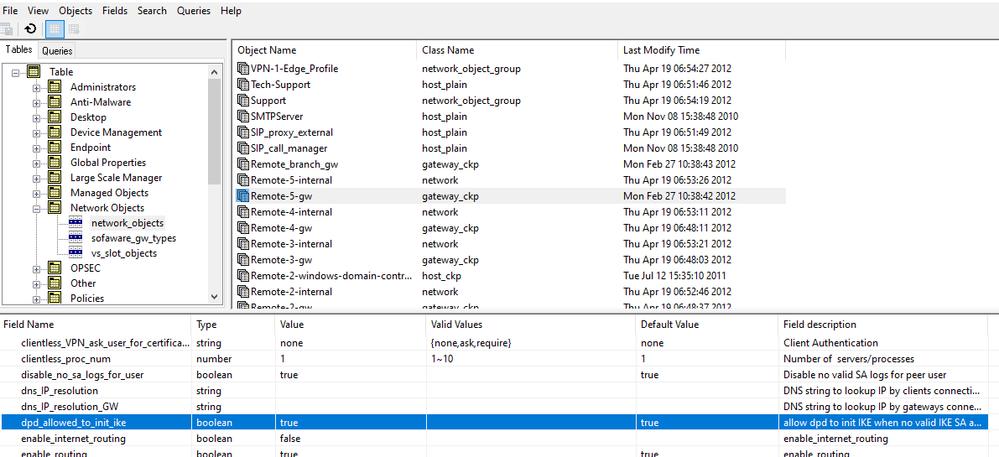
Yes, there is. You can check with the GuiDBedit tool under Network Objects >> network_objects:


DPD.PNG


I hope this helps.

View solution in original post

14 Replies
Jerry
Mentor
Mentor
quickly though:

Ad.1 - it will re-estab SA/SPI indeed
Ad.2. - it will re-estab the tunnel

ps. any changes to the proxy-id or any crypt.conf params will re-key and re-estab SA/SPI
Jerry
Marcel_Gramalla
Advisor
Thanks for the quick reply. That means that we have to announce it so that if there is any issue our partners know about it.
Jerry
Mentor
Mentor
it will in 100% impact/affect an existing tunnel(s) so yes, that should be announced and planed for so called "maintenance window" 🙂

cheers
Jerry
Ravindra_Katrag
Contributor

Is there any way to check if DPD is enabled?

0 Kudos
Nick_Doropoulos
Advisor

Yes, there is. You can check with the GuiDBedit tool under Network Objects >> network_objects:


DPD.PNG


I hope this helps.

Ravindra_Katrag
Contributor

Thank you

0 Kudos
Nick_Doropoulos
Advisor

My pleasure!

0 Kudos
nagaraja_cs
Contributor

Can we achieve VPN redundancy with 3rd party Gateways by enabling DPD(In R80.10 or R80.20) ?


0 Kudos
Ted_Serreyn
Collaborator

Can we enable Dead Peer detection on the third party devices only?  Or do we have to enable it on the checkpoint gateways also? My understanding is if enabled on the checkpoint gateways it affects all other VPNs?

0 Kudos
Timothy_Hall
MVP Gold
MVP Gold

You can set DPD per remote gateway via the tunnel_keepalive_method variable in GUIDBedit as described in this lengthy thread, you don't have to change this value for your Check Point gateway:

https://community.checkpoint.com/t5/Next-Generation-Firewall/Enable-DPD-on-R80-20/m-p/32605

Starting in R81 tunnel_keepalive_method will be set to DPD by default on all Interoperable Device object types.

New Book: "Max Power 2026" Coming Soon
Check Point Firewall Performance Optimization
Gavin
Explorer

Do you know how to capture DPD packets in any way? I could see tunnel test in the logs, but seem to be missing how to spot DPD packets. I can't see them in TCPDUMP as they are encrypted. I would really appreciate some guidance on this. I am working on an AWS VPN issue where I think the tunnels are being shut down regularly and I would like to spot what is going on. I have a TAC case open but every time I ask the question they seem to swerve around it.

0 Kudos
PhoneBoy
Admin
Admin

fw monitor should show the packets as they are encrypted/decrypted.

0 Kudos
Hussien_Wahab
Employee
Employee

Hussien_Wahab_0-1673868297596.png

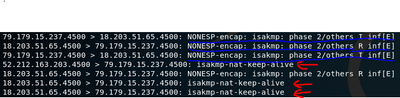
AWS sends "isakmp-nat-keep-alive" packets that are outside the DPD tunnel health monitoring, please see the packets in red (the ones in blue are for the actual DPD that keeps the tunnel status up and alive)


0 Kudos
Jeff
Contributor
Contributor

Hi everyone, I hope this isn’t too old, but it’s still relevant right now.  It seems like every time we discuss Tunnels with PA, FG, Cisco, or others, we’re always hearing about significant issues.  What we should do if we use Permanent Tunnel with 3d party?

I know there are a few SKs on this topic, but it’s not always easy to figure out the best way to configure it. The notes are a bit confusing, like “Note: In some cases, the Check Point gateway …” and so on. It makes you wonder if you really need those extra settings.

In those situations, could anyone share their experiences and walk through the clear steps for configuring Check Point when dealing with third-party S2S Tunnels? Maybe someone has a checklist for CP GW and additional checklist for Peer?

For example:

1. Creating an IOD, Community, and other settings on a CP GW is straightforward, I think everyone knows what to do.

2. Tunnel Management: Use Permanent Tunnel. We want to keep an eye on the tunnel status even when there’s no traffic.

3. Close the console, open GUIDBEdit, and find… what? Do we need to change settings on the CP GW, or only on the peer object? What if we have multiple tunnels and communities on a single CP GW (CP-CP, CP-Cisco, CP-PA)?

4. tunnel_keepalive_method = dpd (for Peer or for CP GW too?)

5. dpd_allowed_to_init_ike = true ?

6. DPD_DONT_DEL_SA = 0 or 1 ?

7. ike_keep_child_sa_interop_devices = true ?

8. Anything else?

What of them we must do on the CP GP, what of them on the Peer?

9. Install Policy.

0 Kudos

Leaderboard

Epsum factorial non deposit quid pro quo hic escorol.

Upcoming Events

    CheckMates Events