- Products
- Learn
- Local User Groups
- Partners
- More

MVP 2026: Submissions
Are Now Open!
What's New in R82.10?
10 December @ 5pm CET / 11am ET
Announcing Quantum R82.10!
Learn MoreOverlap in Security Validation
Help us to understand your needs better
CheckMates Go:
Maestro Madness
Hi community! ![]()
Please help me with simple question.
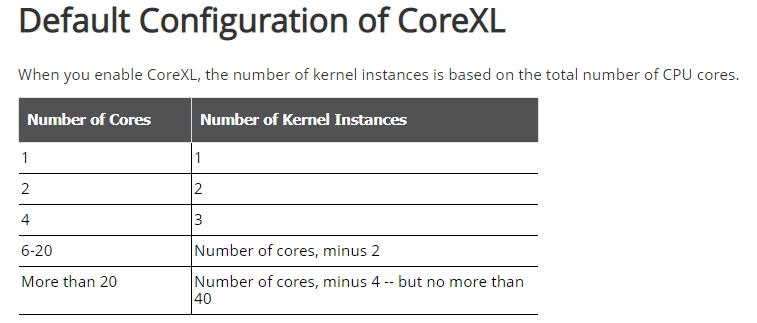
In CoreXL admin guide we can see, that CoreXL is enabled from 1 CPU (as I can understand this doc):
Performance Tuning R80.10 (Part of Check Point Infinity)

But.
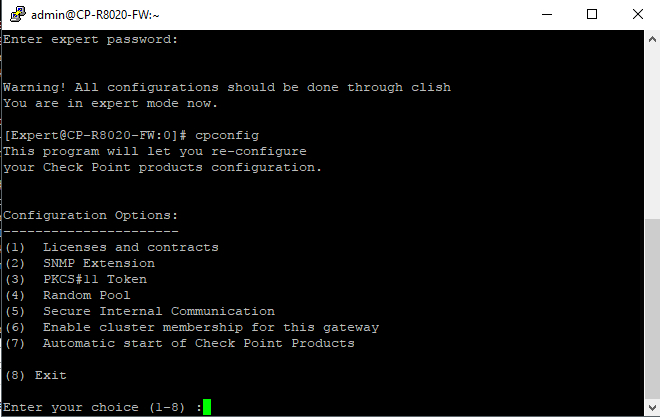
If I create a VM with 1 CPU, in cpconfig there is no CoreXL options:

If I create a VM with 2 CPUs, cpconfig has CoreXL options:

Tell me, please, what is the least amount of CPUs required to enable CoreXL and if CoreXLrequired at least 2 CPUs, why we see one CPU in admin guide? And if CoreXL is enabled with 1 CPU, why there is no options in cpconfig?
If you have only one CPU CoreXL makes no sense. There is no CPU available to distribute anything to another CPU.
With CoreXL you can distribute the overall load to all or maybe only some CPUs. You need at least two, but better more CPUs to really benefit from CoreXL.
And yes, the documentation is a little bit confusing.
Wolfgang
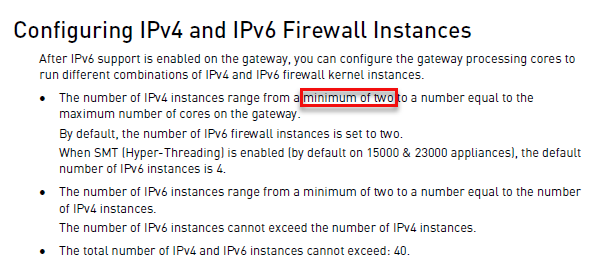
On the same page where you found the table ![]()

CoreXL does not make sense on one core - you cannot multiply one ![]()
Thank you. I missed this moment.
Then I do not understand the table line with 1 CPU.
That is a good point! Me neither
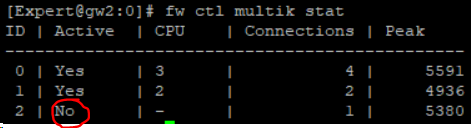
At R80.20 there's a new hack to turn the CoreXL instances on the fly on and off. Here is an example with 3 FW wokers!
Now start the command:
# fw ctl multik stop -> stop CoreXL instance 1
![]()

# fw ctl multik stop -> stop CoreXL instance 2
![]()

# fw ctl multik stop -> The last instance cannot be disabled:-)
![]()
You can activate it again per:
# fw ctl multik start
Conclusion:
CoreXL 0 cannot really be deactivated under R80.10+:-)
More see here:
Silly question - if I have a openserver license for 2 cores is there anypoint in turning on COREXL? If I disable this will it still use the two cores, or simple use one of them?
This was mentioned in my book, whether disabling CoreXL on a 2-core system is desirable will depend on a lot of factors.
With CoreXL enabled, the split is 2/2 with the two cores each acting as both an SND and Firewall Worker (kernel instance). While both cores are having to pull double duty and constantly switch context/roles, it does allow more than just one core to process traffic should a large majority of it get concentrated in either the Accelerated Path (handled by SND) or the Medium/Firewall Paths (handed by Firewall Workers). It also allows both cores to empty NIC ring buffers in a timely fashion and help avoid RX-DRP frame loss.
However if CoreXL is disabled, core 0 becomes just a SND and core 1 is just a Firewall Worker. The coordination overhead of CoreXL between multiple Firewall Workers, and the coordination overhead of SecureXL between multiple SNDs is no longer present, thus freeing up a fair amount of CPU time to potentially move more traffic. The downside is that if one core or the other gets fully saturated doing whatever it is doing, the other core cannot help at all thus creating a bottleneck while all possible CPU resources are not being fully utilized.
As mentioned in my book, the only way to determine if disabling CoreXL will help (which is essentially going to a 1/1 split) is to carefully baseline CPU utilization and network error counters with CoreXL enabled, then disable it and see what happens to CPU utilization and network error counters. Disabling CoreXL on a 2-core system may help overall performance or it may not.
As ever Tim, thanks.
Leaderboard
Epsum factorial non deposit quid pro quo hic escorol.
| User | Count |
|---|---|
| 16 | |
| 13 | |
| 8 | |
| 7 | |
| 6 | |
| 4 | |
| 3 | |
| 3 | |
| 2 | |
| 2 |
Fri 12 Dec 2025 @ 10:00 AM (CET)
Check Mates Live Netherlands: #41 AI & Multi Context ProtocolFri 12 Dec 2025 @ 10:00 AM (CET)
Check Mates Live Netherlands: #41 AI & Multi Context ProtocolTue 16 Dec 2025 @ 05:00 PM (CET)
Under the Hood: CloudGuard Network Security for Oracle Cloud - Config and Autoscaling!About CheckMates
Learn Check Point
Advanced Learning
YOU DESERVE THE BEST SECURITY