- Products
- Learn
- Local User Groups
- Partners
- More

MVP 2026: Submissions
Are Now Open!
What's New in R82.10?
10 December @ 5pm CET / 11am ET
Announcing Quantum R82.10!
Learn MoreOverlap in Security Validation
Help us to understand your needs better
CheckMates Go:
Maestro Madness
Hi everyone,
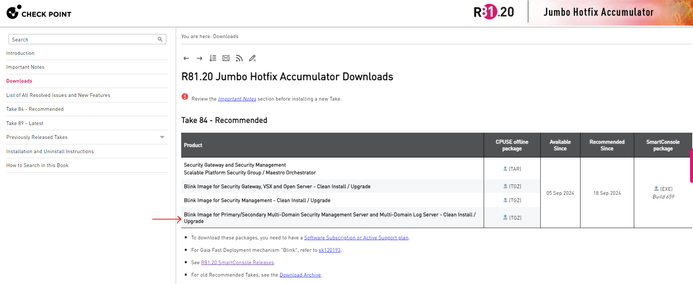
I am having issues when installing the recommended version R81.20 JHF T84 for an MDS. Because my new machine doesn't have access to Internet, I am going to install R81.20 Take 634 (from https://support.checkpoint.com/results/download/124397):
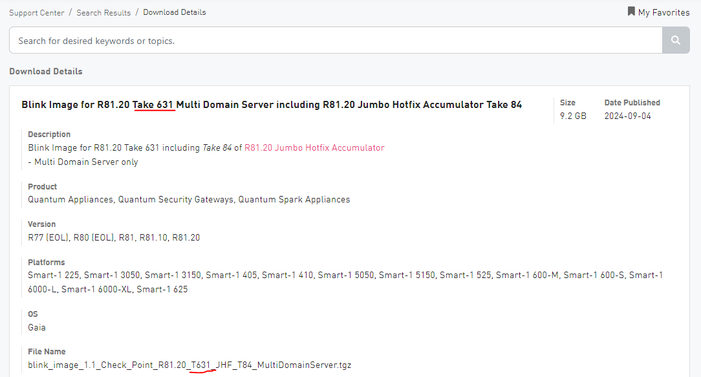
Then, import the JHF T84 with CPUSE (from https://support.checkpoint.com/results/download/134941, which is for R81.20 Take 631, there is not for R81.20 Take 634, I don't know why):
After doing this process, I have R81.20 T631 with JHF T84:
But what happens with R81.20 Take 634? According to my first image "Effective June 3, 2024, the R81.20 Gaia images have been replaced with Take 634.". I assume this is because the JHF T84 TGZ file I downloaded is for Take 631, but as said, I didn't find for Take 634. Is this process fine? Am I missing something?
Regards,
Julián
The blink image you're referring to has both the base version and the JHF in it. If you are doing the version upgrade with the R81.20 take 634 package, you would not then install the blink image, you would install just the JHF by itself (the top download link in your second screenshot.
Hi @fjulianom
You are right our blink images are with take 631 + the recommended jumbo
because our jumbo starting take 65 contain the VPN CVE which was released in take 634 you can be sure you are not missing anything and you are secure
we are checking internally how we can improve our blinks and have them with take 634 and not with take 631 as the base version
Thanks
Matan.
Hi,
Then, is R81.20 Take 631 + JHF T84 fine?
Regards,
Julián
Hi
Indeed all good!
Hi,
OK. By the way, can you clarify what's is the difference in Check Point between version, release, take, build, hot fix, jumbo hot fix. There are a lot of terms...
Regards,
Julián
- Version is e.g. R81.20 that is different from R81 and R81.10.
- from time to time, new installation media builds with different take numbers will be available that include important fixes https://support.checkpoint.com/results/sk/sk173903
- Jumbo Takes for the Versions are available here: https://support.checkpoint.com/results/sk/sk174185
- SmartConsole versions are maintained e.g. here https://sc1.checkpoint.com/documents/Jumbo_HFA/R81.10_SC/R81.10/R81.10-List-of-all-Resolved-Issues.h...
- special HFAs will be suggested by support for occuring issues only
Hi,
OK, many thanks. Check Point should review its official links, they are not updated and contradictory.
From sk174185
From R81.20 Jumbo Hotfix Take 84
Regards,
Julián
At the bottom of every SK article is a chance for you to offer feedback to the article. If you see an article needing correction, select "No" and you'll be given the option to write a comment. This goes to the SK maintainers and they will review your comments and make corrections if/where needed.
The blink image you're referring to has both the base version and the JHF in it. If you are doing the version upgrade with the R81.20 take 634 package, you would not then install the blink image, you would install just the JHF by itself (the top download link in your second screenshot.
Hi,
But they make it confusing, because the top link says “Security Gateway / Security Management”, and not “Multi-Domain Security Management Server”, as the link I referred to… I will try with the top link…
UPDATE
I have tried and it worked! That's the process. I imagine there is not aN ISO file which contains the R81.20 version plus the JHF 84, right?
Regards,
Julián
Leaderboard
Epsum factorial non deposit quid pro quo hic escorol.
| User | Count |
|---|---|
| 16 | |
| 13 | |
| 8 | |
| 7 | |
| 6 | |
| 4 | |
| 3 | |
| 3 | |
| 2 | |
| 2 |
Fri 12 Dec 2025 @ 10:00 AM (CET)
Check Mates Live Netherlands: #41 AI & Multi Context ProtocolTue 16 Dec 2025 @ 05:00 PM (CET)
Under the Hood: CloudGuard Network Security for Oracle Cloud - Config and Autoscaling!Fri 12 Dec 2025 @ 10:00 AM (CET)
Check Mates Live Netherlands: #41 AI & Multi Context ProtocolTue 16 Dec 2025 @ 05:00 PM (CET)
Under the Hood: CloudGuard Network Security for Oracle Cloud - Config and Autoscaling!About CheckMates
Learn Check Point
Advanced Learning
YOU DESERVE THE BEST SECURITY