- Products
- Learn
- Local User Groups
- Partners
- More

The Great Exposure Reset
24 February 2026 @ 5pm CET / 11am EST
CheckMates Fest 2026
Watch Now!AI Security Masters
Hacking with AI: The Dark Side of Innovation
CheckMates Go:
CheckMates Fest
Hello Dear,
I am newcomer with the CheckPoint Solutions and It’s my first time to activate the license but the others config are OK because I worked on the Cisco products.
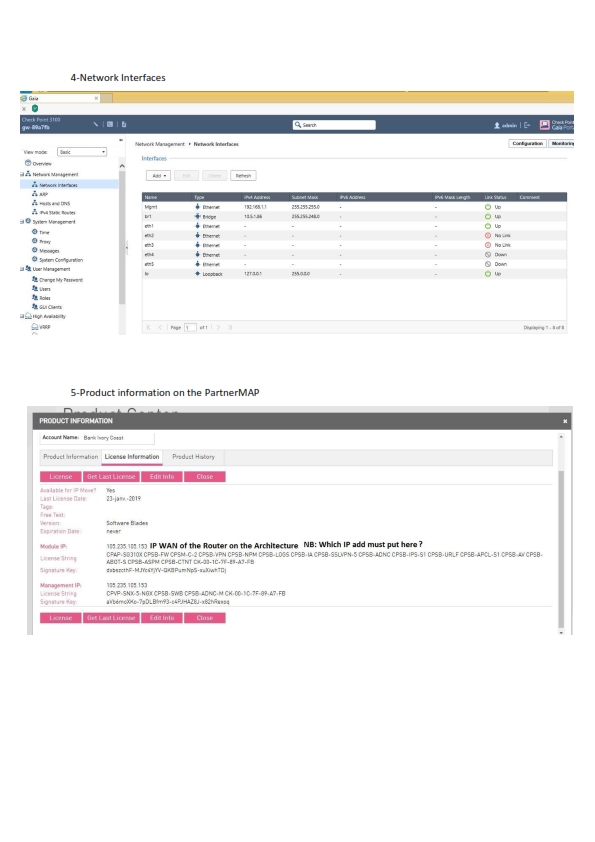
I tried to activate the license on the CP Appliance 3100 but I am confused just a bit. Please this is the information
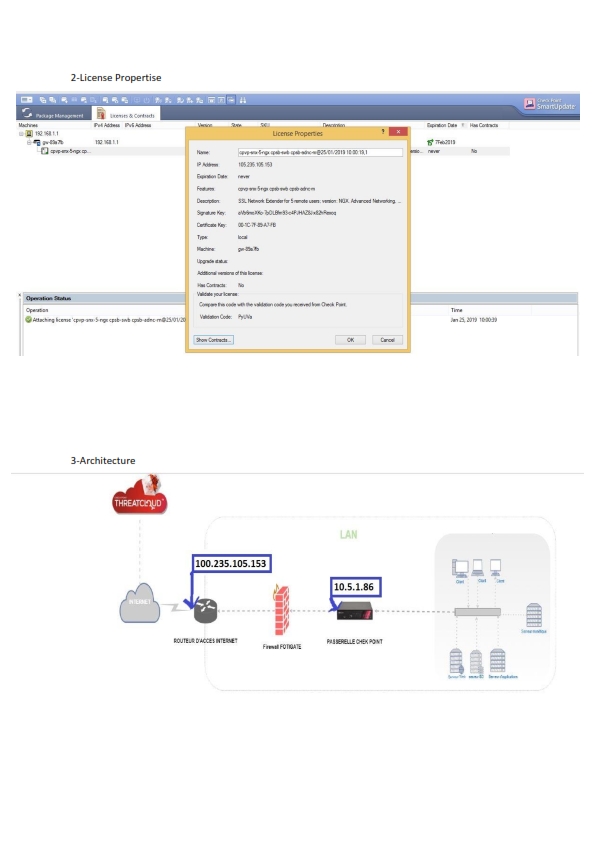
IP Mgmt : 192.166.1.1
IP add br : 10.5.1.86 to access to Internet
IP WAN on Router(Provider) : 100.235.105.153
NB : the CP Appliance 3100 Behind the fortigate and to generate the license on the usercenter.checkpoint.com/usercenter the IP add I put is the IP WAN 100.235.105.153.
Brief you can see the information and the errors on the files attached.
1-Which IP add must I put when I fill the form to generate the activation file ?
IP add br : 10.5.1.86 or IP WAN on Router : 100.235.105.153
2- Which is the problem ?
Thank you for all.
Hi Yanick,
The 3000 series appliance will use Central licensing to activate the license. Because of this the IP address on the license will be the IP address of the management server. If you are using gateway and management server on the same machine you could just use the management interface IP address and then add the license via SmartUpdate.
I would use the IP address for the license of whichever interface you have set as the Mgmt interface. The mgmt interface necessarily doesn't have to be the physical interface that is marked as Mgmt. The management interface can be changed via Gaia.
Hope this helps.
Cheers
Mark
Thanks to you Mark for your reponse
To keep things simple, I'd recommend taking the following steps:
1. Regenerate your license from usercenter using the IP of the Management interface (192.168.1.1) and download the license file
2. Open up SmartUpdate, navigate to the licenses and contracts tab and detach the license previously attached
3. Attach the new license, and update contracts.
This should resolve your issue. Let us know if that helps.
Jovani
Thank you I understood well, It's ok
For more information, please check the Check Point License Guide. https://supportcenter.checkpoint.com/supportcenter/portal?eventSubmit_doGoviewsolutiondetails=&solut...
Great I am very happy to work on the Checkpoint solution
Did you "activate" the license for the 3100 using the First Time Wizard when setting up the appliance?
Or what exact steps did you follow to get to this state?
In general, the license should be associated with one of:
Apfter using the First Time Wizard when setting up the appliance I wanted to activate the license but I took the ISP IP add but now I understood I think, I am going to try
Thanks for all but after the activation of the Apliance, is possible to change the ip address I have used for the activation and put another network(IP add) or this address (The first IP add) is bind with the SmartConsole for the Mgmt?
Technically, as long as the IP of the license matches an IP on a gateway interface (or the management IP) it is fine.
If you need to relicense, Account Services can help.
Leaderboard
Epsum factorial non deposit quid pro quo hic escorol.
| User | Count |
|---|---|
| 27 | |
| 19 | |
| 10 | |
| 9 | |
| 8 | |
| 7 | |
| 6 | |
| 6 | |
| 5 | |
| 4 |
Thu 19 Feb 2026 @ 03:00 PM (EST)
Americas Deep Dive: Check Point Management API Best PracticesMon 23 Feb 2026 @ 11:00 AM (EST)
Latest updates on Quantum Spark including R82 features and Spark Management zero touch - AMERTue 24 Feb 2026 @ 10:00 AM (CET)
Latest updates on Quantum Spark including R82 features and Spark Management zero touch - EMEAThu 19 Feb 2026 @ 03:00 PM (EST)
Americas Deep Dive: Check Point Management API Best PracticesMon 23 Feb 2026 @ 11:00 AM (EST)
Latest updates on Quantum Spark including R82 features and Spark Management zero touch - AMERTue 24 Feb 2026 @ 10:00 AM (CET)
Latest updates on Quantum Spark including R82 features and Spark Management zero touch - EMEAAbout CheckMates
Learn Check Point
Advanced Learning
YOU DESERVE THE BEST SECURITY