- Products
- Learn
- Local User Groups
- Partners
- More

Simplify Admin Operations with R82.20
Wed, 19 August @ 5pm CET/11am EDT
The industry's first AI Network Firewall
Securing AI traffic, everywhere
The State of Ransomware Q2 2026:
This Quarter's Trends, and Their Impact on Your Defenses
READY OR NOT: Securing the AI Enterprise
AI Research & Threat Landscape
CheckMates Go:
No Attack Required
Hey boys and girls, ladies and gents,
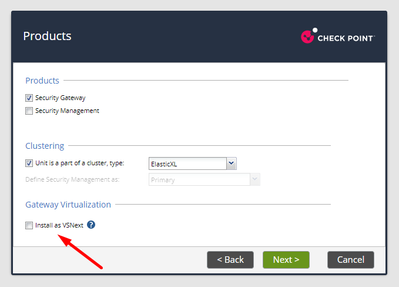
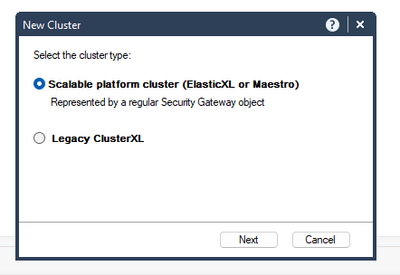
I built R82 elasticXL lab and though I followed below link by @HeikoAnkenbrand , not sure if I cant make it work cause Im using eveNG or for what reason, but I created 2 separate elasticxl instances, but clustering part fails for some reason, so if anyone has an idea, happy to hear it 🙂
I could care less if this lab breaks, its super easy to rebuid anyway.
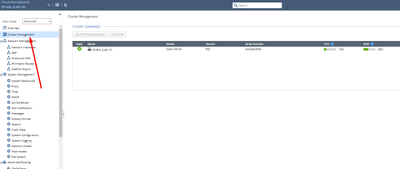
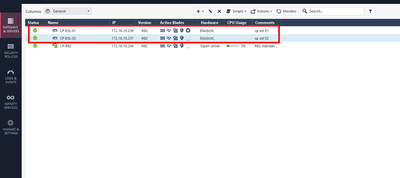
This is the link I was referring to. I also attached some screenshots and outputs.
Andy
https://community.checkpoint.com/t5/Security-Gateways/R82-Install-ElasticXL-Cluster/td-p/206235
[Expert@CP-EXL-1-s01-01:0]# cphaprob state
Cluster Mode: HA Over LS
ID Unique Address Assigned Load State Name
1 (local) 192.0.2.1 100% ACTIVE(P) CP-EXL-1-s01-01
Active PNOTEs: None
Last member state change event:
Event Code: CLUS-114904
State change: ACTIVE(!) -> ACTIVE
Reason for state change: Reason for ACTIVE! alert has been resolved
Event time: Mon Jul 1 19:40:49 2024
[Expert@CP-EXL-1-s01-01:0]#
[Expert@CP-EXL-02-s01-01:0]# asg monitor
Mon Jul 01 20:44:20 EDT 2024
--------------------------------------------------------------------------------
| System Status - ElasticXL |
--------------------------------------------------------------------------------
| Up time | 39:27 minutes |
| Members | 1 / 1 |
| Version | R82 (Build Number 633) |
Mon Jul 01 20:44:21 EDT 2024
--------------------------------------------------------------------------------
| System Status - ElasticXL |
--------------------------------------------------------------------------------
| Up time | 39:29 minutes |
| Members | 1 / 1 |
| Version | R82 (Build Number 633) |
| FW Policy Date | 01Jul24 20:38 |
| AMW Policy Date | N/A |
--------------------------------------------------------------------------------
| Member ID Site1 |
| ACTIVE |
--------------------------------------------------------------------------------
| 1 ACTIVE |
--------------------------------------------------------------------------------
^C
[Expert@CP-EXL-02-s01-01:0]#
[Expert@CP-EXL-02-s01-01:0]# cphaprob -a if
CCP mode: Automatic
Interface Name: Status:
eth2 UP
eth3 UP
Sync (S) UP
magg1 (LS) UP
S - sync, HA/LS - bond type, LM - link monitor, P - probing
[Expert@CP-EXL-1-s01-01:0]#
[Expert@CP-EXL-1-s01-01:0]# cphaprob -a if
CCP mode: Automatic
Interface Name: Status:
eth2 UP
eth3 UP
Sync (S) UP
magg1 (LS) UP
S - sync, HA/LS - bond type, LM - link monitor, P - probing
Virtual cluster interfaces: 5
lo 127.0.0.1
eth2 192.168.10.238
eth3 169.254.0.238
Sync 192.0.2.1
magg1 172.16.10.238
[Expert@CP-EXL-1-s01-01:0]#
Virtual cluster interfaces: 5
lo 127.0.0.1
eth2 192.168.10.237
eth3 169.254.0.237
Sync 192.0.2.1
magg1 172.16.10.237
[Expert@CP-EXL-02-s01-01:0]#
And since elasticxl cluster object does NOT have an option to add cluster members, there is something obvious Im missing, but cant figure out what, so will check it later.
Andy
Hello,
Installing a cluster of ElasticXL gateways on Proxmox.
I used the approach ShaiF showed, executing step 1 the additional gateways after the first gateway was run through FTW, finalized configuration, added to management, and applied policy. Step 2 was then executed on ALL members, including the first, which brought the additional gateways into the display of first member's "Pending Gateways", so they could be added.
Thanks for the pointer.
Eric
R82 offers to let you build an ElasticXL cluster out of a 3000-series unit, but it fails in rather spectacular fashion. Gets stuck in a boot loop which needs hands on to fix. You never get the boot menu, so you can't revert to factory defaults without someone cycling power. I get that ElasticXL isn't supported on the 3000-series boxes, but the UI offers it up. It's even the default cluster method for them unless you go out of your way to specify ClusterXL. I expect this will bite a LOT of people when boxes start shipping with R82 by default. Edit: just got word R&D has PMTR-114648 for this boot loop. I bet the fix will be to disable the option in the setup wizard to make the 3000-series into an ElasticXL cluster, but we'll see.
While it's not supported, it's possible to set up an ElasticXL cluster for lab use on a pair of 3000-series boxes. I've only tested it on 3600s, since that's what I physically have, but they're all identical in almost all of the ways which matter for this. To build the first member and set up the cluster:
To add another member, you follow steps 1-6, then have one of the working members accept the new member's join request.
Incidentally, a 3600 (or cluster of them, or probably a cluster of 3100 units, 3200 units, or 3800 units) can also run VSNext this way. I haven't yet tried, but I bet it would even work on a 2200, which uses the file 00-T-110-00.rules.
Regarding the interface names, this worked for me on VmWare:
> set interface-name by-name eth0 to Sync
Might be a new clish command
That command has existed since at least R80.40 (I don't have anything earlier to check). Only works on open servers and VMs, though.
Hi Bob!
Do you (or anyone else) have any tip on how to get EXL setup using 5200 appliances.
I brought a couple of decommished boxes from work to use for labs, and even though they should be pretty similar to 3200 appliances (just slightly larger), and especially very similar to the 5100 boxes that I understand that @emmap managed to setup, but the udev-rules file looks quite different than the examples that I have seen, both in these examples and also in the past as this file is something that us who have been working with Open Servers for a long time has gotten used to manipulating, and I have tried to just remove what's in my file and replace with the "old school" look, like below:
ID=="0000:03:00.0", NAME="eth1"
ID=="0000:04:00.0", NAME="eth2"
ID=="0000:05:00.0", NAME="eth3"
ID=="0000:06:00.0", NAME="eth4"
ID=="0000:07:00.0", NAME="Sync"
ID=="0000:08:00.0", NAME="Mgmt"
But this is the content of my file, and just replacing with the above and changing "eth5" to "Sync" didn't work for me, the appliance is going into boot loop and had to be reinstalled.
Please share a list of all of the files in /etc/udev/rules.d/. It's possible some other file needs to be modified instead.
Hello!
Here is the folder content as well as the content of each file:
-rw-r--r-- 1 admin root 218 Jun 17 15:52 00-PB-20-00.rules
-rw-r--r-- 1 admin root 190 Mar 12 08:41 01-usb_init_script.rules
-rw-r--r-- 1 admin root 85 Mar 12 08:14 09-azure-sriov-net.rules
-rw-r--r-- 1 admin root 179 Mar 12 08:14 50-bsg-mpi3mrctl-smart-1-g7.rules
-rw-r--r-- 1 admin root 237 Mar 12 08:14 66-raid-hotplug.rules
-rw-r--r-- 1 admin root 245 Dec 12 2025 85-diagnostics.rules
Content from 00-PB-20-00.rules:
cat /etc/udev/rules.d/00-PB-20-00.rules
SUBSYSTEM=="net", KERNEL=="wrp*", OPTIONS="ignore_device"
DRIVERS=="mlx5_core", PROGRAM="/sbin/mlx_renaming %k 0", NAME="%c", GOTO="ETH_END"
SUBSYSTEM=="net", PROGRAM="/sbin/eth_renaming %k", NAME="%c"
LABEL="ETH_END"
Content from 01-usb_init_script.rules:
cat /etc/udev/rules.d/01-usb_init_script.rules
ACTION=="add", SUBSYSTEM=="block", SUBSYSTEMS=="usb", KERNEL=="sd?[0-9]", ATTRS{idVendor}=="****", ATTRS{idProduct}=="****", TAG+="systemd", ENV{SYSTEMD_WANTS}="plugAndPlay@$kernel.service"
Content from 09-azure-sriov-net.rules:
cat /etc/udev/rules.d/09-azure-sriov-net.rules
SUBSYSTEM=="net", DRIVERS=="hv_pci", ACTION=="add", PROGRAM="/sbin/eth_hv_rename %k"
Content from 50-bsg-mpi3mrctl-smart-1-g7.rules:
cat /etc/udev/rules.d/50-bsg-mpi3mrctl-smart-1-g7.rules
# Custom rule for mpi3mrctl devices on Smart-1 G7 appliances
# Creates a symbolic link in /dev/bsg for mpi3mrctl devices supporting Smart-1 G7
KERNEL=="mpi3mrctl*", NAME="bsg/%k"
Content from 66-raid-hotplug.rules:
cat /etc/udev/rules.d/66-raid-hotplug.rules
SUBSYSTEM!="block", GOTO="RAID_END"
KERNEL=="sd*", GOTO="RAID_ACTION"
KERNEL!="nvme*", GOTO="RAID_END"
LABEL="RAID_ACTION"
ACTION=="add", RUN+="/sbin/raid_add %k"
ACTION=="remove", RUN+="/sbin/raid_remove %k"
LABEL="RAID_END"
Content from 00-PB-20-00.rules
cat /etc/udev/rules.d/85-diagnostics.rules
ACTION=="add", SUBSYSTEMS=="usb", KERNEL=="sd?1", SUBSYSTEM=="block", TAG+="systemd", ENV{SYSTEMD_WANTS}="diagmain-detect@%k.service"
#ACTION=="remove", KERNEL=="sd?1", SUBSYSTEM=="block", SUBSYSTEMS=="usb", RUN+="/usr/bin/diagMain --remove=%k"
00-PB-20-00.rules is the right file. Looks like /sbin/eth_renaming in that third line has all of the interface naming logic, probably due to the card slot. I'm not sure yet how either that script or the 00-PB-20-00.rules file should be modified.
Hi Jonas
Did you do the rest of the file editing from my post below? Please also check with the 'lspci' command that your interfaces have the same PCI IDs as mine do. Instead of rebooting, apparently you can also kick those changes in with the command 'udevtrigger'. I haven't tried that yet, but it's in the open server instructions for this. You should also be aware that this rules file will revert to its default every time you install a JHF patch, I haven't found a way to fix that, I just end up editing it back via console every time I patch them (but with 'eth1-Sync' instead of 'Sync' - potentionally this is what it should be from the start, I haven't tried to start from scratch since I posted that below).
When the appliance is boot looping do you have a console cable connected? Can you see what it's failing on?
I did follow the rest of your instructions, and I checked with lspci and my interfaces/PCI bus no is the same as your 5100's:
03:00.0 Ethernet controller: Intel Corporation I211 Gigabit Network Connection (rev 03)
04:00.0 Ethernet controller: Intel Corporation I211 Gigabit Network Connection (rev 03)
05:00.0 Ethernet controller: Intel Corporation I211 Gigabit Network Connection (rev 03)
06:00.0 Ethernet controller: Intel Corporation I211 Gigabit Network Connection (rev 03)
07:00.0 Ethernet controller: Intel Corporation I211 Gigabit Network Connection (rev 03)
08:00.0 Ethernet controller: Intel Corporation I211 Gigabit Network Connection (rev 03)
My interfaces on the "outside" of the appliances are eth1-eth5 and Mgmt from left to right.
And if I interpret the order, the first in order, 03:00.0 being eth1 on the outside, but I'm not sure exactly how it works...
I also forgot to mention that I have re-imaged the appliances with a USB created by ISOMorphic, with version R82.10 + JHF19.
I pre-fixed the 00-rules file with the list of interfaces and named interface eth5 to "Sync" and then the dbset stuff and then rebooted and then it fell into boot loop.
I also tried applying the <loop>no</loop> change, but no change.
Hello y'all!
I did a little experiment, I re-imaged the appliances using the ISO of R82 Take 779, and after doing that, the replacement of the content of the udev-rules file was actually implemented, and after the FTW it came up fine and I could add it to SmartConsole.
BUT, after re-imaging the secondary appliance, replacing the content of the udev-rules file and rebooting again, the second appliance doesn't appear under "Pending Gateways", and I have tried the "tellpm process:exl_detectiond t" after rebooting the second appliance, tried it on both...
As soon as I get the full cluster working, I want to find out what happens when upgrading the R82.10, if the configuration is preserved or if it all goes to crap...
But I have to figure out why it won't appear as a "Pending Gateway", and I'd appreciate any pointers in the direction of resolving this...
Br,
Jonas
Try changing your 'Sync' interface to 'eth1-Sync' in the udev rules and running 'udevtrigger'. Then give it 10 minutes to see if appears as a pending gateway.
I'm surprised it let you install R82.10, it's not supported on 5000 series gateways. That might explain why it wasn't working though.
I got my hands on a pair of 5100s that I have built into an EXL cluster, it's also not supported as they don't have Sync interfaces but with the info in this thread and some other trickery I made it work. I figured I'd document it here for posterity with the usual caveat - this is for educational purposes only and is not supported in an production environment.
Once R82 is fresh installed on the appliances, log in and get to expert mode. You need to edit the udev rules file, same as with a 3X00, but it's a bit more complicated because of the expansion card slot in the appliance. It'll look very different to a VM or a 3X00 - basically, delete what is in there and put this in:
ID=="0000:03:00.0", NAME="eth1"
ID=="0000:04:00.0", NAME="eth2"
ID=="0000:05:00.0", NAME="eth3"
ID=="0000:06:00.0", NAME="eth4"
ID=="0000:07:00.0", NAME="Sync"
ID=="0000:08:00.0", NAME="Mgmt"
Those ID line are PCI bus addresses for interfaces on a 5100, you can check what they are on your system by using the command 'lspci'. Those lines in there will rename the existing eth5 interface as Sync and keep the rest as-is.
The next step is to turn off the 'see if we have a line card installed' code. Edit the /etc/appliance_config.xml file and change the line <loop>yes</loop> to <loop>no</loop> - this file is not writable, so chmod it to +w before you edit it and then -w after.
Next you have to set the EXL detection like this:
dbset process:exl_detectiond t
dbset :save
Reboot the appliance. It may come up without the Sync interface enabled as it didn't exist in the config before. Set it to state 'on' in clish. Now edit the rules file again to change the Sync interface to eth1-Sync, on gateway 1 only. At this stage you should be able to run the FTW on your gateway 1.
After running the FTW on gateway 1 and getting the cluster going, you need to enable detection on all cluster members to be able to add more gateways into the group.
tellpm process:exl_detectiond t
Edit the Sync interface on your other gateways to be named eth1-Sync here.
At this point I could build the cluster per normal steps, except that one of the 5100s has an -HA license on it. Due to this being an online install, the appliance constantly fetches this license and applies it. This license being applied breaks policy install, because the appliance is not in a CXL cluster - even with an eval on there, it refuses to take a policy install. Unfortunately for me, I lost the coin toss and this appliance as initially my gateway 1_1, which meant I could not actually build the cluster, I had to rebuild it again while swapping over to setting the other appliance as my gateway 1_1. As it is now, every time gateway 1_2 boots up it goes down due to not taking the policy. I can try to get it working again by:
So keep all that in mind if you're planning on using existing cluster gateways that were purchased with the old -HA licensing in your new EXL cluster. It's a pain in the neck.
OK I fixed the license fetching issue by changing the MAC address on the Mgmt interface on that box (in local clish). Now it no longer fetches the -HA license and just uses the eval that's on there.
Hi Emmap
I have a lab enviroiment with two members, I configured the first wizard for two devices with elastic cluster option, but both has the same sync IP, there are some way to changue on one member the sync IP? I didnt found some information about.
Hipervisor = Vmware Esxi
Version R82 JHF34
Member 1 management IP = 172.16.2.50
Member 1 eth1 eth1-Sync = 192.0.2.1
Member 2 management IP = 172.16.2.51
Member 1 eth1 eth1-Sync = 192.0.2.1
Thanks.
Hi Tymdrake
When you are setting up an EXL cluster, you do not perform the FTW on additional gateway members. You just build them, make sure the Sync port is connected (or, eth1 on VMs) and the SMO gateway will discover the additional ones to add. When building a VM to lab test it, just leave the eth0 ip address at its default. EXL cluster members don't have IP address per interface outside of the Sync link.
To follow up on this old thread, use of ElasticXL with Virtual Machines and Open Hardware is now officially supported:
Virtual Machines: R82 Jumbo HFA 41+ on ESX only
Open Hardware: R82 Jumbo HFA 10+, and all members of the cluster must be the same CPU type (Intel vs. ARM)
This is all nicely documented in the following new SK, which includes officially supported steps to get ElasticXL working, many of which appear to be taken from this thread. sk183513: ElasticXL supported combinations of hardware platforms in R82 and higher
Amazing news, Tim.
Great News!
I have a feeling that lots of customers may opt to use that option.
I tried to make it work in eve-ng again without any file modifications, but no joy. Anyway, not a big deal, since its still not officially supported on it 🙂
Gives me a good reason to clean up the "Solutions" for this old thread 🙂
That's really great news, given that I want to make 2026 my year of the lab, giving my colleagues more chances to get their hands dirty without harming the customers 😉

Leaderboard
Epsum factorial non deposit quid pro quo hic escorol.
| User | Count |
|---|---|
| 156 | |
| 103 | |
| 15 | |
| 12 | |
| 12 | |
| 9 | |
| 8 | |
| 7 | |
| 6 | |
| 6 |
Tue 11 Aug 2026 @ 11:00 AM (EDT)
Beyond Phishing: Securing Email Against SaaS and AI-Driven ThreatsThu 20 Aug 2026 @ 08:30 AM (COT)
Medellin: Workspace Evolution: Hybrid Mesh Management - Visibilidad, Automatización e IATue 11 Aug 2026 @ 11:00 AM (EDT)
Beyond Phishing: Securing Email Against SaaS and AI-Driven ThreatsThu 20 Aug 2026 @ 10:00 AM (PDT)
AI Security Masters E13: READY OR NOT: Securing the AI Ent 5/5 - AI Research & Threat LandscapeTue 25 Aug 2026 @ 05:00 PM (CEST)
The State of Ransomware Q2 2026: This Quarter's Trends, and Their Impact on Your DefensesThu 20 Aug 2026 @ 08:30 AM (COT)
Medellin: Workspace Evolution: Hybrid Mesh Management - Visibilidad, Automatización e IAThu 20 Aug 2026 @ 06:00 PM (COT)
Medellin: Workspace Intelligence: IA Generativa en Acción para Equipos de SeguridadAbout CheckMates
Learn Check Point
Advanced Learning

YOU DESERVE THE BEST SECURITY