- Products
- Learn
- Local User Groups
- Partners
- More

Secure Your AI Transformation
9 April @ 12pm SGT / 3pm CET / 2PM EDT
Check Point WAF TechTalk:
Introduction and New Features
AI Security Masters E6: When AI Goes Wrong -
Hallucinations, Jailbreaks, and the Curious Behavior of AI Agents
Ink Dragon: A Major Nation-State Campaign
Watch HereAI Security Masters E5:
Powering Prevention: The AI Driving Check Point’s ThreatCloud
CheckMates Go:
CheckMates Fest
Hi!
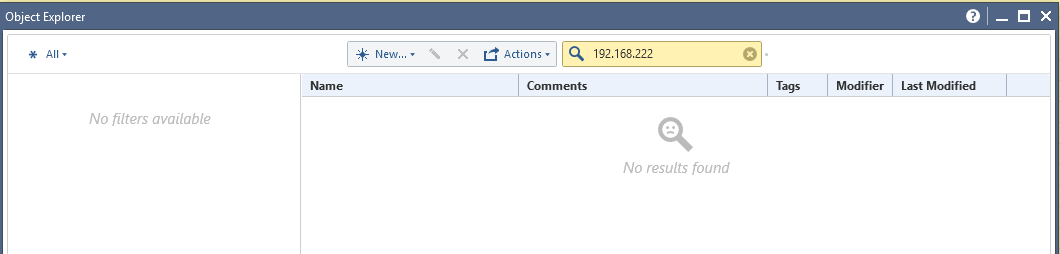
The network objects that were automatically created during the "Get topology" action do not show under the network objects in the Object Explorer. However, I can reference/use them in the firewall rule base.
For example:
"Get Topology" created two new networks: Net_192.168.111.0 and Net_192.168.222.0. Those object can be added to the firewall rule, but if you try to look them up in the Object Explorer they do not show.
Is this perhaps a known bug?
Regards,
Jure
Venkat Raman G G wrote:
Hi Tomer -
I do have the same problem and i am running R80. Is there a fix available? All the auto created objects are not visible in the object explorer. Let me know.
Let's continue this conversation at the other thread - Get interfaces auto generated networks
Hi Jure,
The network objects created via 'Get Topology' shouldn't be available be used in the rule base,
Can you please specify how were you able to add them to the rule base?
Thanks,
Uriel Fleishcman
Hi Uriel!
I found those networks in the drop down list of the source/destination field of the rule base.
This is something that is working perfectly in the pre-R80 versions so I do not understand why Check Point moved it now.
New networks pulled/created via "Get topology" are very likely to be used afterwards in the rule base.
I can submit few screenshots to backup the story.
Regards,
Jure Simundic
Hi,
Can you please explain in general your usages for this networks?
When performing get topology those networks are all added into one network group usually called <gwName>_<inetrfaceName>, is this group also usable in the rule base?
Thanks,
Uriel Fleischman
Yes, it is usable.
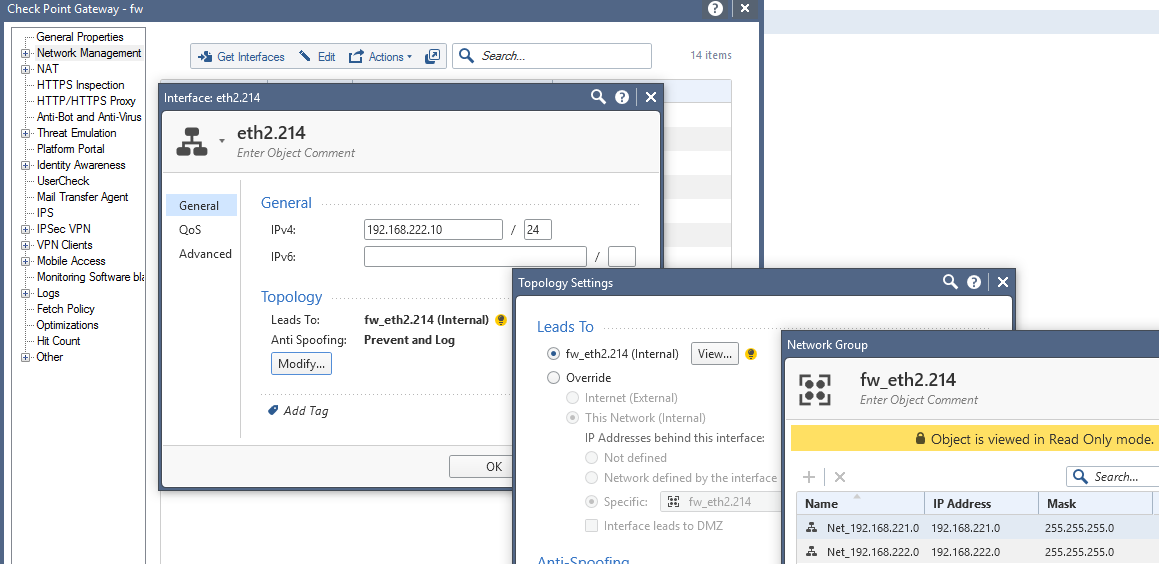
For example, we created a new VLAN interface eth2.214 with two networks behind it. The networks are available in the rule base, but they do not show in the object explorer. In the pre-80 versions this has never been a problem.
In general, the Object Explorer is not working well in terms of filtering, e.g. you cannot filter according to NAT IP address, sometimes it does not list the object if you try to filter it according to its IP address.
Are we to have that fixed in R80.10?
Regards,
Jure
Hi,
Unfortunately I cannot commit on things planned to be released in R80.10 just yet. We are aware of these 2 issues. Were there any other specific issues that you experienced with the Object Explorer?
Hi Tomer -
I do have the same problem and i am running R80. Is there a fix available? All the auto created objects are not visible in the object explorer. Let me know.
Venkat Raman G G wrote:
Hi Tomer -
I do have the same problem and i am running R80. Is there a fix available? All the auto created objects are not visible in the object explorer. Let me know.
Let's continue this conversation at the other thread - Get interfaces auto generated networks
In general, the Object Explorer is not working well in terms of filtering, e.g. you cannot filter according to NAT IP address, sometimes it does not list the object if you try to filter it according to its IP address.
Are we to have that fixed in R80.10?
Regards,
Jure
tomera5b2e7f3-09aa-32f8-96c2-f0f5bfa2988b wrote:
Hi,
Unfortunately I cannot commit on things planned to be released in R80.10 just yet. We are aware of these 2 issues. Were there any other specific issues that you experienced with the Object Explorer?
Hi Jure,
Since R80.10 is currently available as EA from the Check Point User Center, I can now confirm that filtering network objects in the Object Explorer by the NAT address is supported in R80.10, as well as fixes to the filter by IP Addresses.
Leaderboard
Epsum factorial non deposit quid pro quo hic escorol.
| User | Count |
|---|---|
| 66 | |
| 42 | |
| 25 | |
| 12 | |
| 12 | |
| 10 | |
| 10 | |
| 9 | |
| 9 | |
| 9 |
Thu 26 Mar 2026 @ 06:00 PM (COT)
Tegucigalpa: Spark Firewall y AI-Powered Security ManagementTue 07 Apr 2026 @ 06:00 PM (IDT)
Under the Hood: Check Point WAF and IO River: Multi-CDN Security in ActionTue 07 Apr 2026 @ 06:00 PM (IDT)
Under the Hood: Check Point WAF and IO River: Multi-CDN Security in ActionWed 08 Apr 2026 @ 10:00 AM (CEST)
The Cloud Architects Series: The Cloud Firewall with near 100% Zero Day prevention - In 7 LanguagesWed 08 Apr 2026 @ 07:00 PM (CST)
ERM al Descubierto: Amenazas Ocultas que Pondrán a Prueba tu Empresa en 2026Thu 26 Mar 2026 @ 06:00 PM (COT)
Tegucigalpa: Spark Firewall y AI-Powered Security ManagementTue 14 Apr 2026 @ 03:00 PM (PDT)
Renton, WA: Securing The AI Transformation and Exposure ManagementThu 30 Apr 2026 @ 03:00 PM (PDT)
Hillsboro, OR: Securing The AI Transformation and Exposure ManagementAbout CheckMates
Learn Check Point
Advanced Learning
YOU DESERVE THE BEST SECURITY