- Products
- Learn
- Local User Groups
- Partners
- More

AI Security Masters E7:
How CPR Broke ChatGPT's Isolation and What It Means for You
Call For Papers
Your Expertise. Our Stage
Good, Better, Best:
Prioritizing Defenses Against Credential Abuse
Ink Dragon: A Major Nation-State Campaign
Watch HereCheckMates Go:
CheckMates Fest
Hello friends,
Has anyone else had this problem when updating?
We have tried to perform an advance migration, with a clean installation and importing data with the migrate tools, and also I tried have done it directly with the CPUSE.
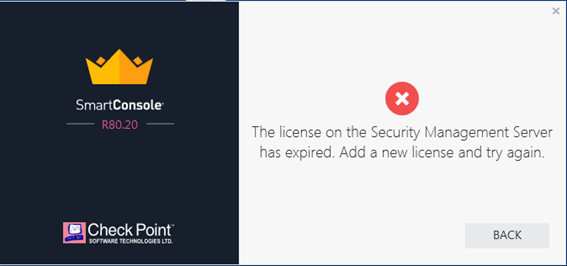
We always get the same expired license problem.

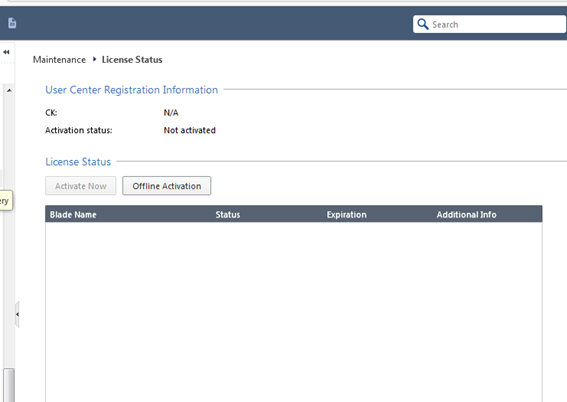
If we access to the license status page from Gaia web, the state of the license and blades is blank.

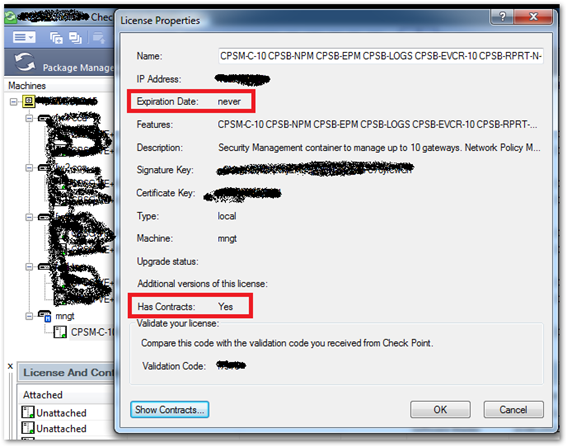
However, from the Smart Update console, we see that the licenses are attached, and that the contracts are still there.

Thanks in advance,
Angel.
What do you see if you do cplic print from the CLI of the SMS?
After you run the command above, it looks like its attached, try to unattach and then reattach the license in SmartUpdate.
This might be a silly question, but did you change the IP address of the server during the upgrade?
Hi,
Cplic print output the license details correctly but not showing contracts.
I tried to deatach and attach again with same results
I didn't change IP address...
Thanks...
El 5 dic. 2018 22:03, Daniel Taney <donotreply@checkpoint.com> escribió:
CheckMates <https://community.checkpoint.com/?et=watches.email.thread>
Re: License Expired when upgrade SMS from R80.10 to R80.20
reply from Daniel Taney<https://community.checkpoint.com/people/b4b37152-d764-4c4d-b1a6-25430ade17ab?et=watches.email.thread> in Management - View the full discussion<https://community.checkpoint.com/message/34427-re-license-expired-when-upgrade-sms-from-r8010-to-r80...>
That is strange. Have you tried manually importing your contracts file file the command line? You should be able to download the XML file of your contracts from User Center. SCP that file over to the management server and run:
cplic contract put /path_to/ServiceContractFile.xml
sk33089: What is a Service Contract File?
If that still doesn't work, you may want to put a call into account services. I've had weird licensing / contract issues arise during upgrades in the past and they were pretty good at quickly seeing what was wrong.
Good luck!
I would install the contract file manually on the GW:
- Download it from UserCenter > MyAccounts > Accounts > Products > Manue on right side > Get Contracts file
- install the Service Contract File on GW with CLI: # cplic contract put -o <file name>.xml
We posted the same response at the same time... weird!
As we both read that licenses were ok, but contracts not, ithis ws the most sensible answer...
Thanks to all for your replys..
Mysteriously, after the weekend, the expired license error in SmartConsole login window had disappeared, and we can access from this.
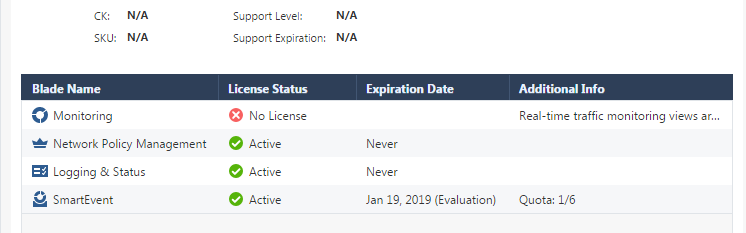
It also show us that we have the smartevent in trial period, strange.

I try to import manually xml contracts file, and the Network Policy Management is already licensed
I I'll talk with support...
thanks so much.
It will talk to CP and update license information...
Leaderboard
Epsum factorial non deposit quid pro quo hic escorol.
| User | Count |
|---|---|
| 77 | |
| 28 | |
| 13 | |
| 12 | |
| 12 | |
| 12 | |
| 9 | |
| 8 | |
| 8 | |
| 7 |
Tue 21 Apr 2026 @ 05:00 PM (IDT)
AI Security Masters E7: How CPR Broke ChatGPT's Isolation and What It Means for YouTue 28 Apr 2026 @ 06:00 PM (IDT)
Under the Hood: Securing your GenAI-enabled Web Applications with Check Point WAFTue 21 Apr 2026 @ 05:00 PM (IDT)
AI Security Masters E7: How CPR Broke ChatGPT's Isolation and What It Means for YouTue 28 Apr 2026 @ 06:00 PM (IDT)
Under the Hood: Securing your GenAI-enabled Web Applications with Check Point WAFTue 12 May 2026 @ 10:00 AM (CEST)
The Cloud Architects Series: Check Point Cloud Firewall delivered as a serviceThu 30 Apr 2026 @ 03:00 PM (PDT)
Hillsboro, OR: Securing The AI Transformation and Exposure ManagementAbout CheckMates
Learn Check Point
Advanced Learning
YOU DESERVE THE BEST SECURITY