How to Roll Out IPS Updates Safely
Staging → Evidence → Promotion (Prevent) without production surprises
Why this matters (real-world pain)
IPS content updates are frequent and necessary — but the operational risk is not the download. The risk is new/updated protections going straight to Prevent without evidence, which is how you get:
-
false positives that break business apps,
-
emergency exceptions (often global),
-
and “IPS caused an outage” narratives.
This post outlines a repeatable, low-risk workflow to adopt IPS updates with discipline: stage first, validate with evidence, then promote.
1) TAC mental model: Update vs Enforcement
IPS update ≠ enforcement.
TAC principle: Download is not risk. Policy install + Prevent is risk.
2) The single most important control: Stage newly updated protections
Your goal is to ensure new and newly updated protections enter a review state (typically Detect / staging / Follow Up) before you ever promote them to Prevent.
Where to configure (SmartConsole)
Path : SmartConsole → Security Policies → Threat Prevention → Profiles → → IPS → Updates
[PRINT] Profile → IPS → Updates (Newly Updated Protections / Staging / Follow Up setting)

What to explain next to the screenshot (2 lines):
-
This setting defines how newly introduced/updated IPS protections behave by default.
-
TAC best practice: stage in Detect first, then promote based on evidence.
3) Controlled rollout: Rings (blast-radius management)
Don’t apply IPS changes everywhere at once.
Recommended rings:
Go/No-Go criteria to advance:
4) Operational workflow
Step A — Update IPS content in Management
Use your standard process (scheduled/manual) to fetch the IPS content update.
Key point: at this stage, you’re updating content availability — not enforcing yet.
Step B — Install Threat Prevention policy to Ring 0 (controlled)
Path:
SmartConsole → Install Policy → select Threat Prevention Policy → choose Ring 0 gateways

[PRINT] Install Policy dialog highlighting Threat Prevention + Ring 0 selection
TAC note: enforcing the policy in a pilot ring lets you observe real traffic impact safely.
Step C — Evidence window (Detect/staging observation)
Define a standard observation window:
What you must review during the window:
-
top triggered “newly updated” protections
-
business apps impacted at matching timestamps
-
recurrence patterns (one host vs many)
-
severity/confidence relevance (where applicable)
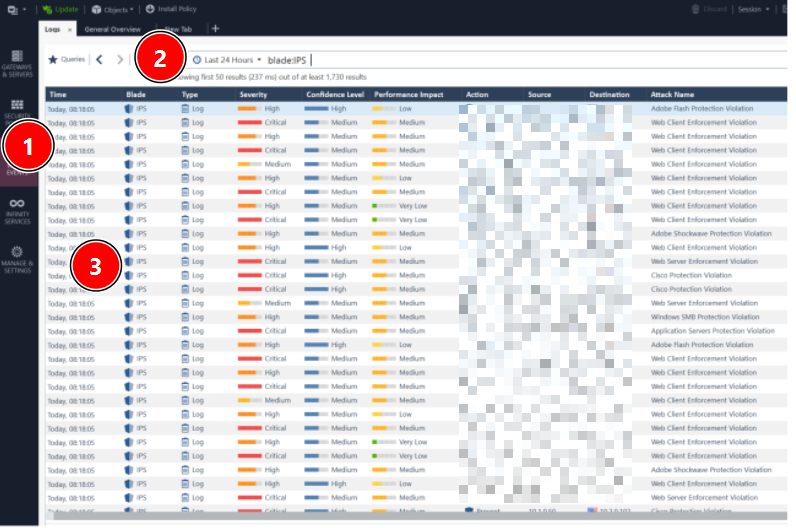
Path (logs): SmartConsole → Logs & Monitor → SmartLog (filter for IPS / Threat Prevention)
[PRINT] SmartLog filter showing IPS events for Ring 0 window
5) Promote safely: Detect → Prevent (only what is proven)
Once you have evidence a protection is safe and relevant, promote it from Detect to Prevent.
Path (protections view):
SmartConsole → Threat Prevention → Protections → IPS Protections
Filter: Follow Up / Newly Updated (or equivalent view for your version)
Promotion decision rule (practical):
-
Promote protections that are relevant and have no confirmed FP in your environment.
-
Keep in Detect if evidence is insufficient.
-
If FP occurs, prefer granular exceptions over global disable.
6) Exceptions governance (avoid permanent risk debt)
The classic failure mode is “disable globally” or “global exception forever.”
Every exception must include:
-
Scope: specific host/group/network/app (never global by default)
-
Justification: business need + risk acceptance
-
Owner: who approved
-
Expiry/review date: enforce cleanup
-
Evidence: log excerpt + timestamp + reproduction steps
TAC principle: exceptions without expiry become attack surface.
7) Fast triage (10–15 minutes) when someone says “IPS broke it”
-
Capture exact timestamp of the failure.
-
In SmartLog, filter IPS events in that time window.
-
Identify the exact protection that matched (name/ID).
-
Confirm whether it was Detect vs Prevent.
-
Validate reproducibility and business impact.
-
If FP: implement scoped exception, reinstall policy to Ring, re-test.
8) Summary flow (diagram you can paste)
[PRINT] Controlled IPS update flow diagram (Step 8)
-
IPS content update (management)
-
Newly updated protections → staging/Detect
-
Install Threat Prevention policy to Ring 0
-
Observe logs + validate app impact
-
Promote selected protections Detect → Prevent
-
Expand to Ring 1 → Ring 2
-
Exceptions: scoped + owner + expiry + evidence

Closing question (to drive community responses)
How do you handle IPS changes today?
-
Do you stage new protections in Detect first?
-
What’s your typical evidence window before Prevent?
-
What’s your internal SLA for reviewing “Follow Up / newly updated” protections?
Refer oficial
- R81 Threat Prevention Administration Guide - Configuring-IPS-Profile-Settings
- R82 Threat Prevention Administration Guide - Configuring-IPS-Profile-Settings
- R80.40 Threat Prevention Administration Guide - Creating_Threat_Prevention_Rules
- R82 Threat Prevention Administration Guide - IPS_Protections_for_Custom_Threat_Prevention





