

- Products
- Learn
- Local User Groups
- Partners
- More

Step Into the Future of
AI-Powered Cyber Security
The State of Ransomware Q1 2026
Key Trends and Their Impact
AI Security Masters E8:
Claude Mythos: New Era in Cyber Security
Blueprint Architecture for Securing
The AI Factory & AI Data Center
Call For Papers
Your Expertise. Our Stage
CheckMates Go:
CheckMates Fest
IPS content updates are frequent and necessary — but the operational risk is not the download. The risk is new/updated protections going straight to Prevent without evidence, which is how you get:
false positives that break business apps,
emergency exceptions (often global),
and “IPS caused an outage” narratives.
This post outlines a repeatable, low-risk workflow to adopt IPS updates with discipline: stage first, validate with evidence, then promote.
IPS update ≠ enforcement.
IPS content update makes new/updated protections available in management.
Threat Prevention Policy install is what actually enforces changes on gateways.
TAC principle: Download is not risk. Policy install + Prevent is risk.
Your goal is to ensure new and newly updated protections enter a review state (typically Detect / staging / Follow Up) before you ever promote them to Prevent.
Path : SmartConsole → Security Policies → Threat Prevention → Profiles → → IPS → Updates
[PRINT] Profile → IPS → Updates (Newly Updated Protections / Staging / Follow Up setting)
What to explain next to the screenshot (2 lines):
This setting defines how newly introduced/updated IPS protections behave by default.
TAC best practice: stage in Detect first, then promote based on evidence.
Don’t apply IPS changes everywhere at once.
Recommended rings:
Ring 0 (pilot): one non-critical gateway or a controlled site
Ring 1: secondary perimeter / lower risk segment
Ring 2: broad production
Go/No-Go criteria to advance:
no critical app outages
no spike in false positives
gateway performance stable (CPU/throughput/drops)
Use your standard process (scheduled/manual) to fetch the IPS content update.
Key point: at this stage, you’re updating content availability — not enforcing yet.
Path:
SmartConsole → Install Policy → select Threat Prevention Policy → choose Ring 0 gateways
[PRINT] Install Policy dialog highlighting Threat Prevention + Ring 0 selection
TAC note: enforcing the policy in a pilot ring lets you observe real traffic impact safely.
Define a standard observation window:
7 days for internet edge (usually faster signal)
10–14 days for internal/DC (more complex baselines)
What you must review during the window:
top triggered “newly updated” protections
business apps impacted at matching timestamps
recurrence patterns (one host vs many)
severity/confidence relevance (where applicable)
Path (logs): SmartConsole → Logs & Monitor → SmartLog (filter for IPS / Threat Prevention)
[PRINT] SmartLog filter showing IPS events for Ring 0 window
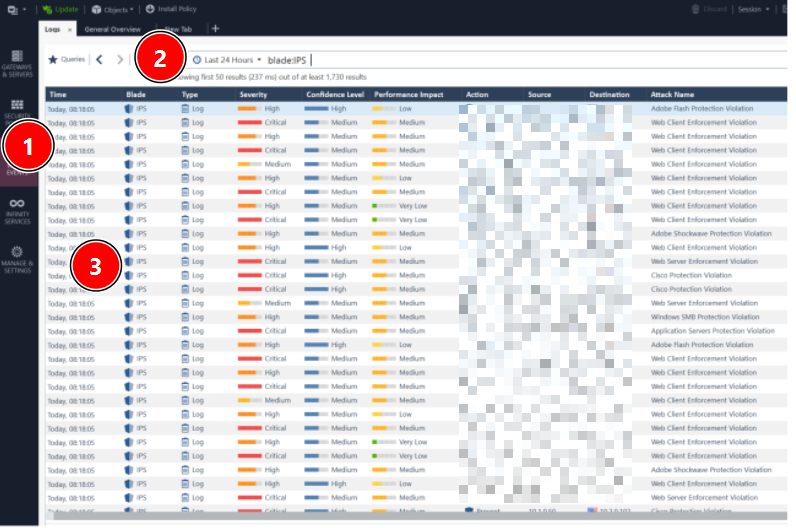
Once you have evidence a protection is safe and relevant, promote it from Detect to Prevent.
Path (protections view):
SmartConsole → Threat Prevention → Protections → IPS Protections
Filter: Follow Up / Newly Updated (or equivalent view for your version)
Promotion decision rule (practical):
Promote protections that are relevant and have no confirmed FP in your environment.
Keep in Detect if evidence is insufficient.
If FP occurs, prefer granular exceptions over global disable.
The classic failure mode is “disable globally” or “global exception forever.”
Every exception must include:
Scope: specific host/group/network/app (never global by default)
Justification: business need + risk acceptance
Owner: who approved
Expiry/review date: enforce cleanup
Evidence: log excerpt + timestamp + reproduction steps
TAC principle: exceptions without expiry become attack surface.
Capture exact timestamp of the failure.
In SmartLog, filter IPS events in that time window.
Identify the exact protection that matched (name/ID).
Confirm whether it was Detect vs Prevent.
Validate reproducibility and business impact.
If FP: implement scoped exception, reinstall policy to Ring, re-test.
[PRINT] Controlled IPS update flow diagram (Step 8)
IPS content update (management)
Newly updated protections → staging/Detect
Install Threat Prevention policy to Ring 0
Observe logs + validate app impact
Promote selected protections Detect → Prevent
Expand to Ring 1 → Ring 2
Exceptions: scoped + owner + expiry + evidence
How do you handle IPS changes today?
Do you stage new protections in Detect first?
What’s your typical evidence window before Prevent?
What’s your internal SLA for reviewing “Follow Up / newly updated” protections?
About CheckMates
Learn Check Point
Advanced Learning

YOU DESERVE THE BEST SECURITY


