- Products
- Learn
- Local User Groups
- Partners
- More

Simplify Admin Operations with R82.20
Wed, 19 August @ 5pm CET/11am EDT
The industry's first AI Network Firewall
Securing AI traffic, everywhere
The State of Ransomware Q2 2026:
This Quarter's Trends, and Their Impact on Your Defenses
READY OR NOT: Securing the AI Enterprise
AI Research & Threat Landscape
CheckMates Go:
No Attack Required
Hello!!
I find a problem deploying a new gateway in R81.20 (open server), and i hope someone could help me.
The management and the firewall are in different subnets. I have permormed a fw unloadlocal in the gateway before the SIC initialization process, but I have notice every traffic from remote networks are dropped by antispoofing even when the routes are well configured and I have dissabled the policy in the firewall.
Anybody knows if there is any way to disable this antispoofing protection?
Best regards!
Yes, i double checked it on my R81.20 GW now,
try the following commands by this order:
fwaccel off
fw ctl set int fw_antispoofing_enabled 0
fwaccel on
verify it set to 0 by:
fw ctl get int fw_antispoofing_enabled
try to initiate SIC now
P.s fw unloadlocal don't unload the antispoofing configuration
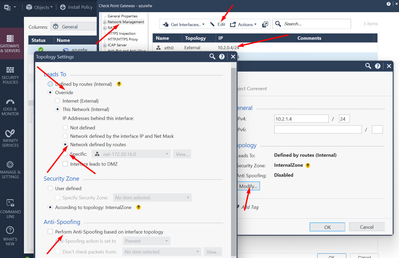
Yes, but dont do that, UNLESS its Check Point in Azure, then it has to be disabled. This is where you modify it, make sure its set per route setting, as that automatically updates it, OR as long as group defined is correct.
Best,
Andy
To disable Anti-Spoofing either completely or partly just edit the relevant interface in SmartConsole:
Good reference
Interface - Topology Settings (checkpoint.com)
An interface can be defined as being External (leading to the Internet) or Internal (leading to the LAN).
The type of network that the interface Leads To:
Internet (External) or This Network (Internal) - This is the default setting. It is automatically calculated from the topology of the gateway. To update the topology of an internal network after changes to static routes, click Network Management > Get Interfaces in the General Properties window of the gateway.
Override - Override the default setting.
If you Override the default setting:
Internet (External) - All external/Internet addresses
This Network (Internal) -
Not Defined - All IP addresses behind this interface are considered a part of the internal network that connects to this interface
Network defined by the interface IP and Net Mask - Only the network that directly connects to this internal interface
Network defined by routes - The gateway dynamically calculates the topology behind this interface. If the network changes, there is no need to click "Get Interfaces" and install a policy.
Specific - A specific network object (a network, a host, an address range, or a network group) behind this internal interface
Interface leads to DMZ - The DMZ that directly connects to this internal interface
If your issue is that you can't initiate SIC or install the policy because of Anti spoofing drop and you can't change your antispoofing configuration and push policy because of that, and you want to disable it on the fly from cli temporaty
Try:
fw ctl set int fw_antispoofing_enabled 0
EXCELLENT idea!
Best,
Andy
This is exactly my issue! But I tried to do that follow the sk117618, But it didnt works!
The version metioned in these SK is from R77.20 to R80.40. Maybe this is the issue. I dont know in the newest version there is another way to perform this action.
So you ran: fw ctl set int sim_anti_spoofing_enabled 0 -a
And turn off and on fwaccel As well?
If you reset SIC in the Gw side after the cprestart do you still have drops?
I try to execute this command, but it dont work
I havent reset the sic because i didnt perform the SIC in the first place. I dont know if the antispoofing is something configured in smartconsole why is affected the traffic if the firewall hasnt policy installed...
Yes its configured in gw object in smart dashboard. Are you saying it's fresh installed gw that never had sic or policy installed before, and still drop traffic on anti spoofing?
mm not really. I need to change the interface configuration of this firewall. So I perform the following steps
1. Clear the trust between Management and firewall (Because the new trust will be initialized in other interface)
2. cpconfig and restablish SIC password in the gateway.
3. Change the network interface and routing configuration. (An new router is added between Management and firewall)
4. I perform a fw unloadlocal (In this point I think i dont have to be worried about antispoofing) But for any not understandeble reason, it still affected traffic.
5. Try to ininitalize again the SIC.
Yes, i double checked it on my R81.20 GW now,
try the following commands by this order:
fwaccel off
fw ctl set int fw_antispoofing_enabled 0
fwaccel on
verify it set to 0 by:
fw ctl get int fw_antispoofing_enabled
try to initiate SIC now
P.s fw unloadlocal don't unload the antispoofing configuration
Thanks!! Maybe I didnt perform the commands in the correct order! 😄
Technically, turning off securexl would not have anything to do with anti-spoofing. I would double check you have it set correctly if its in production.
Best,
Andy
Leaderboard
Epsum factorial non deposit quid pro quo hic escorol.
| User | Count |
|---|---|
| 156 | |
| 103 | |
| 15 | |
| 12 | |
| 12 | |
| 9 | |
| 8 | |
| 6 | |
| 6 | |
| 6 |
Tue 11 Aug 2026 @ 11:00 AM (EDT)
Beyond Phishing: Securing Email Against SaaS and AI-Driven ThreatsThu 20 Aug 2026 @ 08:30 AM (COT)
Medellin: Workspace Evolution: Hybrid Mesh Management - Visibilidad, Automatización e IATue 11 Aug 2026 @ 11:00 AM (EDT)
Beyond Phishing: Securing Email Against SaaS and AI-Driven ThreatsThu 20 Aug 2026 @ 10:00 AM (PDT)
AI Security Masters E13: READY OR NOT: Securing the AI Ent 5/5 - AI Research & Threat LandscapeTue 25 Aug 2026 @ 05:00 PM (CEST)
The State of Ransomware Q2 2026: This Quarter's Trends, and Their Impact on Your DefensesThu 20 Aug 2026 @ 08:30 AM (COT)
Medellin: Workspace Evolution: Hybrid Mesh Management - Visibilidad, Automatización e IAThu 20 Aug 2026 @ 06:00 PM (COT)
Medellin: Workspace Intelligence: IA Generativa en Acción para Equipos de SeguridadAbout CheckMates
Learn Check Point
Advanced Learning
YOU DESERVE THE BEST SECURITY