- Products
- Learn
- Local User Groups
- Partners
- More

AI Security Masters E7:
How CPR Broke ChatGPT's Isolation and What It Means for You
Call For Papers
Your Expertise. Our Stage
Good, Better, Best:
Prioritizing Defenses Against Credential Abuse
Ink Dragon: A Major Nation-State Campaign
Watch HereCheckMates Go:
CheckMates Fest
Like I said, you need to limit either the destinations, the services, or both.
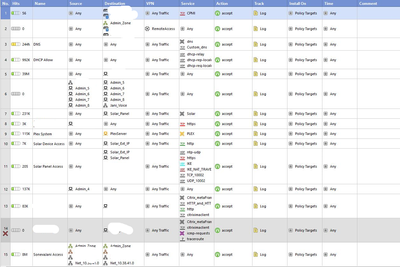
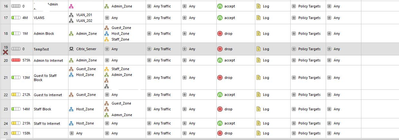
This advice applies to one or more of 8, 17, 20, 24.
Each one of these rules could easily be two rules.
One example:
Replace http/https with the precise services that are actually required for Internet access and nothing more.
This is by far the most performant approach.
Another option would be to put a rule near the bottom of your App Control rulebase like the following:
To get the Service column to show up in your App Control rulebase, right click on the title bar and check Service.
If you don't want to outright block the traffic, you can instead use the action "Limit" and specify whatever sort of limit you wish to place on this traffic.
Note the limit applies for anything matching this rule and should be below more specific rules.
Please share some additional information if you would like assistance e.g.
- Version & JHF?
- SSL / HTTPS inspection? Y/N
- Classification (hold) mode Y/N
- What alternate rule in the policy is matching the traffic?
yes both FW and Application control rules.
I suspect you're allowing UDP high ports to random places on the Internet, which is generally not best practice. - How do i stop this??
Sorry i am not having much knowledge of firewalls doing just some RnD. Support is not available trying to do it myself.
We have some firewall rules which state from any to any. please find the SS attached.
For an effective strategy you will need to limit (reduce) the number of such rules and get more detailed with the permitted services and destinations.
Hi,
i will make sure of that during the installation of latest firewall. for time being i am looking for the solution to block torrent or limit the download speeds(only for torrent not whole interface).
Thanks,
Prashant.
Like I said, you need to limit either the destinations, the services, or both.
This advice applies to one or more of 8, 17, 20, 24.
Each one of these rules could easily be two rules.
One example:
Replace http/https with the precise services that are actually required for Internet access and nothing more.
This is by far the most performant approach.
Another option would be to put a rule near the bottom of your App Control rulebase like the following:
To get the Service column to show up in your App Control rulebase, right click on the title bar and check Service.
If you don't want to outright block the traffic, you can instead use the action "Limit" and specify whatever sort of limit you wish to place on this traffic.
Note the limit applies for anything matching this rule and should be below more specific rules.
Leaderboard
Epsum factorial non deposit quid pro quo hic escorol.
| User | Count |
|---|---|
| 68 | |
| 26 | |
| 13 | |
| 12 | |
| 12 | |
| 9 | |
| 9 | |
| 8 | |
| 8 | |
| 7 |
Tue 21 Apr 2026 @ 05:00 PM (IDT)
AI Security Masters E7: How CPR Broke ChatGPT's Isolation and What It Means for YouTue 28 Apr 2026 @ 06:00 PM (IDT)
Under the Hood: Securing your GenAI-enabled Web Applications with Check Point WAFTue 21 Apr 2026 @ 05:00 PM (IDT)
AI Security Masters E7: How CPR Broke ChatGPT's Isolation and What It Means for YouTue 28 Apr 2026 @ 06:00 PM (IDT)
Under the Hood: Securing your GenAI-enabled Web Applications with Check Point WAFTue 12 May 2026 @ 10:00 AM (CEST)
The Cloud Architects Series: Check Point Cloud Firewall delivered as a serviceThu 30 Apr 2026 @ 03:00 PM (PDT)
Hillsboro, OR: Securing The AI Transformation and Exposure ManagementAbout CheckMates
Learn Check Point
Advanced Learning
YOU DESERVE THE BEST SECURITY