- Products
- Learn
- Local User Groups
- Partners
- More

Simplify Admin Operations with R82.20
Watch HereThe State of Ransomware Q2 2026:
This Quarter's Trends, and Their Impact on Your Defenses
READY OR NOT: Securing the AI Enterprise
AI Research & Threat Landscape
CheckMates Go:
Half is Not Enough
Like I said, you need to limit either the destinations, the services, or both.
This advice applies to one or more of 8, 17, 20, 24.
Each one of these rules could easily be two rules.
One example:
Screen Shot 2020-03-23 at 2.12.23 PM.png
Replace http/https with the precise services that are actually required for Internet access and nothing more.
This is by far the most performant approach.
Another option would be to put a rule near the bottom of your App Control rulebase like the following:
Screen Shot 2020-03-23 at 2.15.26 PM.png
To get the Service column to show up in your App Control rulebase, right click on the title bar and check Service.
If you don't want to outright block the traffic, you can instead use the action "Limit" and specify whatever sort of limit you wish to place on this traffic.
Note the limit applies for anything matching this rule and should be below more specific rules.
Please share some additional information if you would like assistance e.g.
- Version & JHF?
- SSL / HTTPS inspection? Y/N
- Classification (hold) mode Y/N
- What alternate rule in the policy is matching the traffic?
yes both FW and Application control rules.
I suspect you're allowing UDP high ports to random places on the Internet, which is generally not best practice. - How do i stop this??
Sorry i am not having much knowledge of firewalls doing just some RnD. Support is not available trying to do it myself.
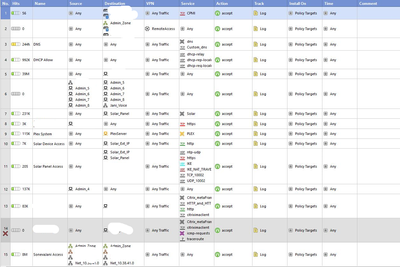
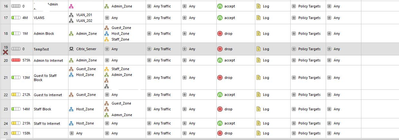
We have some firewall rules which state from any to any. please find the SS attached.
fw rules1.png
fw rules2.png
For an effective strategy you will need to limit (reduce) the number of such rules and get more detailed with the permitted services and destinations.
Hi,
i will make sure of that during the installation of latest firewall. for time being i am looking for the solution to block torrent or limit the download speeds(only for torrent not whole interface).
Thanks,
Prashant.
Like I said, you need to limit either the destinations, the services, or both.
This advice applies to one or more of 8, 17, 20, 24.
Each one of these rules could easily be two rules.
One example:
Screen Shot 2020-03-23 at 2.12.23 PM.png
Replace http/https with the precise services that are actually required for Internet access and nothing more.
This is by far the most performant approach.
Another option would be to put a rule near the bottom of your App Control rulebase like the following:
Screen Shot 2020-03-23 at 2.15.26 PM.png
To get the Service column to show up in your App Control rulebase, right click on the title bar and check Service.
If you don't want to outright block the traffic, you can instead use the action "Limit" and specify whatever sort of limit you wish to place on this traffic.
Note the limit applies for anything matching this rule and should be below more specific rules.
Leaderboard
Epsum factorial non deposit quid pro quo hic escorol.
| User | Count |
|---|---|
| 133 | |
| 85 | |
| 14 | |
| 12 | |
| 10 | |
| 8 | |
| 8 | |
| 6 | |
| 6 | |
| 5 |
Tue 25 Aug 2026 @ 05:00 PM (CEST)
The State of Ransomware Q2 2026: This Quarter's Trends, and Their Impact on Your DefensesThu 27 Aug 2026 @ 10:00 AM (EDT)
Why Email Agent Hijacking is a Game-Changer for Email SecurityTue 25 Aug 2026 @ 05:00 PM (CEST)
The State of Ransomware Q2 2026: This Quarter's Trends, and Their Impact on Your DefensesThu 27 Aug 2026 @ 10:00 AM (EDT)
Why Email Agent Hijacking is a Game-Changer for Email SecurityTue 01 Sep 2026 @ 05:00 PM (CEST)
Under the Hood | Check Point SASE: Onboarding, Step by StepTue 15 Sep 2026 @ 12:00 PM (MDT)
Lone Tree, CO: Workspace Security and Exposure ManagementAbout CheckMates
Learn Check Point
Advanced Learning
YOU DESERVE THE BEST SECURITY