- Products
- Learn
- Local User Groups
- Partners
- More
Scaling Check Point Automation with Arodonata
7 October @ 5pm CET / 11am EDT
What's New in Check Point SASE
The State of Ransomware Q2 2026:
This Quarter's Trends, and Their Impact on Your Defenses
AI Security Masters
Implementing the AI Security Trifecta
CheckMates Go:
Half is Not Enough
Good morning,
it's been a few days since I migrated the backup of my production environment to completely isolated servers, in order to prepare the environment and then migrate everything to the new ones. I migrated the first node and after some problems and changing the routes, I managed to get out of it. but now I have migrated the second one and despite having changed the routes to reach the switch, it still cannot communicate with anyone but itself. I looked at all the settings that came to my mind and they are the same as what works now.
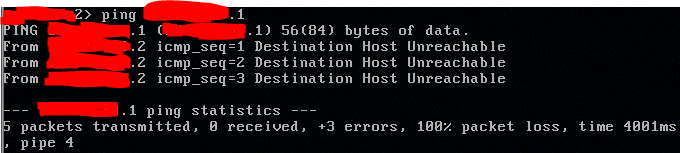
trying to ping node 1 from node 2 (node 2 is the one having problems)
the switch
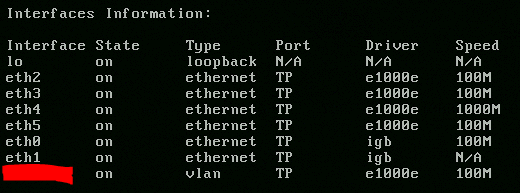
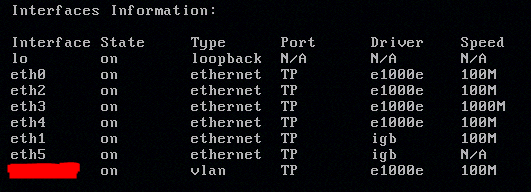
the only difference I have found that I am not sure about is this:
node 1 (working)
node 2 (not working)
I would like to clarify that before migrating it, I had installed gaia, created the cluster and verified that everything worked, I don't think it is a physical configuration problem. any suggestions? if you need some more data, just ask. Thanks
Note that the interface name order is not the same on both nodes.
Are the interfaces mapped correctly according to the phisical position and their names/aliases ?
I mean:
does phisical interface X really corresponds to ethX ?
does phisical interface Y really corresponds to ethY ?
Check cabling, unplug each by each one at a time and confirm that the one that goes down is really the desired one .
What about arp table ? are they the same on the switch side ?
Can you see correct / expected traffic on tcpdump and/or fw monitor ?
Try this in expert mode:
printf "%9s%13s%10s%8s%6s\n" "Interface" "Bus Addr" "PCI-ID" "Driver" "Link?";ifconfig -a | egrep "^[^ ]" | awk '{print $1}' | egrep -v "^(lo$|usb|bond[0-9\.]+|Mgmt\.[0-9]|eth[-0-9]+\.)" | xargs -n 1 -I @ sh -c 'printf "%9s" @;printf "%13s" $(ethtool -i @ | grep "bus" | cut -d" " -f2);printf "%10s" $(lspci -n | grep $(ethtool -i @ | grep "bus" | cut -d: -f3-4) | cut -d" " -f3);printf "%8s" $(ethtool -i @ | grep "driver" | cut -d" " -f2);printf "%6s" $(ethtool @ | grep "Link" | cut -d" " -f3);echo ""'
It prints the interface name, the PCIe address, the PCI ID (used to confirm the driver is correct), the driver name, and the link status of each physical interface. Example output:
[Expert@LabFW]# printf "%9s%13s%10s%8s%6s\n" "Interface" "Bus Addr" "PCI-ID" "Driver" "Link?";ifconfig -a | egrep "^[^ ]" | awk '{print $1}' | egrep -v "^(lo$|usb|bond[0-9\.]+|Mgmt\.[0-9]|eth[-0-9]+\.)" | xargs -n 1 -I @ sh -c 'printf "%9s" @;printf "%13s" $(ethtool -i @ | grep "bus" | cut -d" " -f2);printf "%10s" $(lspci -n | grep $(ethtool -i @ | grep "bus" | cut -d: -f3-4) | cut -d" " -f3);printf "%8s" $(ethtool -i @ | grep "driver" | cut -d" " -f2);printf "%6s" $(ethtool @ | grep "Link" | cut -d" " -f3);echo ""'
Interface Bus Addr PCI-ID Driver Link?
eth0 0000:07:00.0 8086:150c e1000e no
eth1 0000:02:00.0 8086:150c e1000e yes
eth2 0000:03:00.0 8086:150c e1000e no
eth3 0000:04:00.0 8086:150c e1000e no
[Expert@LabFW]#
Make sure the interface names and the PCIe addresses match between boxes. If they don't, you can use /etc/udev/rules.d/00-OS-XX.rules to rearrange the names, as described in sk69621.
Perhaps the hardware discovery process was a little bit different on each box.
try :
" tail -f /var/log/messages* | grep -i eth " and remove cables (one at a time) or shutdown the corresponding port on the switch side (one at a time) .
verify if the interface that goes down is what you are expecting.
If it does not matches, see if you can try the following:
sk69621 - How to change interface naming on Open Servers running Gaia OS
reorganize the cables to match the naming decided by the OS after the hardware discovery
Does the second node have any policy installed? Check it is not an initial policy. Also, unload, before you push the new one.
since i can't access the webUI, i looked for the commands to manage the policies from the cli but i found almost nothing. I tried with the command fw unloadlocal and then with the command fw fetch local but with both I had no luck.
Make sure you are on the same network as the node, run "fw unloadlocal" and check the connectivity again. If it does not work, there is something wrong with the box.
Note that the interface name order is not the same on both nodes.
Are the interfaces mapped correctly according to the phisical position and their names/aliases ?
I mean:
does phisical interface X really corresponds to ethX ?
does phisical interface Y really corresponds to ethY ?
Check cabling, unplug each by each one at a time and confirm that the one that goes down is really the desired one .
What about arp table ? are they the same on the switch side ?
Can you see correct / expected traffic on tcpdump and/or fw monitor ?
I was just about to send the same comment...thats a very good point. @fabiofabio , can you confirm what @rrbranco mentioned?
Andy
Try this in expert mode:
printf "%9s%13s%10s%8s%6s\n" "Interface" "Bus Addr" "PCI-ID" "Driver" "Link?";ifconfig -a | egrep "^[^ ]" | awk '{print $1}' | egrep -v "^(lo$|usb|bond[0-9\.]+|Mgmt\.[0-9]|eth[-0-9]+\.)" | xargs -n 1 -I @ sh -c 'printf "%9s" @;printf "%13s" $(ethtool -i @ | grep "bus" | cut -d" " -f2);printf "%10s" $(lspci -n | grep $(ethtool -i @ | grep "bus" | cut -d: -f3-4) | cut -d" " -f3);printf "%8s" $(ethtool -i @ | grep "driver" | cut -d" " -f2);printf "%6s" $(ethtool @ | grep "Link" | cut -d" " -f3);echo ""'
It prints the interface name, the PCIe address, the PCI ID (used to confirm the driver is correct), the driver name, and the link status of each physical interface. Example output:
[Expert@LabFW]# printf "%9s%13s%10s%8s%6s\n" "Interface" "Bus Addr" "PCI-ID" "Driver" "Link?";ifconfig -a | egrep "^[^ ]" | awk '{print $1}' | egrep -v "^(lo$|usb|bond[0-9\.]+|Mgmt\.[0-9]|eth[-0-9]+\.)" | xargs -n 1 -I @ sh -c 'printf "%9s" @;printf "%13s" $(ethtool -i @ | grep "bus" | cut -d" " -f2);printf "%10s" $(lspci -n | grep $(ethtool -i @ | grep "bus" | cut -d: -f3-4) | cut -d" " -f3);printf "%8s" $(ethtool -i @ | grep "driver" | cut -d" " -f2);printf "%6s" $(ethtool @ | grep "Link" | cut -d" " -f3);echo ""'
Interface Bus Addr PCI-ID Driver Link?
eth0 0000:07:00.0 8086:150c e1000e no
eth1 0000:02:00.0 8086:150c e1000e yes
eth2 0000:03:00.0 8086:150c e1000e no
eth3 0000:04:00.0 8086:150c e1000e no
[Expert@LabFW]#
Make sure the interface names and the PCIe addresses match between boxes. If they don't, you can use /etc/udev/rules.d/00-OS-XX.rules to rearrange the names, as described in sk69621.
Perhaps the hardware discovery process was a little bit different on each box.
try :
" tail -f /var/log/messages* | grep -i eth " and remove cables (one at a time) or shutdown the corresponding port on the switch side (one at a time) .
verify if the interface that goes down is what you are expecting.
If it does not matches, see if you can try the following:
sk69621 - How to change interface naming on Open Servers running Gaia OS
reorganize the cables to match the naming decided by the OS after the hardware discovery
Leaderboard
Epsum factorial non deposit quid pro quo hic escorol.
| User | Count |
|---|---|
| 30 | |
| 6 | |
| 5 | |
| 5 | |
| 4 | |
| 4 | |
| 4 | |
| 3 | |
| 3 | |
| 3 |
Wed 23 Sep 2026 @ 06:00 PM (EDT)
Santo Domingo: Workspace Security and SASE Live: Protección Total del Usuario Email, Endpoint y SASEMon 28 Sep 2026 @ 03:00 PM (CEST)
La nouvelle réalité des attaques DDoS: autonomie, échelle et avenir de la défenseMon 28 Sep 2026 @ 03:00 PM (CEST)
La nouvelle réalité des attaques DDoS: autonomie, échelle et avenir de la défenseThu 01 Oct 2026 @ 05:00 PM (CEST)
Under the Hood: Check Point WAF | Preventing minus-zero-day attacksWed 23 Sep 2026 @ 06:00 PM (EDT)
Santo Domingo: Workspace Security and SASE Live: Protección Total del Usuario Email, Endpoint y SASEAbout CheckMates
Learn Check Point
Advanced Learning
YOU DESERVE THE BEST SECURITY