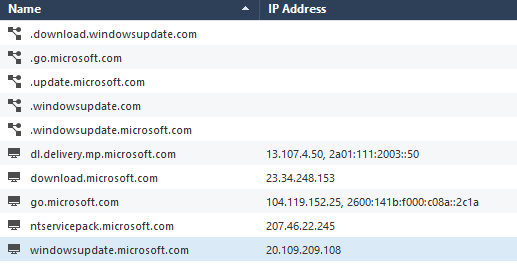
I thought I would add our issue and partial working fix for others that arrive here. Windows AD hosts would not connect to Win updates. At first it needed a DNS forwarder to a public DNS service, we used Cloudflare, and allow rules for DNS traffic to the forward IP.
After that there were still dropped destination IP's that were not covered in any MS IP lists we added. TCPdump of the hosts DNS queries , showed they were trying to check certs using OCSP at digicert so we allowed *.digicert.com. Once that was allowed there were still some of the same blocked IP's but traffic started flowing and updates finally downloaded.
There must be another Domain\URL that needs to be added for the other IP's because to test we added about 25 from MS documentation.
But then converted to using App Control with the new knowledge:
Access rules:
AD hosts > any > http and https > allow
AD host > Couldflare IP > dns (udp/tcp) > allow
App Control
AD hosts > Microsoft Updates - HTTPS bypass > http/https > accept
AD hosts > couldflare IP > dns udp/tcp > accept
AD hosts > .digicert.com (non-FQDN) > http/https > accept
AD hosts > any >any > drop
HTTPs bypass outbound
AD hosts > Microsoft Updates - HTTPS bypass > https > bypass
Update: Well that didn't last long
After 3 more manual update attempts to see if it would fail, it failed again with a new set of IP addresses
Added random guessed updatable objects to App control: Akamai Services, Azure Update Delivery Public Services, Azure Device Update Public - Global Services, Microsoft Updates - Smart Accel. ..and started to work again. Lets see for how long 🙂