- Products
- Learn
- Local User Groups
- Partners
- More

What’s New in Device Diagnostics?
Dec 2nd @ 5pm CET / 11am EST
AI Security Masters
Security in the Pace of AI:
From Threat to Force Multiplier
CPX is Back!
Join us in Las Vegas, Vienna, and/or Bangkok!
Check Point Named a Leader
The Forrester Wave:
Enterprise Firewall Solutions, Q4 2026
What’s New in Agentic Network Orchestration
CheckMates Go:
Fun Ding
Hello community,
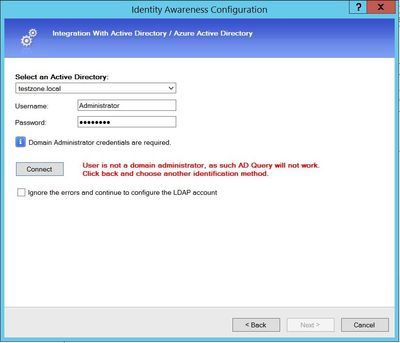
When I tried activate IA with AD Query, I got error message "User is not a domain administrator as such AD Query will not work".
But I using admin account with right credentials. Environment clusterXL R81.10, windows server 2012 R2.
What can be checked to understand where the problem is?
See sk86441: ATRG: Identity Awareness !
Have just seen this issue in a lab environment with the same issue (account is Enterprise Administrator etc.).
Installing a different policy fixed it.
Not sure yet what the problem is but at the moment but suspect HTTPS Inspection could be causing it or Application Control or URLF blade. HTTPS Inspection policy was last updated.
Edit: Also R81.10, no JHFA 30 installed yet.
Edit2: Windows Server 2016 Standard
Rgds,
Don
I saw this once before when I was on site with a customer and we just created another admin account and then it all worked. I really never got a good explanation from TAC why this would happen...
We tried that and it failed for us. New AD admin and same groups (Enterprise admins etc.) with no luck.#
Maybe we got lucky that time, not sure, but thats what worked. I could be wrong when I say this, but from what I recall n old days, you never had to use admin account, but maybe that changed in R80 +.
Have seen this happen when the AD domain is configured to only allow NTLMv2.
Check Point recommends using Identity Collector as the identity source instead of AD Query - any chance you can switch to using that? Seems using ADQ will only get more challenging in the future - check out sk176148.
Good call. That would be my recommendation too,
Hi guys, many thanks for advice.
I catch this issue in my lab environment not production, I don't know what was it, but I reinstall windows server and it was resolve.
Regarding Identity Collector I know, but for some tests needed exactly AD Query.
Just encountered the exact same issue with a fresh Win2022 Server lab installation.
The error messages when trying to connect the AD are quite useful: they tell you if it can't reach the ADC, if the credentials are wrong or if the domain can't be found.
Thus, if you see this "User is not a domain administrator as such AD Query will not work" message, it's most likely not a connection/lack of policies issue.
Also keep in mind that the initial connectivity test is made from the SmartConsole's machine instead of from the GW.
However, in my case after installing all the Windows updates and couple reboots, the connection eventually worked.
Leaderboard
Epsum factorial non deposit quid pro quo hic escorol.
| User | Count |
|---|---|
| 28 | |
| 8 | |
| 7 | |
| 5 | |
| 5 | |
| 4 | |
| 4 | |
| 4 | |
| 4 | |
| 3 |
Tue 24 Nov 2026 @ 01:30 PM (GMT)
La nueva realidad de los ataques DDoS: autonomía, escala y el futuro de la defensaWed 02 Dec 2026 @ 03:30 PM (GMT)
The New DDoS Reality: Autonomy, Scale, and the Future of DefenseThu 03 Dec 2026 @ 11:00 AM (EST)
Under the Hood: Check Point Cloud Firewall for Nutanix - How to Secure your AI WorkloadsTue 24 Nov 2026 @ 01:30 PM (GMT)
La nueva realidad de los ataques DDoS: autonomía, escala y el futuro de la defensaWed 02 Dec 2026 @ 03:30 PM (GMT)
The New DDoS Reality: Autonomy, Scale, and the Future of DefenseThu 03 Dec 2026 @ 11:00 AM (EST)
Under the Hood: Check Point Cloud Firewall for Nutanix - How to Secure your AI WorkloadsAbout CheckMates
Learn Check Point
Advanced Learning
WE SECURE YOUR AI TRANSFORMATION