- Products
- Learn
- Local User Groups
- Partners
- More
MVP 2026: Submissions
Are Now Open!
What's New in R82.10?
Watch NowOverlap in Security Validation
Help us to understand your needs better
CheckMates Go:
Maestro Madness
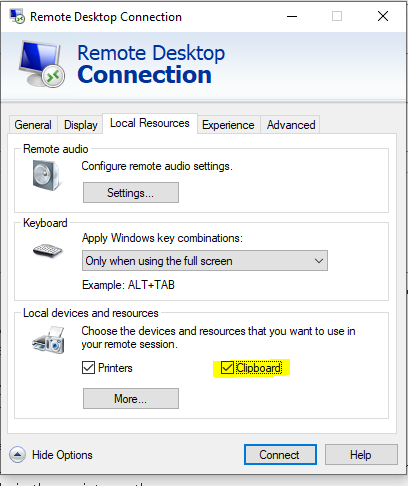
I am trying to ensure that users that log on to VPN and RDP to their machine, can't copy/paste text/files over the RDP session.
In Windows 10 this is controlled by the following registry: HKLM/SOFTWARE\Microsoft\Terminal Server Client\DisableClipboardRedirection. Set REG_DWORD to 1 for disable, 0 for enable clipboard.
You can create a Compliance->Applications/Files check -> Modify and check registry, input the above key name in the registry value name, check REG_DWORD under "Reg type" and Exist under "Check registry key and value".
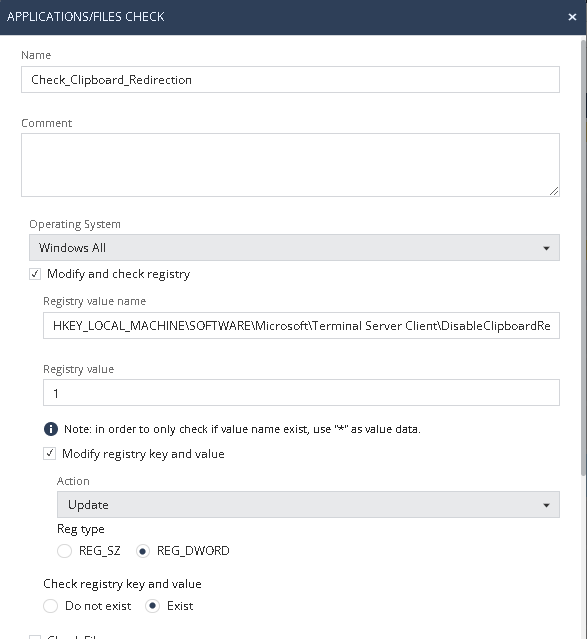
The problem is that it seems the compliance check, goes and checks the wrong registry location. I found this is the case, by selecting Action=Update. I found that it updated the following location: HKLM/SOFTWARE\WOW6432Node\Microsoft\Terminal Server Client\DisableClipboardRedirection. So it's adding WOW6432Node in the registry path.
Any idea on why this happens and how to resolve it?
Setting the REG_DWORD to 1 on the WOW6432Node path doesn't disable the Clipboard in RDP.
The machine running Harmony Endpoint is Windows 10 x64.
I had the same issue with another key under HKLM\Software in the past and according to TAC Compliance blade on 64-Bit windows checks are checking both 64-Bit and 32-Bit location of the registry but can only remediate the 32-Bit RegKey.
Therefore you have to workaround this by using a remediation batch script that will explicitly set the 64-Bit Key.
Example remediation batch script content (everything in one line):
reg add "HKEY_LOCAL_MACHINE\SOFTWARE\Microsoft\Terminal Server Client" /v DisableClipboardRedirection /t REG_DWORD /d 1 /f /reg:64
this is because the Compliance blade is running as a 32-Bit process
WOW6432Node is the correct path, at least according to this: https://supportcenter.checkpoint.com/supportcenter/portal?eventSubmit_doGoviewsolutiondetails=&solut...
I had the same issue with another key under HKLM\Software in the past and according to TAC Compliance blade on 64-Bit windows checks are checking both 64-Bit and 32-Bit location of the registry but can only remediate the 32-Bit RegKey.
Therefore you have to workaround this by using a remediation batch script that will explicitly set the 64-Bit Key.
Example remediation batch script content (everything in one line):
reg add "HKEY_LOCAL_MACHINE\SOFTWARE\Microsoft\Terminal Server Client" /v DisableClipboardRedirection /t REG_DWORD /d 1 /f /reg:64
this is because the Compliance blade is running as a 32-Bit process
When I input the above line under "Registry value", it fails to Save the configuration. I guess something is wrong with the statement. I am running 81.10 on a cloud server. Is there some documentation on how to write the statement for this version? I see that different versions position the 'reg add' verb in different locations in the statement.
You can't put this into the value field. You have to define a remediation action and use the above line in a .bat file hosted on a webserver and downloadable from all clients
Thanks.
I tried a remediation action to run the .bat file from an internet located web server and also from a location on the client PC (File://C:\Program Files (x86)\Checkpoint), but I get the same error in both cases:
When I perform a curl, it downloads the file from the URL fine. Also when I test running the .bat file manually with admin rights, it adds the registry key ok. Not sure if it's rights issue. I use Run as System option.
Leaderboard
Epsum factorial non deposit quid pro quo hic escorol.
| User | Count |
|---|---|
| 8 | |
| 3 | |
| 2 | |
| 2 | |
| 2 | |
| 1 | |
| 1 | |
| 1 | |
| 1 | |
| 1 |
Fri 12 Dec 2025 @ 10:00 AM (CET)
Check Mates Live Netherlands: #41 AI & Multi Context ProtocolTue 16 Dec 2025 @ 05:00 PM (CET)
Under the Hood: CloudGuard Network Security for Oracle Cloud - Config and Autoscaling!Fri 12 Dec 2025 @ 10:00 AM (CET)
Check Mates Live Netherlands: #41 AI & Multi Context ProtocolTue 16 Dec 2025 @ 05:00 PM (CET)
Under the Hood: CloudGuard Network Security for Oracle Cloud - Config and Autoscaling!About CheckMates
Learn Check Point
Advanced Learning
YOU DESERVE THE BEST SECURITY
