- Products
- Learn
- Local User Groups
- Partners
- More

MVP 2026: Submissions
Are Now Open!
What's New in R82.10?
Watch NowOverlap in Security Validation
Help us to understand your needs better
CheckMates Go:
Maestro Madness
Hi All,
Maybe I do something in the wrong way, but after installing client with EPS.msi there is no connection to server, works in offline mode. If I just install Initial Client then Server Name and Server IP fields are empty, it only show a green connected in the pop-up window, and that's all.
Client version: E80.65 and E80.70
Client: Windows 7
Server version: R80.10
I'm running on temporary licenses and this worked for me earlier with no issues. I've upgraded from R80 to R80.10 a week ago.
Update: If I install the original Initial Client (not the downloaded one from my server) it asks the address of the server, but if I enter it, it says Failed to connect to server.
Thanks in advance, I've no more ideas.
Kind Regards,
Balázs
Hi,
Can you post the screenshot of the error.??
Thank you
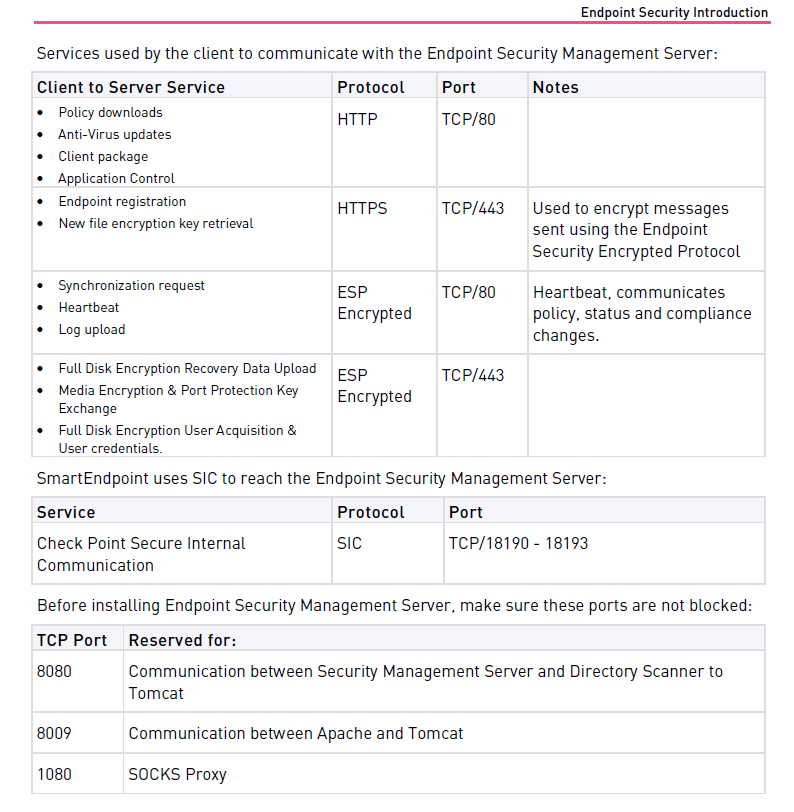
And the required ports and protocols are allowed?
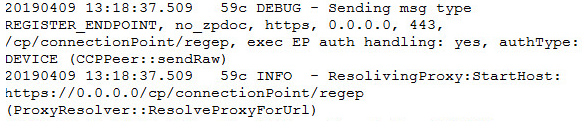
I assume that the used EPS.msi was generated using the EPSS and should contain the server IP. Did you check the client log ? If the Win FW is the culprit, you should see that in:
C:\Program Files (x86)\CheckPoint\Endpoint Security\Endpoint Common\Logs\cpda.log
Hi,
We had a same issue on Endpoint client. When i checked cpda.log, got below messages. Any idea why it happened.
Most likely incorrect configuration.
Please check the following SK`s:
https://supportcenter.checkpoint.com/supportcenter/portal?eventSubmit_doGoviewsolutiondetails=&solut...
I would like to suggest you opening SR with cpda.log file.
It can be found in the following location:
c:\Program Files (x86)\CheckPoint\Endpoint Security\Endpoint Common\Logs\
Leaderboard
Epsum factorial non deposit quid pro quo hic escorol.
| User | Count |
|---|---|
| 8 | |
| 4 | |
| 2 | |
| 2 | |
| 1 | |
| 1 | |
| 1 | |
| 1 | |
| 1 | |
| 1 |
Tue 16 Dec 2025 @ 05:00 PM (CET)
Under the Hood: CloudGuard Network Security for Oracle Cloud - Config and Autoscaling!Thu 18 Dec 2025 @ 10:00 AM (CET)
Cloud Architect Series - Building a Hybrid Mesh Security Strategy across cloudsTue 16 Dec 2025 @ 05:00 PM (CET)
Under the Hood: CloudGuard Network Security for Oracle Cloud - Config and Autoscaling!Thu 18 Dec 2025 @ 10:00 AM (CET)
Cloud Architect Series - Building a Hybrid Mesh Security Strategy across cloudsAbout CheckMates
Learn Check Point
Advanced Learning
YOU DESERVE THE BEST SECURITY