- Products
- Learn
- Local User Groups
- Partners
- More

MVP 2026: Submissions
Are Now Open!
What's New in R82.10?
Watch NowOverlap in Security Validation
Help us to understand your needs better
CheckMates Go:
Maestro Madness
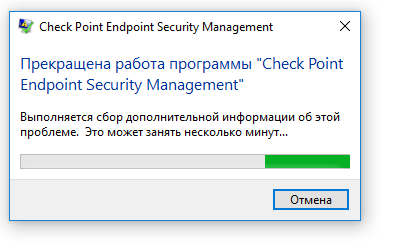
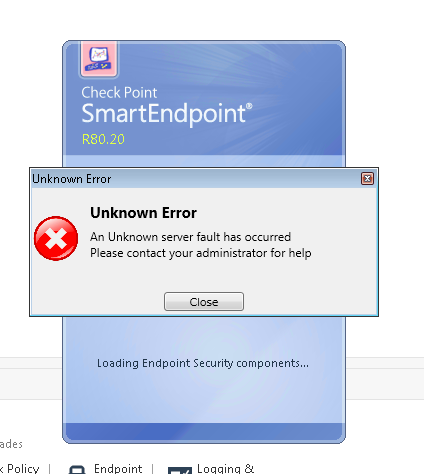
Hello. I am trying to use R80.20 for Endpoint Managment Server. But when I upload a package with an agent I got error.
My system: Windows 10, DotNet FrameWork 4.7, all security updates. I have tried to upload the package from Windows 7, but have an other error (in attach).
From the same PC I can use R77.30 management server. Agent uploading is ok for that version.
How to fix it? There are no official support for R80.20.
Hi Evgeniy,
I would like to separate between these 2 issues and would like you to reproduce them again and provide logs with date and time of reproduction.
The logs are:
server_messages.log can be found on the server at $UEPMDIR\logs
SmartEndpoint_Logs.txt can be found on Smart Endpoint machine in %localappdata%\Checkpoint\SmartEndpoint_Logs\R80_20
In addition, can you specify which version of R80.20 are you using?
Can you share the version of SmartEndpoint (can be found on Menu--> Help--> About)?
Thank you for reply!
I used this iso for installation - Check_Point_R80.20_EA_42_T3_Security_Management.iso
SmartEndpoint version - R80.20 (992000002)
server_message.log - https://pastebin.com/raw/tXV9C9Kd (Tried to upload form Windows 10)
server_message.log - https://pastebin.com/raw/fEqWiPFU (Tried to upload form Windows 7)
SmartEndpoint_Logs from Windows7 - https://pastebin.com/raw/cxEBKZUn (C:\Users\Gleb\AppData\Local\Checkpoint\SmartEndpoint_Logs\R80_20)
SmartEndpoint_Logs from Windows7 - https://pastebin.com/raw/wNSyWe7g (C:\Users\Gleb\AppData\Local\Checkpoint\SmartEndpoint_Logs)
I can't find SmartEndpoint_Logs on Windows 10.
From the logs I see the following:
Exception: Invalid session-cookie. Authentication refused by FWM
Please run the following command to turn on fwm logs:
fw debug fwm on TDERROR_ALL_ALL=5
than reproduce on window 7 and provide the following logs located at the server:
$FWDIR/log/fwm.elg* (fwm.elg.1, fwm.elg.2…)
$FWDIR/log/cpm.elg*
Regarding window 10, are you sure you have administrator privileges? seems like a permission issue, please try to run as administrator.
Note: to turn off the logs you may run:
fw debug fwm off TDERROR_ALL_ALL=0
Logs in attach - logs - Google Drive
For Windows 10. I am sure, I am an admin.
Hi Evgeniy,
Unfortunately, I don't see anything on the logs.
I would suggest to open a CFG task so support will try to replicate the issue and found the root cause for both issues.
thanks,
itamar
Leaderboard
Epsum factorial non deposit quid pro quo hic escorol.
| User | Count |
|---|---|
| 8 | |
| 4 | |
| 2 | |
| 2 | |
| 2 | |
| 1 | |
| 1 | |
| 1 | |
| 1 | |
| 1 |
Fri 12 Dec 2025 @ 10:00 AM (CET)
Check Mates Live Netherlands: #41 AI & Multi Context ProtocolTue 16 Dec 2025 @ 05:00 PM (CET)
Under the Hood: CloudGuard Network Security for Oracle Cloud - Config and Autoscaling!Fri 12 Dec 2025 @ 10:00 AM (CET)
Check Mates Live Netherlands: #41 AI & Multi Context ProtocolTue 16 Dec 2025 @ 05:00 PM (CET)
Under the Hood: CloudGuard Network Security for Oracle Cloud - Config and Autoscaling!Thu 18 Dec 2025 @ 10:00 AM (CET)
Cloud Architect Series - Building a Hybrid Mesh Security Strategy across cloudsAbout CheckMates
Learn Check Point
Advanced Learning
YOU DESERVE THE BEST SECURITY