- Products
- Learn
- Local User Groups
- Partners
- More

AI Security Masters E7:
How CPR Broke ChatGPT's Isolation and What It Means for You
Call For Papers
Your Expertise. Our Stage
Good, Better, Best:
Prioritizing Defenses Against Credential Abuse
Ink Dragon: A Major Nation-State Campaign
Watch HereCheckMates Go:
CheckMates Fest
Hi guys! When i connect Endpoint security vpn my internet stop working on macos pro 13. And shows this: "Security policy not configured". How can i solve this problem, please help1?
It sounds like you downloaded an Endpoint Security package directly from Check Point and installed it on your system.
This is not supported, as Endpoint Security packages must be deployed from the connected management.
Note this doesn't apply for the VPN-only installations, provided you install the correct package.
The latest release is available: https://support.checkpoint.com/results/sk/sk117536
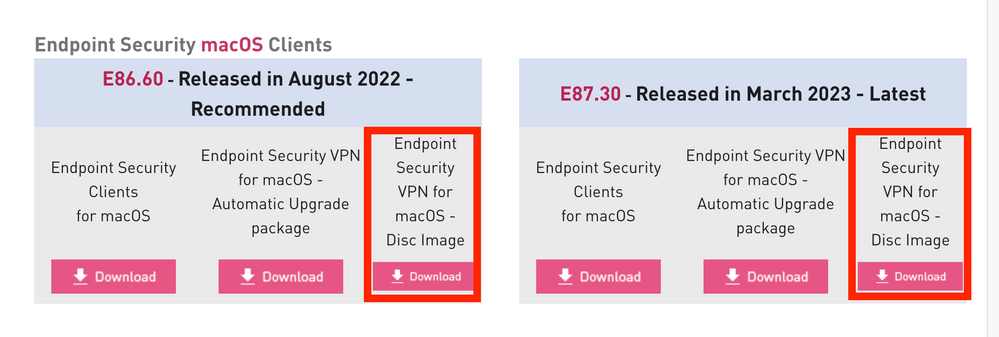
For VPN-only, make sure you choose one of these options:
What precisely did you install?
Where exactly did you download it from?
What precise steps (with screenshots) did you take?
I agree with exactly what @PhoneBoy told you. IF you installed barebone VPN client, you would NEVER see a message like that, as there is no policy to check or configure.
Andy
Hi I have downloaded below,
Used the VPN configuration utility(https://sc1.checkpoint.com/documents/RemoteAccessClients_forWindows_AdminGuide/Content/Topics-RA-VPN...) to install the bundle on the client machine. I am still getting the same error. No policy server is enabled on the the MGMT server. Any advise?
And do you have your MGMT server configured as a Policy Server?
Got it. When you configure the installation package with the VPN config utility, make sure you choose Remote Access and not the Endpoint Security option. From what you wrote, it seems the package is configured for the Endpoint Security option, which requires a policy server.
@_Val_ Thanks, so Which option below I should be using, SecueRemote I guess, and I need to make sure I have enabled this option from Gateway settings as well , I guess?
Yes, SecureRemote option. Also, you may want to look into Remote Access Admin Guide, like this one: https://sc1.checkpoint.com/documents/R81.10/WebAdminGuides/EN/CP_R81.10_RemoteAccessVPN_AdminGuide/S...
As @_Val_ said, secure remote would work in such case, but too many limitations.
Andy
Thanks again, I see what you guys mean, as far as customer knowns this is not a security issue this is fine in my opinion.
I agree with that!
Leaderboard
Epsum factorial non deposit quid pro quo hic escorol.
| User | Count |
|---|---|
| 5 | |
| 4 | |
| 3 | |
| 3 | |
| 2 | |
| 1 | |
| 1 | |
| 1 | |
| 1 | |
| 1 |
Tue 21 Apr 2026 @ 05:00 PM (IDT)
AI Security Masters E7: How CPR Broke ChatGPT's Isolation and What It Means for YouTue 28 Apr 2026 @ 06:00 PM (IDT)
Under the Hood: Securing your GenAI-enabled Web Applications with Check Point WAFTue 21 Apr 2026 @ 05:00 PM (IDT)
AI Security Masters E7: How CPR Broke ChatGPT's Isolation and What It Means for YouTue 28 Apr 2026 @ 06:00 PM (IDT)
Under the Hood: Securing your GenAI-enabled Web Applications with Check Point WAFTue 12 May 2026 @ 10:00 AM (CEST)
The Cloud Architects Series: Check Point Cloud Firewall delivered as a serviceThu 30 Apr 2026 @ 03:00 PM (PDT)
Hillsboro, OR: Securing The AI Transformation and Exposure ManagementAbout CheckMates
Learn Check Point
Advanced Learning
YOU DESERVE THE BEST SECURITY