- Products
- Learn
- Local User Groups
- Partners
- More

Simplify Admin Operations with R82.20
Watch HereThe State of Ransomware Q2 2026:
This Quarter's Trends, and Their Impact on Your Defenses
READY OR NOT: Securing the AI Enterprise
AI Research & Threat Landscape
CheckMates Go:
Half is Not Enough
Hello friends,
I wanted to ask you how can i disable checkpoint endpoint antivirus on one particular PC. I can not see an option to do that.. I can just create a group and disable all the policies there. I that the only option to disable antivirus on a PC or there is an another option.. Thank you.
Yes, you create a group with the relevant blade settings and assign the PC to that group.
That would be how you disable a blade on a specific PC.
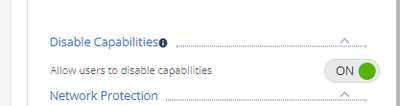
If you are the admin, you can access management portal and check policy tab ->"client Settings" -> General -> Allow users to disable capabilities is ON for your machine policy.
image.png
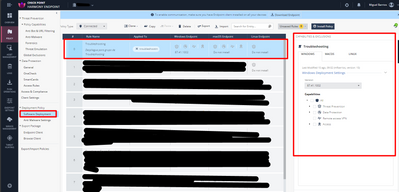
Hi @scenarist , you need to create the rule in "Software Deployment" policy. (not in threat prevention policy).
I would recommend that you use the option to disable features from the endpoint itself (which I discussed previously in this post).
If you decide to use this method, take into account the version of the endpoint when configuring the rule (it should be the same version of the devices you want to disable their protections).
image.png
Yes, you create a group with the relevant blade settings and assign the PC to that group.
That would be how you disable a blade on a specific PC.
Thank you for your reply. Let me give you an example of what i want to do exactly. If you have an ordinary antivirus (exp Avast) you can go and disable shields for a certain time (10 minutes or permanently).. I am searching for a similar option here.. Is there an option like that to turn it off on a particular PC or i have to disable all the policies in a group and than move the PC to the group there?
you can create a special group (for example NOTSECURE) and in the deployment rules disable all security blades for this group. You can move the client to this group.
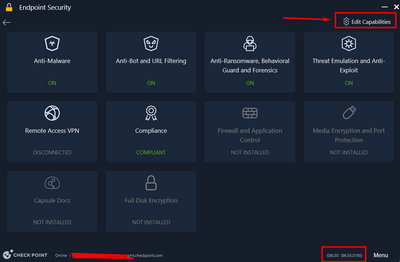
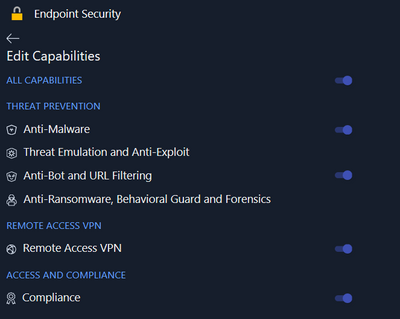
The other option would be to use E86.50 and you can find "Edit Capabilities" button in the new UI and disable the security modules you want for this PC.
MikeB_0-1657199628327.png
MikeB_1-1657199647085.png
Hello,
i have the E87.31.1016 and the "Edit capabilities" isn't present. Any idea to solve this ?
Thank you
If you are the admin, you can access management portal and check policy tab ->"client Settings" -> General -> Allow users to disable capabilities is ON for your machine policy.
image.png
There is no way to just temporarly disable the antivirus like in Avast, you have to use the solution described by @PhoneBoy
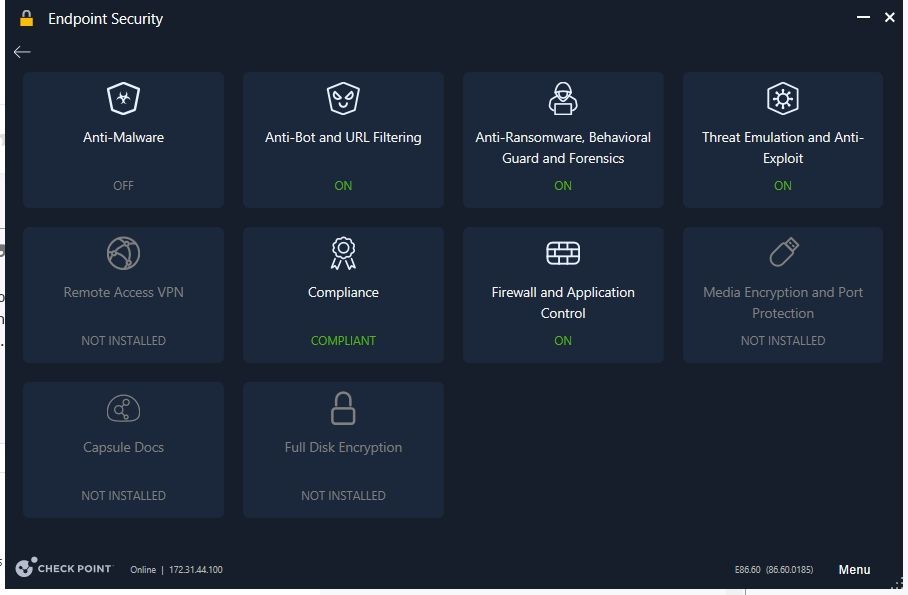
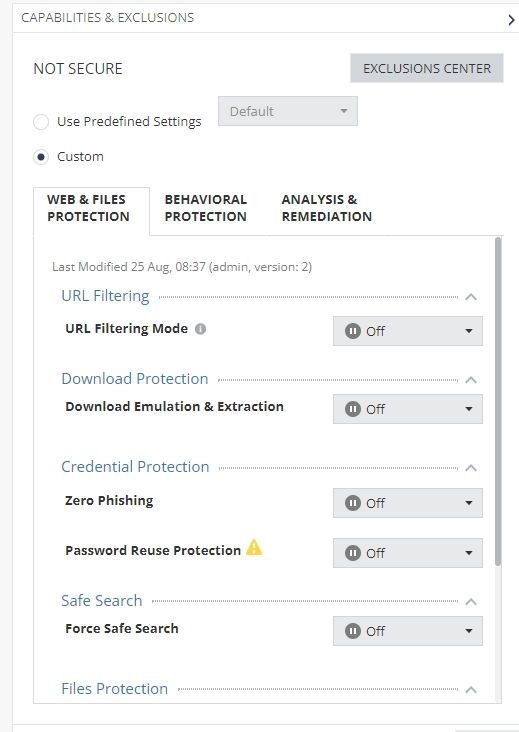
Yes. I use @PhoneBoy solution and create special virtual group with name "NOT SECURE" and turn off all capabilites but after that harmony endpoint still have TURN ON all capabilities excpet AntiMalware and still running all services in task manager. I am using E86.60 endpoint client. I would like to know how to turn off all capabilities ?2023-09-27 14 15 26.jpg
2023-09-27 14 10 41.jpg
Hi @scenarist , you need to create the rule in "Software Deployment" policy. (not in threat prevention policy).
I would recommend that you use the option to disable features from the endpoint itself (which I discussed previously in this post).
If you decide to use this method, take into account the version of the endpoint when configuring the rule (it should be the same version of the devices you want to disable their protections).
image.png
@MikeB Great. Thank you very much Mike.
Possible this is a (display) bug.
I recommend engaging with the TAC here: https://help.checkpoint.com
Leaderboard
Epsum factorial non deposit quid pro quo hic escorol.
| User | Count |
|---|---|
| 67 | |
| 6 | |
| 1 | |
| 1 | |
| 1 | |
| 1 |
Tue 25 Aug 2026 @ 05:00 PM (CEST)
The State of Ransomware Q2 2026: This Quarter's Trends, and Their Impact on Your DefensesThu 27 Aug 2026 @ 10:00 AM (EDT)
Why Email Agent Hijacking is a Game-Changer for Email SecurityTue 25 Aug 2026 @ 05:00 PM (CEST)
The State of Ransomware Q2 2026: This Quarter's Trends, and Their Impact on Your DefensesThu 27 Aug 2026 @ 10:00 AM (EDT)
Why Email Agent Hijacking is a Game-Changer for Email SecurityTue 01 Sep 2026 @ 05:00 PM (CEST)
Under the Hood | Check Point SASE: Onboarding, Step by StepTue 15 Sep 2026 @ 12:00 PM (MDT)
Lone Tree, CO: Workspace Security and Exposure ManagementAbout CheckMates
Learn Check Point
Advanced Learning
YOU DESERVE THE BEST SECURITY