- Products
- Learn
- Local User Groups
- Partners
- More

Policy Insights and Policy Auditor in Action
19 November @ 5pm CET / 11am ET
Access Control and Threat Prevention Best Practices
Watch HereOverlap in Security Validation
Help us to understand your needs better
CheckMates Go:
Maestro Madness
Hello friends,
I wanted to ask you how can i disable checkpoint endpoint antivirus on one particular PC. I can not see an option to do that.. I can just create a group and disable all the policies there. I that the only option to disable antivirus on a PC or there is an another option.. Thank you.
Yes, you create a group with the relevant blade settings and assign the PC to that group.
That would be how you disable a blade on a specific PC.
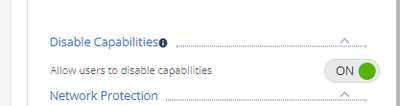
If you are the admin, you can access management portal and check policy tab ->"client Settings" -> General -> Allow users to disable capabilities is ON for your machine policy.
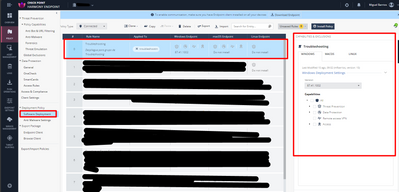
Hi @scenarist , you need to create the rule in "Software Deployment" policy. (not in threat prevention policy).
I would recommend that you use the option to disable features from the endpoint itself (which I discussed previously in this post).
If you decide to use this method, take into account the version of the endpoint when configuring the rule (it should be the same version of the devices you want to disable their protections).
Yes, you create a group with the relevant blade settings and assign the PC to that group.
That would be how you disable a blade on a specific PC.
Thank you for your reply. Let me give you an example of what i want to do exactly. If you have an ordinary antivirus (exp Avast) you can go and disable shields for a certain time (10 minutes or permanently).. I am searching for a similar option here.. Is there an option like that to turn it off on a particular PC or i have to disable all the policies in a group and than move the PC to the group there?
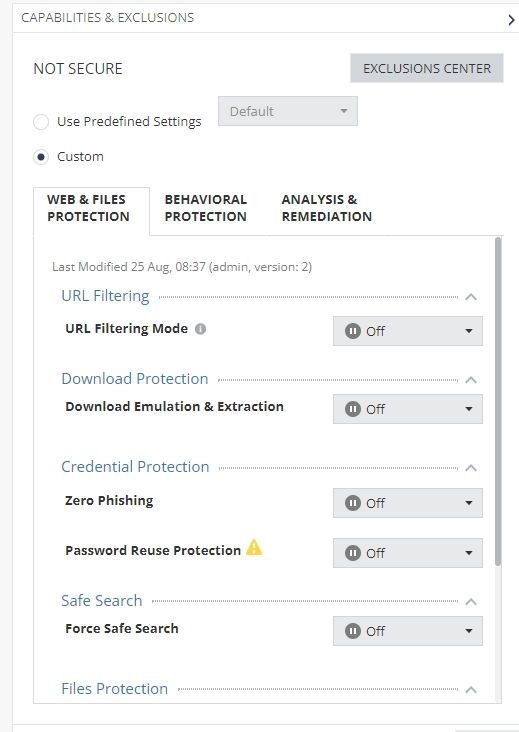
you can create a special group (for example NOTSECURE) and in the deployment rules disable all security blades for this group. You can move the client to this group.
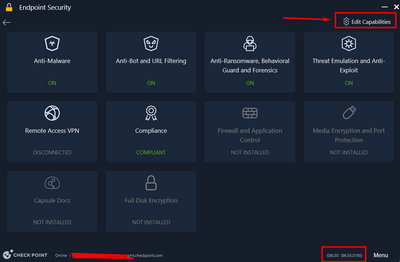
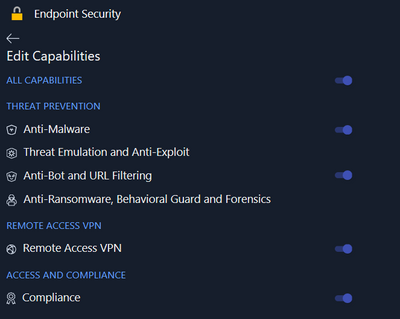
The other option would be to use E86.50 and you can find "Edit Capabilities" button in the new UI and disable the security modules you want for this PC.
Hello,
i have the E87.31.1016 and the "Edit capabilities" isn't present. Any idea to solve this ?
Thank you
If you are the admin, you can access management portal and check policy tab ->"client Settings" -> General -> Allow users to disable capabilities is ON for your machine policy.
There is no way to just temporarly disable the antivirus like in Avast, you have to use the solution described by @PhoneBoy
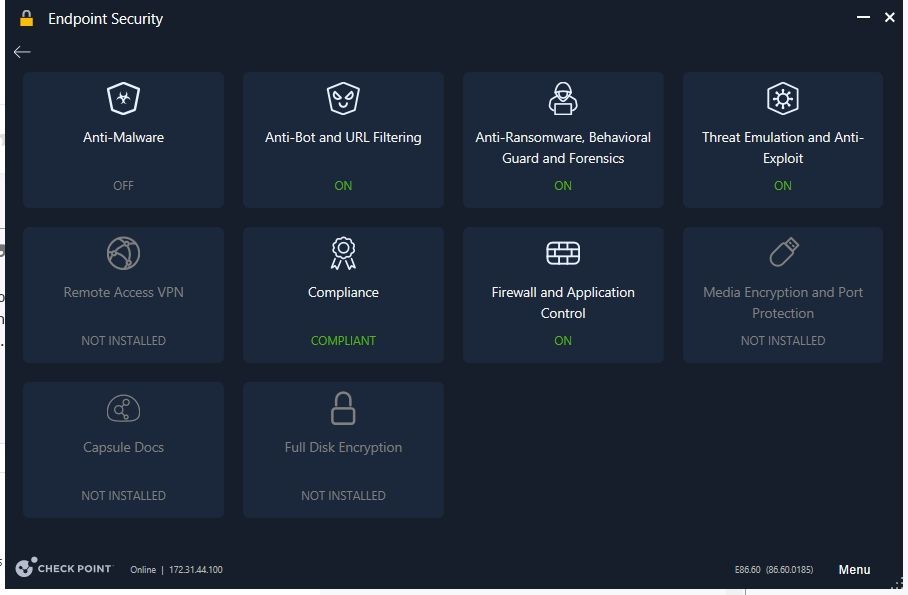
Yes. I use @PhoneBoy solution and create special virtual group with name "NOT SECURE" and turn off all capabilites but after that harmony endpoint still have TURN ON all capabilities excpet AntiMalware and still running all services in task manager. I am using E86.60 endpoint client. I would like to know how to turn off all capabilities ?
Hi @scenarist , you need to create the rule in "Software Deployment" policy. (not in threat prevention policy).
I would recommend that you use the option to disable features from the endpoint itself (which I discussed previously in this post).
If you decide to use this method, take into account the version of the endpoint when configuring the rule (it should be the same version of the devices you want to disable their protections).
@MikeB Great. Thank you very much Mike.
Possible this is a (display) bug.
I recommend engaging with the TAC here: https://help.checkpoint.com
Leaderboard
Epsum factorial non deposit quid pro quo hic escorol.
| User | Count |
|---|---|
| 3 | |
| 2 | |
| 2 | |
| 2 | |
| 1 | |
| 1 | |
| 1 | |
| 1 | |
| 1 | |
| 1 |
Tue 11 Nov 2025 @ 10:00 AM (CET)
Your First Response: Immediate Actions for Cyber Incident Containment- EMEAThu 20 Nov 2025 @ 05:00 PM (CET)
Hacking LLM Applications: latest research and insights from our LLM pen testing projects - AMERTue 11 Nov 2025 @ 06:00 PM (COT)
San Pedro Sula: Risk Management al Horno: ERM, TEM & Pizza NightTue 11 Nov 2025 @ 06:00 PM (COT)
San Pedro Sula: Risk Management al Horno: ERM, TEM & Pizza NightTue 11 Nov 2025 @ 10:00 AM (CET)
Your First Response: Immediate Actions for Cyber Incident Containment- EMEAThu 20 Nov 2025 @ 05:00 PM (CET)
Hacking LLM Applications: latest research and insights from our LLM pen testing projects - AMERThu 13 Nov 2025 @ 10:00 AM (CET)
Cloud Architect Series - Guarding Generative AI: Next-Gen Application Security with CloudGuard WAFFri 14 Nov 2025 @ 10:00 AM (CET)
CheckMates Live Netherlands - Veriti, Threat Exposure ManagementWed 19 Nov 2025 @ 11:00 AM (EST)
TechTalk: Improve Your Security Posture with Threat Prevention and Policy InsightsTue 11 Nov 2025 @ 06:00 PM (COT)
San Pedro Sula: Risk Management al Horno: ERM, TEM & Pizza NightTue 11 Nov 2025 @ 06:00 PM (COT)
San Pedro Sula: Risk Management al Horno: ERM, TEM & Pizza NightAbout CheckMates
Learn Check Point
Advanced Learning
YOU DESERVE THE BEST SECURITY