- Products
- Learn
- Local User Groups
- Partners
- More

AI Security Masters E7:
How CPR Broke ChatGPT's Isolation and What It Means for You
Blueprint Architecture for Securing
The AI Factory & AI Data Center
Call For Papers
Your Expertise. Our Stage
Good, Better, Best:
Prioritizing Defenses Against Credential Abuse
Ink Dragon: A Major Nation-State Campaign
Watch HereCheckMates Go:
CheckMates Fest
Hi there,
we have configured Remote Access VPN Client to disable the "always_connect" setting.
With the VPN Configuration Utility I integrate the trac.defaults file and thus create a new MSI installation file.
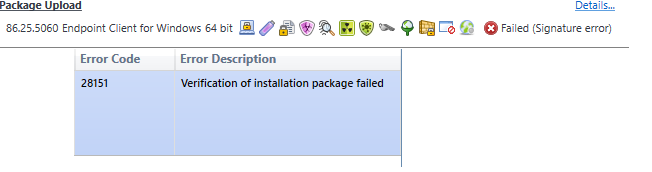
When importing the .msi file I get a "signature error" which I can skip, but at the latest during deployment I get a verification error.
When upgrading the client from E80.20 to E80.25, the trac.defaults file is overwritten and thus our "always_connect" (false) setting is lost.
Therefore I am forced to upload my own MSI file with integrated trac.defaults.
Is there a way to disable signature verification?
Or is there another way to include a separate trac.defaults file with an upgrade?
Or is there a possibility that the trac.defaults file will not be overwritten during a client upgrade.
Thanks.
Not as far as I know.
I recommend a TAC case.
What version/JHF of management are we talking about?
R81.10 (81.10.9600.402)
Did you apply sk172567?
If that didn't work, it might be worth a TAC case.
Updated the Console to R81.10 (81.10.9600.404) same error message appears.
I will set up a fresh win 10 and install the console. I will report.
2 different Win 10 installations with the same problem.
Is there a possibility that the VPN Configuration Utility destroys the signature when creating the MSI file? According to the SK article, should the utility also work for Endpoint Security Client?
Not as far as I know.
I recommend a TAC case.
OK. i opened a TAC case.
And what was the solution ?
Case ist still pending by checkpoint. I'll report as soon as I have more information
Reply from the TAC Support.
Customer: Hi there,
thanks for the enlightenment.
So that I understand correctly: Upgrading the client via the SmartEndpoint Console is only possible if the MSI file is downloaded directly from the Checkpoint server.
As I understand it correctly, the trac.defaults file is automatically overwritten when the client is upgraded. This is works as designed and cannot be prevented.
TAC Support: This is correct.
Regarding this statement: "As soon as the MSI file is changed/created, the client must be upgraded via SCCM/GPO." ---> Technically yes, we can dispatch this file to hosts separately but for large businesses SCCM/GPO are probably the most convenient and recommended.
As soon as the MSI file is changed/created, the client must be upgraded via SCCM/GPO.
Leaderboard
Epsum factorial non deposit quid pro quo hic escorol.
| User | Count |
|---|---|
| 4 | |
| 2 | |
| 1 | |
| 1 | |
| 1 | |
| 1 | |
| 1 | |
| 1 | |
| 1 | |
| 1 |
Tue 28 Apr 2026 @ 06:00 PM (IDT)
Under the Hood: Securing your GenAI-enabled Web Applications with Check Point WAFThu 30 Apr 2026 @ 03:00 PM (PDT)
Hillsboro, OR: Securing The AI Transformation and Exposure ManagementTue 28 Apr 2026 @ 06:00 PM (IDT)
Under the Hood: Securing your GenAI-enabled Web Applications with Check Point WAFTue 12 May 2026 @ 10:00 AM (CEST)
The Cloud Architects Series: Check Point Cloud Firewall delivered as a serviceThu 30 Apr 2026 @ 03:00 PM (PDT)
Hillsboro, OR: Securing The AI Transformation and Exposure ManagementAbout CheckMates
Learn Check Point
Advanced Learning
YOU DESERVE THE BEST SECURITY