- Products
- Learn
- Local User Groups
- Partners
- More

The State of Ransomware Q1 2026
Key Trends and Their Impact
Good, Better, Best:
Prioritizing Defenses Against Credential Abuse
AI Security Masters E7:
How CPR Broke ChatGPT's Isolation and What It Means for You
Blueprint Architecture for Securing
The AI Factory & AI Data Center
Call For Papers
Your Expertise. Our Stage
CheckMates Go:
CheckMates Fest
Hello,
I'm using Harmoy Endpoint Advanced version E87.52 on my Windows machines.
I made some modifications in my policy and now and now I get the following messages
I think this must be website of Microsoft Onedrive. The counter and is now already on 1/263.
At this moment for me impossible to find the wrong setting in the policy.
Somebody, who can help or has a suggestion ?
Thanks.
Just revert what you had modified for now and see if it fixes the issue.
Andy
The settings in question are related to URLF feature. See if the Computers / Internet category is blocked there. If you cannot figure out this yourself, open a call with TAC.
Now the issue is under control.
I changed the "URL Filtering mode" from "Prevent" to "Detect".
You did not fixed it. You are blocking too many categories, check what the policy is saying.
Val is correct. Put it this way...detect mode, or in other terms, monitor/allow, simply refers to the fact that nothing will be blocked,so in my view, thats not really a good solution. Try to see if you can put it back in prevent mode and then make an exception for the computers/internet category. Im not really enpoint guy myself, but I know how to do this, so if you need guidance, I can log in one of clients' portal and send you a screenshot.
Best,
Andy
This is what Im referring to @MarcVB / Exclusion option is on the right side when you look at the rule.
Andy
Just revert what you had modified for now and see if it fixes the issue.
Andy
I completely agree with your advice -"Prevent" is ways better than "Detect".
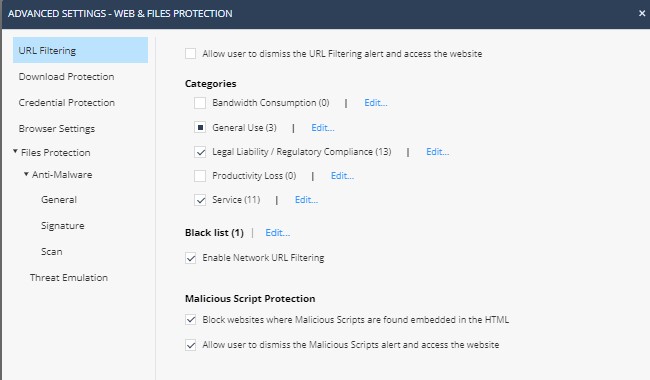
So, I tested a lot of scenario's and I came to the following working situation:
Now, I'm wondering if there exists an article who describes the best practices to set the categories of the "URL filtering". Or is this completety organization dependent ?
Now I wait a few days to see what's happening.
That screenshot looks right. No, TAC told me before there is no sk for such recommendation, so its all really up to the customer what categories they wish to block.
Yes, give it a week to see how it behaves.
Best,
Andy
Thanks, Andy for your (positive) feedback and information.
If everything is OK, I close the issue next week.
Best,
marc
No worries.
Andy
Leaderboard
Epsum factorial non deposit quid pro quo hic escorol.
| User | Count |
|---|---|
| 3 | |
| 2 | |
| 2 | |
| 2 | |
| 1 | |
| 1 | |
| 1 |
Tue 12 May 2026 @ 10:00 AM (CEST)
The Cloud Architects Series: Check Point Cloud Firewall delivered as a serviceWed 13 May 2026 @ 11:00 AM (EDT)
TechTalk: The State of Ransomware Q1 2026: Key Trends and Their ImpactThu 14 May 2026 @ 07:00 PM (EEST)
Under the Hood: Presentando Check Point Cloud Firewall como ServicioTue 12 May 2026 @ 10:00 AM (CEST)
The Cloud Architects Series: Check Point Cloud Firewall delivered as a serviceAbout CheckMates
Learn Check Point
Advanced Learning
YOU DESERVE THE BEST SECURITY