- Products
- Learn
- Local User Groups
- Partners
- More

MVP 2026: Submissions
Are Now Open!
What's New in R82.10?
10 December @ 5pm CET / 11am ET
Announcing Quantum R82.10!
Learn MoreOverlap in Security Validation
Help us to understand your needs better
CheckMates Go:
Maestro Madness
Hi Team,
I am looking for solution to completely remove office 365 account from CloudGuard SaaS.
At the beginning I choose Automatic Mode for deployment and for some reason ( 2FA )
user checkpoint-service-user@[TENANT-NAME].onmicrosoft.com didn't create require configuration.
Now when I am stoping Office 365 service and starting it again ( after an hour or two )
I don't see an option to chose automatic or manual configuration.
Config is going to Auto Mode in 2 steps and all previews settings are on place.
What I can do now is only re-authenticate apps into my Office 365 tenant and this process if going without errors.
However Check Point Service User is not create again and deployment cannot be completed.
Is such possibility to restore setting to factory defaults and start form scratches again ???
or at lest again have an option between Manual Mode and Automatic Mode ???
At this point I am stuck 😞
Thanks in advance,
Regards,
#MJ
Recommend engaging the TAC here.
Hello MiloJawo,
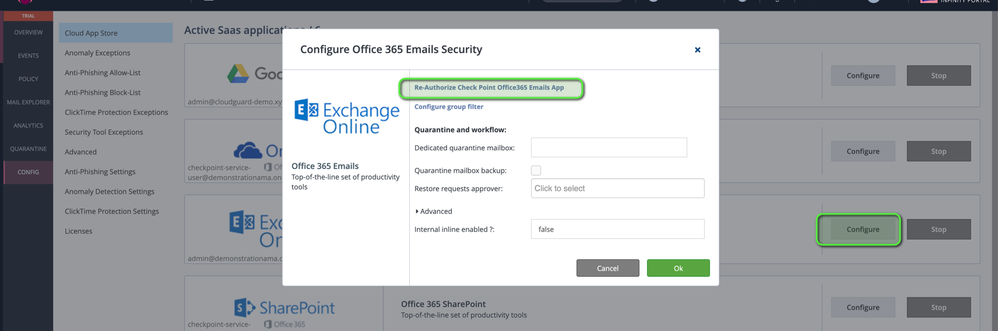
you need to disable 2FA (also geo-location restrictions) for the Check Point user, then it should start to work and you will see events and mails. You can re-authorize the config if needed (see screenshot below):
"After you grant CloudGuard SaaS access permission to Office 365, a new global administration account is created in the Exchange Admin Center. The email address of the account is checkpoint-service-user@[TENANT-NAME].onmicrosoft.com. This account is referred to as Check Point Service User, which runs PowerShell commands to automatically configure Office 365 to work with CloudGuard SaaS (as outlined in sk144213). If MFA is enabled on this user, the configuration cannot take place."
Best regards,
Igor
Hello Igor
Thank for reply ... unfortunately I found 2FA issue / requirement too late.
I had a ChP plugin and Check Point Service User in my Office Tenant however because something was wrong
I delete this user.
Now when I am starting a service and authorize apps again, user is not created again.
I don't see an option to manual setup either ... in short way ... I am stuck 😞
I hope You got a point.
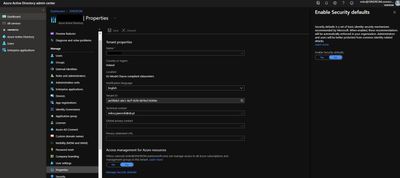
BTW ... instead using conditional access polices You can disable all 2FA ( MS Auth app ) in this section 🙂
Hello!
I had a similar problem with a customer a few weeks ago and was solved by TAC. Did you open a ticket and have the SR number?
Also contact your local office in order to escalate the SR if needed.
Thank you!!
Hello
Working on it 🙂
Hello Milo,
most likely you need to remove the whole configuration which was done by Harmony Email in O365 tenant, not only the user (Connectors, Mailflow-Rules / Journaling-Rules, Enterprise Apps ...) Afterwards you should be able to re-authorize the connection. Don´t use manual mode, as it is a lot more unflexible and you will need to change settings manually each time you change the policy.
As stated by Albero and Phoneboy, just open an SR. You will get an info form TAC what should be removed in the tenant. Maybe they also can just initiate only missing things in the backend to be added.
Regards,
Igor
Hello Igor
Because CheckPoint Service User couldn't login into Office 365 ( 2FA )
he didn't change anything in Connectors, Mailflow-Rules / Journaling-Rules
I removed only Enterprise Apps and ChP Service User from my Office 365
However when I re-authorized the connection form Harmony Portal only Enterprise Apps are recreated again.
( without any problems )
ChP Service User Account is not created again and I am stuck 😐
I hope You got a point.
This is a reason why I was asking about manual mode or starting from scratches, but thanks for advice 🙂
I have a scheduled meeting with experts next week.
I'll let you know about solution 🙂 if any will show up
thank You
BR
Milo
Were you able to get this resolved? I had a similar issue and TAC could not resolve it
What's the TAC SR?
Please send me in a PM.
Hello sir!
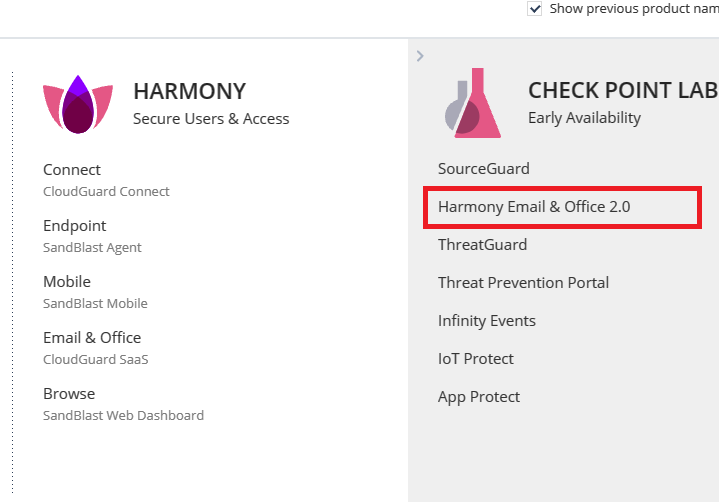
TAC moved me to Harmony Email & Office 2.0 when issue with 2FA + CheckPoint Service User has been resolved.
BR
Milo
Fri 12 Dec 2025 @ 10:00 AM (CET)
Check Mates Live Netherlands: #41 AI & Multi Context ProtocolTue 16 Dec 2025 @ 05:00 PM (CET)
Under the Hood: CloudGuard Network Security for Oracle Cloud - Config and Autoscaling!Fri 12 Dec 2025 @ 10:00 AM (CET)
Check Mates Live Netherlands: #41 AI & Multi Context ProtocolTue 16 Dec 2025 @ 05:00 PM (CET)
Under the Hood: CloudGuard Network Security for Oracle Cloud - Config and Autoscaling!Thu 18 Dec 2025 @ 10:00 AM (CET)
Cloud Architect Series - Building a Hybrid Mesh Security Strategy across cloudsAbout CheckMates
Learn Check Point
Advanced Learning
YOU DESERVE THE BEST SECURITY