- Products
- Learn
- Local User Groups
- Partners
- More

Simplify Admin Operations with R82.20
Watch HereThe State of Ransomware Q2 2026:
This Quarter's Trends, and Their Impact on Your Defenses
READY OR NOT: Securing the AI Enterprise
AI Research & Threat Landscape
CheckMates Go:
Half is Not Enough
Hello,
I am having issues with dev.azure.com and URL filtering since 22nd of February 2023.
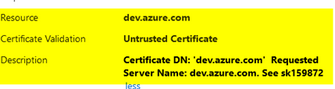
The issue is that my firewall is unable to accept the certificate from dev.azure.com and the certificate validation is : untrusted certificate
untrusted Certificate.png
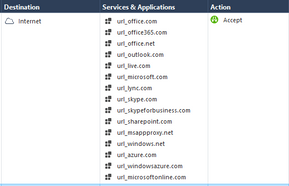
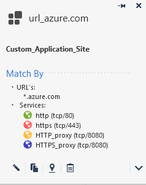
My Rule is like that :
dev_01.png
object.png
This Rule was working for the past 2 years without any issues, however, it has experienced issues recently.
I have created a new rule to cover the first rule dev_Temp.png, however, this rule has more than 6M hit and I think it's not a good idea to use it this way, Due to the DNS lookup for each request.
I have read the SK159872 (Categorize Untrusted Certificates) but I am unable to identify the reason dev.azure.com is untrusted !
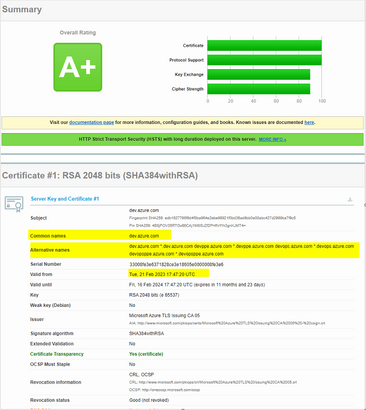
As far as I know, Microsoft Azure had some recent changes made to their Certificate and TLS settings on Azure, but I am not quite sure about it.
Microsoft Certificate.png
Any idea ?
@Sorin_Gogean also brought up a good point. I can send you updated list from my R81.20 lab, but you can also verify its updated from the actual smart console (its under manageand settings -> blades -> https inspection -> configure in smart dashboard
Once old school dashboard comes up, navigate to https inspection tab -> trusted CA and check if update is available at the bottom
Andy
Just tested in my lab and was getting cert error, but once I added the site in allowed rule for app (url) ordered layer and also https inspection bypass rule, worked fine.
Andy
Hello @Cyrus ,
If it's an certificate issue, why not update the CA's for HTTPS engine, and if the new Azure CA is missing, you can import it.
Or?
Ty,
@Sorin_Gogean also brought up a good point. I can send you updated list from my R81.20 lab, but you can also verify its updated from the actual smart console (its under manageand settings -> blades -> https inspection -> configure in smart dashboard
Once old school dashboard comes up, navigate to https inspection tab -> trusted CA and check if update is available at the bottom
Andy
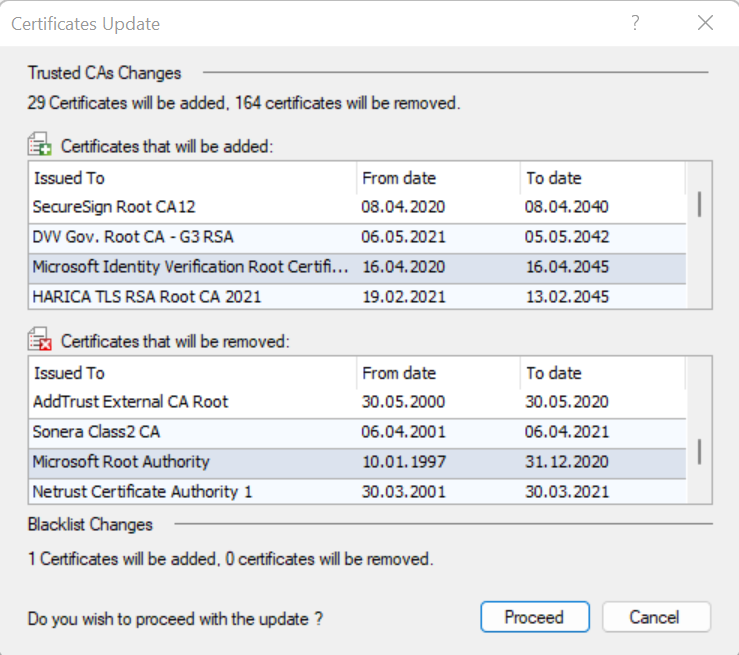
A trusted CA and blacklist update file was downloaded but not installed!
I've checked the update and remove list but can't find anything related to azure.com
A01.png
C-List.png
Can you please check your R81.20 lab ?
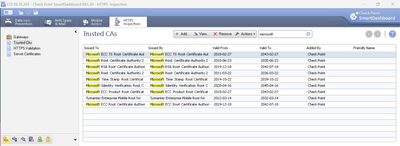
You can update, its totally safe, BUT, if you prefer, I attached update zip file from my R81.20 lab. I dont see anything searching for azure, but below is what I get searching for Microsoft. Zip update file can be imported via http inspection legacy dashboard.
Screenshot_1.png
Cheers mate.
Andy
@the_rock it‘s always a good idea to help here. But I think that‘s not correct to provide a list of trusted CAs here. Never and I say never again I would import this list in an environment. This should come from a trusted vendor. Maybe there is a CA inside from your own lab environment and someone else import this as an example, they trust your playground. I‘m really sure a lot of the folks here understand what it means to trust unknown or foreign CAs, but some does not and trust insecure sources.
Thats fair @Wolfgang , no disagreement :). I will say though the file I attached is from clean R81.20 lab, there was absolutely nothing changed apart from default settings, so Im 100% positive its totally safe to import.
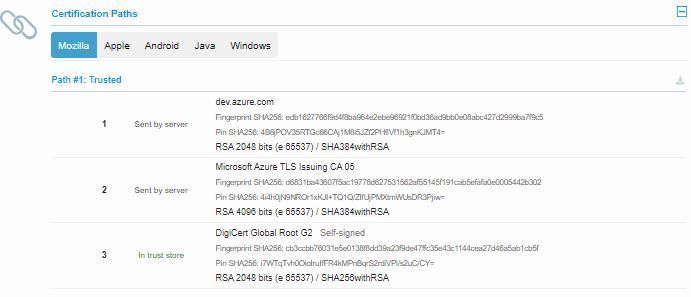
Cyrus, you're looking wrongly for an Microsoft CA when the dev.azure.com SSL cert is under Digicert.
Check this and you will see that dev.azure.com was issued by "Microsoft Azure TLS Issuing CA 05" that is an sub-CA or delegated by " DigiCert Global Root G2" .Capture.JPG
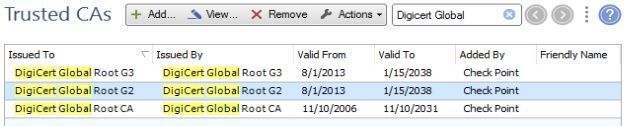
So in the HTTPS CA's you should look for "DigiCert Global Root G2" :
Capture.JPG
I'll check for dev.azure.com , but until now I don't see why the HTTPS Inspect would not know about that one.
Ty,
Yes, you are right, I haven't seen the CA G series.
I'm going to explain this to our team and plan the installation of the CA.
I'll get back to update this topic in 3 or 4 business days with an answer after we install the CA.
Thanks to you all.
That is weird Cyrus, as those were there by default.
I would recommend to get an console to a demo instance (or maybe @the_rock can help) and export the certificates - all the standard ones from CheckPoint and import them in your box.
Enjoy,
PS: it's worth looking on "How to update Trusted CAs automatically (sk173629)"
Yes, I actually attached zip file in my previous response, so that can be used to import updated cert list.
Andy
Also, take advice from @Sorin_Gogean , he is EXCELLENT, he knows this stuff very well. I can assure you that, because I did remote with him before and he also helped me out with previous https inspection issue I had with customer almost a year ago. I learned lots from him abut this.
@Cyrus ...were you able to sort this out?
Cheers mate.
Andy
I tested in a test lab with the same backup and it worked! for production Firewall, it's a bit complicated because of our process.
Thanks to all
Leaderboard
Epsum factorial non deposit quid pro quo hic escorol.
| User | Count |
|---|---|
| 15 | |
| 1 | |
| 1 | |
| 1 |
Tue 25 Aug 2026 @ 05:00 PM (CEST)
The State of Ransomware Q2 2026: This Quarter's Trends, and Their Impact on Your DefensesThu 27 Aug 2026 @ 10:00 AM (EDT)
Why Email Agent Hijacking is a Game-Changer for Email SecurityTue 25 Aug 2026 @ 05:00 PM (CEST)
The State of Ransomware Q2 2026: This Quarter's Trends, and Their Impact on Your DefensesThu 27 Aug 2026 @ 10:00 AM (EDT)
Why Email Agent Hijacking is a Game-Changer for Email SecurityTue 01 Sep 2026 @ 05:00 PM (CEST)
Under the Hood | Check Point SASE: Onboarding, Step by StepTue 15 Sep 2026 @ 12:00 PM (MDT)
Lone Tree, CO: Workspace Security and Exposure ManagementAbout CheckMates
Learn Check Point
Advanced Learning
YOU DESERVE THE BEST SECURITY