- Products
- Learn
- Local User Groups
- Partners
- More

The Great Exposure Reset
24 February 2026 @ 5pm CET / 11am EST
CheckMates Fest 2026
Watch Now!AI Security Masters
Hacking with AI: The Dark Side of Innovation
CheckMates Go:
CheckMates Fest
Hi,
we sometimes see connecting errors from the CloudGuard Controller to Azure and it seems to be an SSL issue.
According zu https://supportcenter.checkpoint.com/supportcenter/portal?eventSubmit_doGoviewsolutiondetails=&solut...it is an HTTPS Inspection issue but we have no https inspection in place.
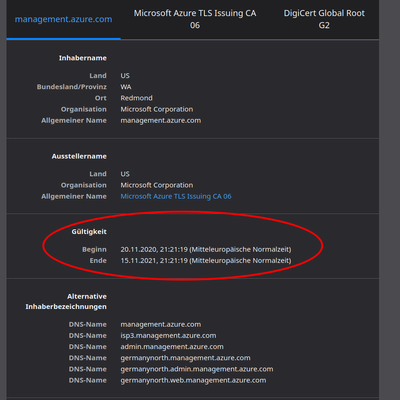
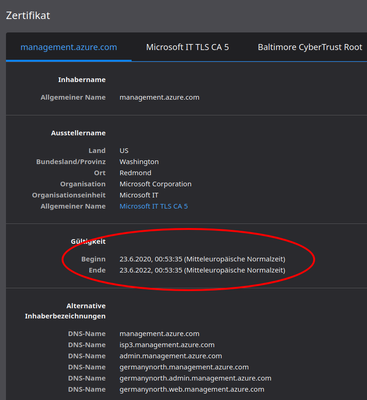
So we assume it is because sometimes https://management.azure.com replies with a new cert from the 20th of Nov.
Can someone confirm and how we can fix this?
Kind Regards,
David
Fix is now available, and is documented in sk170660 - Authentication failure to Microsoft Azure for Check Point CloudGuard Controller, CME and Check Point HA gateways.
You will need to contact support to receive an updated SSL certificate bundle, together with instructions how to deploy it on your SmartCenter/MDS or HA Gateways.
Once you deploy an updated certificate bundle, and verify that you've installed it correctly, you will need to restart the services:
R80.40 Jumbo T172:
UPDATE: Previously, because of connectivity issues with Azure, CloudGuard Controller was deleting IP addresses of Data Center objects from the Security Gateway. CloudGuard Controller will now show an error message instead of revoking identities from the Security Gateway.
If it were HTTPS Inspection you wouldn’t see Microsoft as the certificate signer.
That said maybe they’re using a different CA than we have in the certificate store used by the CloudGuard Controller.
Recommend a recommend a TAC case.
Hi PhoneBoy we are looking into a similar Azure deployment using Cloudguard Controller, but isn't there a better design that would prevent a Azure connectivity issue resulting in rule mismatching on the gateways, that would be a huge Single Point of Failure (SPOF). What would be your recommendation, is there a way to cache this "identities" on the gateway to prevent rule mismatching for some hours? Should I open another feed on this?
R80.40 Jumbo T172:
UPDATE: Previously, because of connectivity issues with Azure, CloudGuard Controller was deleting IP addresses of Data Center objects from the Security Gateway. CloudGuard Controller will now show an error message instead of revoking identities from the Security Gateway.
Great! And is this behavior fix embedded in R81.10 by default? So, it basically means that identities will not be cleared when datacenter connection is lost, how long will these identities remain on the gateway, would that be unlimited until datacenter connection is restored?
It's available in JHF T75 (ongoing) for R81.10.
We actually do cache things locally for a period of time.
If I'm understanding this SK correctly, it should be 72 hours.
Looks like you can configure the cache and other things as described here: https://supportcenter.checkpoint.com/supportcenter/portal?eventSubmit_doGoviewsolutiondetails=&solut...
Commencing November 20th in various regions, Microsoft deployed a new SSL certificate that is causing Check Point CloudGuard Controller to not able to authenticate to the Azure environment.
This will impact all customers who are using Cloud Objects that are learned from Microsoft Azure.
Symptoms:
Solution:
Check Point R&D is currently working closely with Microsoft on a fix. We expect a fix in a way of a hotfix, shortly. Please open a TAC case or in case of Diamond Services, please contact your Diamond engineer, if you would like to be notified of a solution once it is available.
Caution:
Do not reboot the Check Point Management station or gateways if they are experiencing this issue. This will lose all learned Cloud objects from Azure Datacenter and there is no way to recover this until the communication issue has been resolved.
Reference SK:
sk169983: Microsoft Azure: Action required: Review your Azure Services Certificate Authorities
A fix is being validated and will be shared with Check Point Support. Customers with this issue can contact Support.
Fix is now available, and is documented in sk170660 - Authentication failure to Microsoft Azure for Check Point CloudGuard Controller, CME and Check Point HA gateways.
You will need to contact support to receive an updated SSL certificate bundle, together with instructions how to deploy it on your SmartCenter/MDS or HA Gateways.
Once you deploy an updated certificate bundle, and verify that you've installed it correctly, you will need to restart the services:
Leaderboard
Epsum factorial non deposit quid pro quo hic escorol.
| User | Count |
|---|---|
| 7 | |
| 2 | |
| 1 | |
| 1 | |
| 1 | |
| 1 | |
| 1 |
Thu 19 Feb 2026 @ 03:00 PM (EST)
Americas Deep Dive: Check Point Management API Best PracticesTue 24 Feb 2026 @ 11:00 AM (EST)
Under The Hood: CloudGuard Network Security for Azure Virtual WANThu 19 Feb 2026 @ 03:00 PM (EST)
Americas Deep Dive: Check Point Management API Best PracticesTue 24 Feb 2026 @ 11:00 AM (EST)
Under The Hood: CloudGuard Network Security for Azure Virtual WANAbout CheckMates
Learn Check Point
Advanced Learning
YOU DESERVE THE BEST SECURITY