

- Products
- Learn
- Local User Groups
- Partners
- More

What’s New in Device Diagnostics?
Dec 2nd @ 5pm CET / 11am EST
AI Security Masters
Security in the Pace of AI:
From Threat to Force Multiplier
CPX is Back!
Join us in Las Vegas, Vienna, and/or Bangkok!
Check Point Named a Leader
The Forrester Wave:
Enterprise Firewall Solutions, Q4 2026
What’s New in Agentic Network Orchestration
CheckMates Go:
Fun Ding
I am using "show-access-rulebase" API to get rule details, but the JSON output not contains rule vs Zone/Interface mapping details, but in the syslog contains accessed rule and interface details.
Is there any way to find out corresponding rule interface/zone?
Regards
Veera
What the API outputs as part of show-rulebase are the UIDs of the objects in the rules.
An objects dictionary is also returned, which dereferences all the UIDs, including the zones.
Interface/zone UID objects are not available in the rulebase and objects dictionary.
Example:
In my test setup, i added below test rules:

Below is the syslog print:

In this case "show-access-rulebase" output is not contains "eth0" interface details, How to get rule("allow rule") and interface ("eth0") mapping.
Is there any way to configure source/destination interfaces in access rule.
Interfaces cannot be configured as a source/destination in rules so it will never show as part of the rulebases.
The zones used in a rule most definitely show up in the object directory just like any other object.
Will post an example later.
Thank you Dameon Welch-Abernathy
For the following rulebase:

You get the following output from show access-rulebase (relevant bits bolded).
As you can see:
Just to make sure this wasn't unique to R80.20 (where I initially checked this), I also tested this in R80.10 in Demo Mode.
> show access-rulebase name "Test_Policy Network"
uid: "e9aa723f-8a29-4f0e-91a5-e0372c270708"
name: "Test_Policy Network"
rulebase:
- uid: "0b453763-589b-41ea-a747-9d7685ea8388"
name: "Outbound Rule"
type: "access-rule"
domain:
uid: "41e821a0-3720-11e3-aa6e-0800200c9fde"
name: "SMC User"
domain-type: "domain"
rule-number: 1
track:
type: "598ead32-aa42-4615-90ed-f51a5928d41d"
per-session: false
per-connection: true
accounting: false
alert: "none"
source:
- "e8131db2-8388-42a5-924a-82de32db20f7"
source-negate: false
destination:
- "237a4cbc-7fb6-4d50-872a-4904468271c4"
destination-negate: false
service:
- "97aeb369-9aea-11d5-bd16-0090272ccb30"
service-negate: false
vpn:
- "97aeb369-9aea-11d5-bd16-0090272ccb30"
action: "6c488338-8eec-4103-ad21-cd461ac2c472"
action-settings:
enable-identity-captive-portal: false
content:
- "97aeb369-9aea-11d5-bd16-0090272ccb30"
content-negate: false
content-direction: "any"
time:
- "97aeb369-9aea-11d5-bd16-0090272ccb30"
custom-fields:
field-1: ""
field-2: ""
field-3: ""
meta-info:
lock: "unlocked"
validation-state: "ok"
last-modify-time:
posix: 1542387448601
iso-8601: "2018-11-16T18:57+0200"
last-modifier: "admin"
creation-time:
posix: 1542387423017
iso-8601: "2018-11-16T18:57+0200"
creator: "admin"
comments: ""
enabled: true
install-on:
- "6c488338-8eec-4103-ad21-cd461ac2c476"
- uid: "99458043-2ec9-4e37-b43b-c8b83e9c9be2"
name: "Cleanup rule"
type: "access-rule"
domain:
uid: "41e821a0-3720-11e3-aa6e-0800200c9fde"
name: "SMC User"
domain-type: "domain"
rule-number: 2
track:
type: "29e53e3d-23bf-48fe-b6b1-d59bd88036f9"
per-session: false
per-connection: false
accounting: false
alert: "none"
source:
- "97aeb369-9aea-11d5-bd16-0090272ccb30"
source-negate: false
destination:
- "97aeb369-9aea-11d5-bd16-0090272ccb30"
destination-negate: false
service:
- "97aeb369-9aea-11d5-bd16-0090272ccb30"
service-negate: false
vpn:
- "97aeb369-9aea-11d5-bd16-0090272ccb30"
action: "6c488338-8eec-4103-ad21-cd461ac2c473"
action-settings: {}
content:
- "97aeb369-9aea-11d5-bd16-0090272ccb30"
content-negate: false
content-direction: "any"
time:
- "97aeb369-9aea-11d5-bd16-0090272ccb30"
custom-fields:
field-1: ""
field-2: ""
field-3: ""
meta-info:
lock: "unlocked"
validation-state: "ok"
last-modify-time:
posix: 1542387390812
iso-8601: "2018-11-16T18:56+0200"
last-modifier: "admin"
creation-time:
posix: 1542387390812
iso-8601: "2018-11-16T18:56+0200"
creator: "admin"
comments: ""
enabled: true
install-on:
- "6c488338-8eec-4103-ad21-cd461ac2c476"
objects-dictionary:
- uid: "6c488338-8eec-4103-ad21-cd461ac2c472"
name: "Accept"
type: "RulebaseAction"
domain:
uid: "a0bbbc99-adef-4ef8-bb6d-defdefdefdef"
name: "Check Point Data"
domain-type: "data domain"
- uid: "97aeb369-9aea-11d5-bd16-0090272ccb30"
name: "Any"
type: "CpmiAnyObject"
domain:
uid: "a0bbbc99-adef-4ef8-bb6d-defdefdefdef"
name: "Check Point Data"
domain-type: "data domain"
- uid: "6c488338-8eec-4103-ad21-cd461ac2c473"
name: "Drop"
type: "RulebaseAction"
domain:
uid: "a0bbbc99-adef-4ef8-bb6d-defdefdefdef"
name: "Check Point Data"
domain-type: "data domain"
- uid: "237a4cbc-7fb6-4d50-872a-4904468271c4"
name: "ExternalZone"
type: "security-zone"
domain:
uid: "a0bbbc99-adef-4ef8-bb6d-defdefdefdef"
name: "Check Point Data"
domain-type: "data domain"
- uid: "e8131db2-8388-42a5-924a-82de32db20f7"
name: "InternalZone"
type: "security-zone"
domain:
uid: "a0bbbc99-adef-4ef8-bb6d-defdefdefdef"
name: "Check Point Data"
domain-type: "data domain"
- uid: "598ead32-aa42-4615-90ed-f51a5928d41d"
name: "Log"
type: "Track"
domain:
uid: "a0bbbc99-adef-4ef8-bb6d-defdefdefdef"
name: "Check Point Data"
domain-type: "data domain"
- uid: "29e53e3d-23bf-48fe-b6b1-d59bd88036f9"
name: "None"
type: "Track"
domain:
uid: "a0bbbc99-adef-4ef8-bb6d-defdefdefdef"
name: "Check Point Data"
domain-type: "data domain"
- uid: "6c488338-8eec-4103-ad21-cd461ac2c476"
name: "Policy Targets"
type: "Global"
domain:
uid: "a0bbbc99-adef-4ef8-bb6d-defdefdefdef"
name: "Check Point Data"
domain-type: "data domain"
from: 1
to: 2
total: 2
Oh, I see the problem--your rule does not list any zones as source or destinations.
As such, querying the rulebase will not give you this information.
Your best bet is to query the gateway that accepted the connection (by name or UID) using show simple-gateway.
One potential issue I see is that you won't see the interface zone if you use the "default" zone for that interface (i.e. "According to topology"):
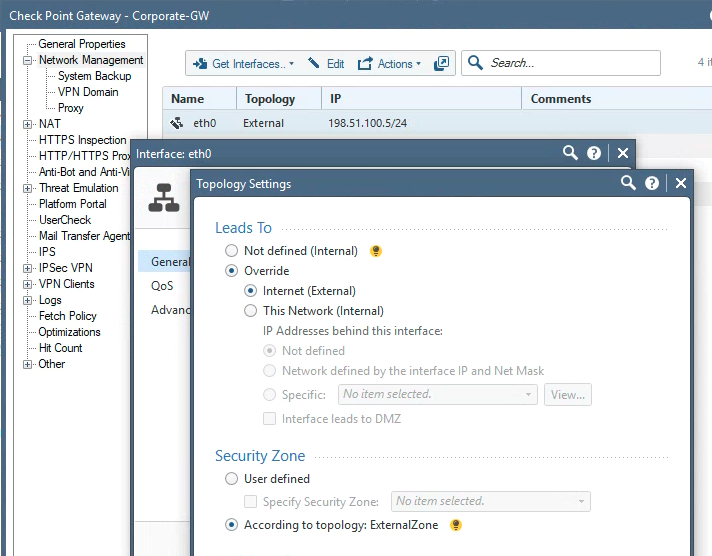
In this case, you'll have to work it out from the interface topology which interfaces are InternalZone or ExternalZone.
In this case, it's eth0.
For others not marked as topology external, you can assume they are in the InternalZone if one is not listed.
In the case of eth2, I set an explicit zone for that interface.
> show simple-gateway name Corporate-GW
uid: "8c134e6d-7b92-4f6a-b572-a819905c1918"
name: "Corporate-GW"
type: "simple-gateway"
domain:
uid: "41e821a0-3720-11e3-aa6e-0800200c9fde"
name: "SMC User"
domain-type: "domain"
interfaces:
- name: "eth3"
ipv4-address: "198.51.100.8"
ipv4-network-mask: "255.255.255.0"
ipv4-mask-length: 24
ipv6-address: ""
topology: "internal"
topology-settings:
ip-address-behind-this-interface: "network defined by the interface ip and net mask"
interface-leads-to-dmz: false
anti-spoofing: false
security-zone: false
- name: "eth0"
ipv4-address: "198.51.100.5"
ipv4-network-mask: "255.255.255.0"
ipv4-mask-length: 24
ipv6-address: ""
topology: "external"
anti-spoofing: false
security-zone: false
- name: "eth1"
ipv4-address: "198.51.100.6"
ipv4-network-mask: "255.255.255.0"
ipv4-mask-length: 24
ipv6-address: ""
topology: "internal"
topology-settings:
ip-address-behind-this-interface: "network defined by the interface ip and net mask"
interface-leads-to-dmz: false
anti-spoofing: false
security-zone: false
- name: "eth2"
ipv4-address: "198.51.100.7"
ipv4-network-mask: "255.255.255.0"
ipv4-mask-length: 24
ipv6-address: ""
topology: "internal"
topology-settings:
ip-address-behind-this-interface: "network defined by the interface ip and net mask"
interface-leads-to-dmz: false
anti-spoofing: false
security-zone: true
security-zone-settings:
auto-calculated: false
specific-zone: "DMZZone"
ipv4-address: "198.51.100.4"
dynamic-ip: false
version: "R80"
os-name: "Gaia"
hardware: "21000 Appliances"
sic-name: ""
sic-state: "uninitialized"
firewall: true
firewall-settings:
auto-maximum-limit-for-concurrent-connections: true
maximum-limit-for-concurrent-connections: 25000
auto-calculate-connections-hash-table-size-and-memory-pool: true
connections-hash-size: 131072
memory-pool-size: 6
maximum-memory-pool-size: 30
vpn: true
vpn-settings:
maximum-concurrent-ike-negotiations: 1000
maximum-concurrent-tunnels: 10000
application-control: true
url-filtering: true
ips: true
content-awareness: true
anti-bot: true
anti-virus: true
threat-emulation: true
save-logs-locally: false
send-alerts-to-server:
- "mgmt"
send-logs-to-server:
- "mgmt"
send-logs-to-backup-server: []
logs-settings:
rotate-log-by-file-size: false
rotate-log-file-size-threshold: 1000
rotate-log-on-schedule: false
alert-when-free-disk-space-below-metrics: "mbytes"
alert-when-free-disk-space-below: true
alert-when-free-disk-space-below-threshold: 20
alert-when-free-disk-space-below-type: "popup alert"
delete-when-free-disk-space-below-metrics: "mbytes"
delete-when-free-disk-space-below: true
delete-when-free-disk-space-below-threshold: 5000
before-delete-keep-logs-from-the-last-days: false
before-delete-keep-logs-from-the-last-days-threshold: 0
before-delete-run-script: false
before-delete-run-script-command: ""
stop-logging-when-free-disk-space-below-metrics: "mbytes"
stop-logging-when-free-disk-space-below: true
stop-logging-when-free-disk-space-below-threshold: 100
reject-connections-when-free-disk-space-below-threshold: false
reserve-for-packet-capture-metrics: "mbytes"
reserve-for-packet-capture-threshold: 500
delete-index-files-when-index-size-above-metrics: "mbytes"
delete-index-files-when-index-size-above: false
delete-index-files-when-index-size-above-threshold: 100000
delete-index-files-older-than-days: false
delete-index-files-older-than-days-threshold: 14
forward-logs-to-log-server: false
perform-log-rotate-before-log-forwarding: false
update-account-log-every: 3600
detect-new-citrix-ica-application-names: false
turn-on-qos-logging: true
groups: []
comments: ""
color: "black"
icon: "NetworkObjects/gateway"
tags: []
meta-info:
lock: "unlocked"
validation-state: "ok"
last-modify-time:
posix: 1542390183151
iso-8601: "2018-11-16T19:43+0200"
last-modifier: "admin"
creation-time:
posix: 1460464877124
iso-8601: "2016-04-12T15:41+0300"
creator: "admin"
read-only: false

Tue 24 Nov 2026 @ 01:30 PM (GMT)
La nueva realidad de los ataques DDoS: autonomía, escala y el futuro de la defensaWed 02 Dec 2026 @ 03:30 PM (GMT)
The New DDoS Reality: Autonomy, Scale, and the Future of DefenseTue 24 Nov 2026 @ 01:30 PM (GMT)
La nueva realidad de los ataques DDoS: autonomía, escala y el futuro de la defensaWed 02 Dec 2026 @ 03:30 PM (GMT)
The New DDoS Reality: Autonomy, Scale, and the Future of DefenseAbout CheckMates
Learn Check Point
Advanced Learning

WE SECURE YOUR AI TRANSFORMATION


