- Products
- Learn
- Local User Groups
- Partners
- More
MVP 2026: Submissions
Are Now Open!
What's New in R82.10?
Watch NowOverlap in Security Validation
Help us to understand your needs better
CheckMates Go:
Maestro Madness
Hi,
Is there a solution to filter or fetch single object from show-gateways-and-servers API based on name field or any other similar API?
Our API version is 1.6.1, basically looking for object details + policy details, which can be fetched from show-gateways-and-servers. But I was not able to find a option to filter only one object instead of all objects.
Please help, Thanks in advance.
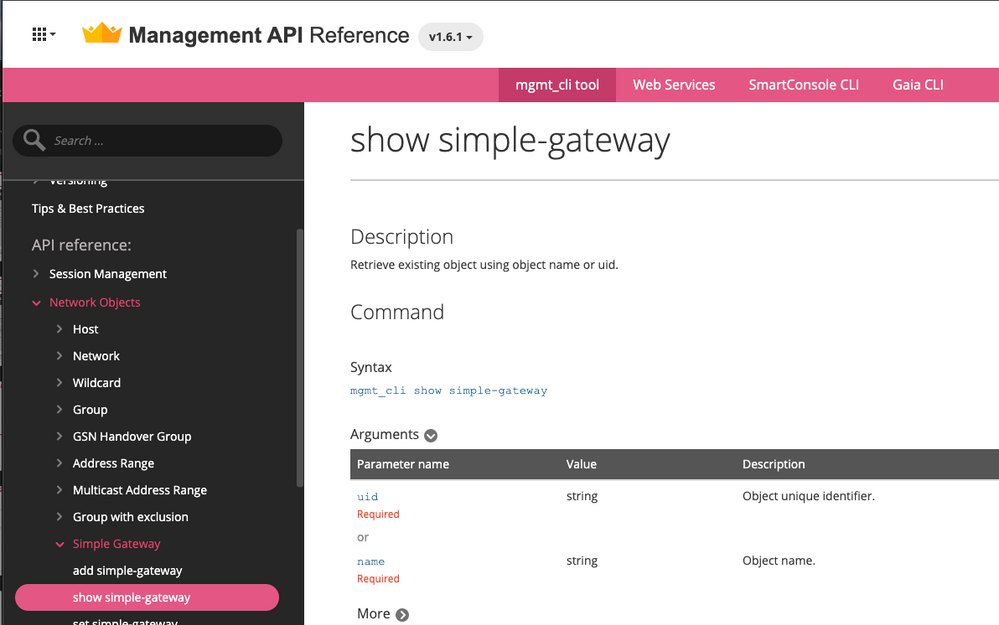
There is "show simple-gateway" command
We are using 1.6.1 API version and there is no filter option available for this "show-simple-gateway" API, I guess. We need to search using "name" field, the name works only if it is a perfect match.
For example: "Device123_._._Domain" will not be fetched if we are passing "Device123" in name field of "show-simple-gateway" API request. We get this below error,
{
"code" : "generic_err_object_not_found",
"message" : "Requested object [Device123] not found"
}
Also looking for policy details as in show-gateways-and-servers API which seems to be not available in "show-simple-gateway"
"show simple-gateway", same for simple-cluster, etc.
That works if you have the device's exact name, or exact UUID. It doesn't work if you know the device by only part of its name.
I would solve this problem like so:
mgmt_cli --format json -r true show gateways-and-servers limit 500 details-level full \
| jq -c '.objects[]|.' \
| egrep "<filter goes here>" \
| xargs -L 1 jq .
'details-level full' gives us more information about the object like the comment, which might be useful for filtering. 'limit 500' is as high as that option goes, so the command would need to be repeated with an offset if there are more than 500 gateway-and-server objects.
The `jq -c '.objects[]|.'` splits up the items in the 'objects' list in the original JSON, then prints the whole object in compact form (one full object per line).
You can then filter in any way you want. I've used egrep here, but there are other options. Since the whole object is one line, you just have to return lines which match the desired filter. Easy.
Finally, since the grep may return many lines but jq wants to get a single array or object, I use xargs to carve grep's output and feed it one object at a time to jq for pretty print. You can use a longer jq expression here instead of the . if you only want certain fields of the objects.
Could you please help me with the web services (web_api) equivalent, as cURL or Python sample. Since we are using only web services API and do not access mgmt_cli tool.
mgmt_cli just calls the API the same way you’d call it using the REST API.
The magic is happening in other CLI tools:
Ultimately, you will have the parse the results of the API programmatically to get the precise result you’re after.
Leaderboard
Epsum factorial non deposit quid pro quo hic escorol.
| User | Count |
|---|---|
| 4 | |
| 1 | |
| 1 | |
| 1 | |
| 1 | |
| 1 | |
| 1 | |
| 1 | |
| 1 | |
| 1 |
Tue 16 Dec 2025 @ 05:00 PM (CET)
Under the Hood: CloudGuard Network Security for Oracle Cloud - Config and Autoscaling!Thu 18 Dec 2025 @ 10:00 AM (CET)
Cloud Architect Series - Building a Hybrid Mesh Security Strategy across cloudsTue 16 Dec 2025 @ 05:00 PM (CET)
Under the Hood: CloudGuard Network Security for Oracle Cloud - Config and Autoscaling!Thu 18 Dec 2025 @ 10:00 AM (CET)
Cloud Architect Series - Building a Hybrid Mesh Security Strategy across cloudsAbout CheckMates
Learn Check Point
Advanced Learning
YOU DESERVE THE BEST SECURITY