- Products
- Learn
- Local User Groups
- Partners
- More
MVP 2026: Submissions
Are Now Open!
What's New in R82.10?
10 December @ 5pm CET / 11am ET
Announcing Quantum R82.10!
Learn MoreOverlap in Security Validation
Help us to understand your needs better
CheckMates Go:
Maestro Madness
Dear Team,
I have installed Python version 3 in my local machine to export and import policy from management server. (Configurations are done based on below URL)
https://github.com/CheckPointSW/ExportImportPolicyPackage
https://github.com/CheckPointSW/cp_mgmt_api_python_sdk
https://community.checkpoint.com/t5/API-CLI-Discussion/Export-Policy-using-python/m-p/55034#M3555
Local Machine >> Windows 10 64 bit
Management Server >> R80.10
Error: I am getting the below error, please someone suggest me what am I missing !!!
Note: I have increased RAM to 16 GB and allowed all IP address in API settings.
Please enter the IP address of the management server:
10.10.10.210
The script will run with the following parameters:
Export Access-Control layers = True
Export NAT layers = True
Export Threat-Prevention layers = True
Export HTTPS Inspection layers = True
Output-file name = None
Management Server IP = 10.10.10.210
Management Server Port = 443
Management Server Domain = None
1. Change Settings
2. Run
99. Back
2
Please enter your username:
admin
Please enter your password:
Login to management server failed. APIResponse({
"data": {
"errors": [
{
"message": "b'<!DOCTYPE HTML PUBLIC \"-//IETF//DTD HTML 2.0//EN\">\\n<html><head>\\n<title>403 Forbidden</title>\\n</head><body>\\n<h1>Forbidden</h1>\\n<p>You don\\'t have permission to access this resource.</p>\\n</body></html>\\n'"
}
]
},
"error_message": "APIResponse received a response which is not a valid JSON.",
"res_obj": {
"data": {
"errors": [
{
"message": "b'<!DOCTYPE HTML PUBLIC \"-//IETF//DTD HTML 2.0//EN\">\\n<html><head>\\n<title>403 Forbidden</title>\\n</head><body>\\n<h1>Forbidden</h1>\\n<p>You don\\'t have permission to access this resource.</p>\\n</body></html>\\n'"
}
]
},
"status_code": 403
},
"status_code": 403,
"success": false
})
Wow. That's all pre-installed. Simply run this command on your Security Management to export the policy (adjust port 443 if required)
$MDS_FWDIR/scripts/web_api_show_package.sh -n 443 -cHello Danny,
Thanks for the swift response... I hope, I have to mention my query more clearly....
Yes, as per the command which you shared flawlessly creating HTML file from Mgmt.
Allow me to explain what I am trying to do.....
Planning to export policy from one Mgmt and import (Exactly migration with existing policy) that policy into another Mgmt server where policy exist.
In this above process, I took a backup copy of 2 Mgmt policy server for safe side and trying to Migrate one policy database with another Mgmt server.
In the testing process after rectifying so many errors, I have reached this level and trying to succeed either export Or import before migrate.
Kindly correct me if anywhere I am wrong and share your expertise knowledge to succeed in the migration process.
The API server is probably not enabled.
See: https://community.checkpoint.com/t5/API-CLI-Discussion/Enabling-web-api/m-p/32641#M2011
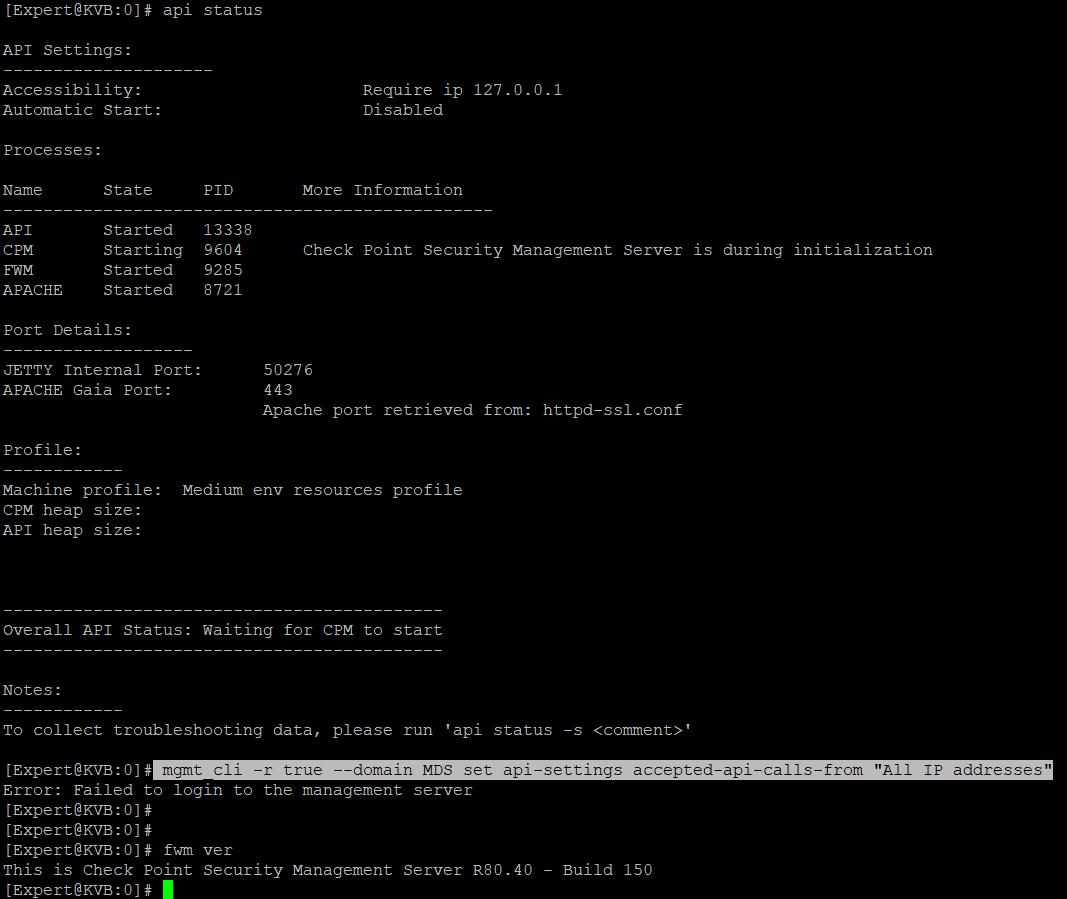
Yes, the command is working in R81, which is not working in R80.40, please find the attached SS for your reference. I could do that through GUI in the below path SS attached for your reference... still i am facing the below error.
Management Server IP = 10.10.10.210
Management Server Port = 443
Management Server Domain = None
1. Change Settings
2. Run
99. Back
2
Please enter your username:
admin
Please enter your password:
Login to management server failed. APIResponse({
"data": {
"errors": [
{
"message": "b'<!DOCTYPE HTML PUBLIC \"-//IETF//DTD HTML 2.0//EN\">\\n<html><head>\\n<title>403 Forbidden</title>\\n</head><body>\\n<h1>Forbidden</h1>\\n<p>You don\\'t have permission to access this resource.</p>\\n</body></html>\\n'"
}
]
},
"error_message": "APIResponse received a response which is not a valid JSON.",
"res_obj": {
"data": {
"errors": [
{
"message": "b'<!DOCTYPE HTML PUBLIC \"-//IETF//DTD HTML 2.0//EN\">\\n<html><head>\\n<title>403 Forbidden</title>\\n</head><body>\\n<h1>Forbidden</h1>\\n<p>You don\\'t have permission to access this resource.</p>\\n</body></html>\\n'"
}
]
},
"status_code": 403
},
"status_code": 403,
"success": false
})
D:\ASA To CP Test\ExportImportPolicyPackage-master>
After reboot CP VM, it took the same comment as you mentioned in the above article... In API STATUS which is showing as required ip as 127.0.0.1.... It is not changing to "All IP Address".
Please find the log below;
1. API Status:
[Expert@KVB:0]# api status | more
API Settings:
---------------------
Accessibility: Require ip 127.0.0.1
Automatic Start: Enabled
Processes:
Name State PID More Information
-------------------------------------------------
API Started 15864
CPM Started 9644 Check Point Security Management Server is running and ready
FWM Started 9260
APACHE Started 8711
Port Details:
-------------------
JETTY Internal Port: 50276
APACHE Gaia Port: 443
Apache port retrieved from: httpd-ssl.conf
Profile:
------------
Machine profile: Medium env resources profile
CPM heap size:
API heap size:
--------------------------------------------
Overall API Status: Started
--------------------------------------------
API readiness test SUCCESSFUL. The server is up and ready to receive connections
Notes:
------------
To collect troubleshooting data, please run 'api status -s <comment>'
[Expert@KVB:0]# fwm ver
This is Check Point Security Management Server R80.40 - Build 150
[Expert@KVB:0]#
2. Error Message from Python script while export:
Login to management server failed. APIResponse({
"data": {
"errors": [
{
"message": "b'<!DOCTYPE HTML PUBLIC \"-//IETF//DTD HTML 2.0//EN\">\\n<html><head>\\n<title>403 Forbidden</title>\\n</head><body>\\n<h1>Forbidden</h1>\\n<p>You don\\'t have permission to access this resource.</p>\\n</body></html>\\n'"
}
]
},
"error_message": "APIResponse received a response which is not a valid JSON.",
"res_obj": {
"data": {
"errors": [
{
"message": "b'<!DOCTYPE HTML PUBLIC \"-//IETF//DTD HTML 2.0//EN\">\\n<html><head>\\n<title>403 Forbidden</title>\\n</head><body>\\n<h1>Forbidden</h1>\\n<p>You don\\'t have permission to access this resource.</p>\\n</body></html>\\n'"
}
]
},
"status_code": 403
},
"status_code": 403,
"success": false
})
Thank in Advance...
You cannot log in to the API. Check you have configured user and API client IPs properly, before anything else.
It would be great, if you guide me, where to check and what to check.... Thanks....
Check here https://community.checkpoint.com/t5/API-CLI-Discussion/Enabling-web-api/td-p/32641 how to prepare and test API before you start working with Python
Leaderboard
Epsum factorial non deposit quid pro quo hic escorol.
| User | Count |
|---|---|
| 4 | |
| 1 | |
| 1 | |
| 1 | |
| 1 | |
| 1 | |
| 1 | |
| 1 | |
| 1 | |
| 1 |
Fri 12 Dec 2025 @ 10:00 AM (CET)
Check Mates Live Netherlands: #41 AI & Multi Context ProtocolTue 16 Dec 2025 @ 05:00 PM (CET)
Under the Hood: CloudGuard Network Security for Oracle Cloud - Config and Autoscaling!Fri 12 Dec 2025 @ 10:00 AM (CET)
Check Mates Live Netherlands: #41 AI & Multi Context ProtocolTue 16 Dec 2025 @ 05:00 PM (CET)
Under the Hood: CloudGuard Network Security for Oracle Cloud - Config and Autoscaling!Thu 18 Dec 2025 @ 10:00 AM (CET)
Cloud Architect Series - Building a Hybrid Mesh Security Strategy across cloudsAbout CheckMates
Learn Check Point
Advanced Learning
YOU DESERVE THE BEST SECURITY