- Products
- Learn
- Local User Groups
- Partners
- More

The State of Ransomware Q1 2026
Key Trends and Their Impact
Good, Better, Best:
Prioritizing Defenses Against Credential Abuse
AI Security Masters E7:
How CPR Broke ChatGPT's Isolation and What It Means for You
Blueprint Architecture for Securing
The AI Factory & AI Data Center
Call For Papers
Your Expertise. Our Stage
CheckMates Go:
CheckMates Fest
In R77.30 and earlier IPS packet capture was stored on the gateways as .pcap files and we could retrieve them using "fwm getpcap" over SSH. In R80+, IPS has been moved to Threat Prevention and it seems that packet capture is now being stored as .EML files. Looking at the logs from "fw log", the "packet_capture_unique_id" is now a name, where on earlier versions this was a ID number. Tried running "fwm getpcap" with different ID's from the logs, but all returning errors.
I heard that there are plans to stop using .EML files, but until then, are there any ways to get the IPS packet captures out from SSH?
I don't know if this is too late, but maybe sk120773 helps:
IPS packet captures are located on on the Security Gateway in:
Hm... good question.
Let me ping my friends in R&D about this one.
Turns out that’s in R80.10+, the packet captures are stored on the log server, not the gateway as was the case in R77.30 and earlier.
Consequentially, the fwm getpcap command does not work for R80.10+ Gateways
An API for this is planned in R80.20.
Also, in R80.20, we plan to make the pcap available as a pcap (not EML).
Meanwhile, in R80.10, the only way to get the capture is via SmartConsole.
Thanks, will await for R80.20 then
Did the ability to pull pcaps from the API make it into the R80.20 EA?
I don't see anything in the API docs for it offhand...
I don't know if this is too late, but maybe sk120773 helps:
IPS packet captures are located on on the Security Gateway in:
Never too late for a correct answer ![]()
The nice thing is in R80.10, these files are stored as .cap files directly, which means Wireshark and other tools can read them.
In a R80.10 installation it seems that there is only .cap files for the last couple of days. Does anyone know for how long the .cap files are stored and where it can be configured?
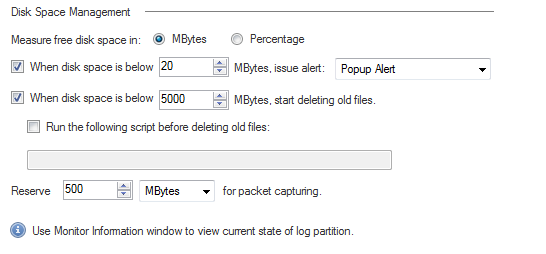
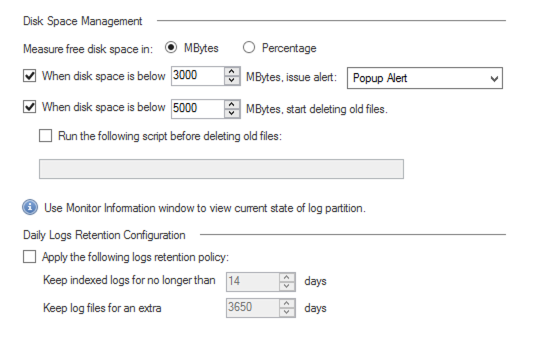
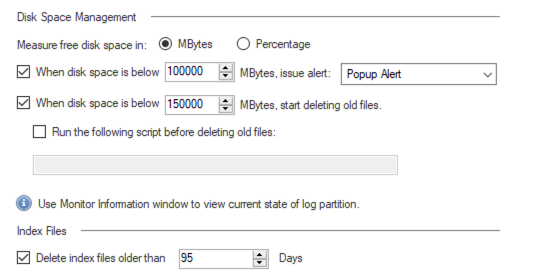
It's my understanding that these settings are configured from 'Disk Space Management' (GW Properties -> Logs -> Local Storage). Here you can also define how much disk space will be allocated for packet capturing. Files should be stored until we start running out of space (then log rotation starts working as per the settings)

It seems that R81.10 does not offer the possibility to configure this anymore:
Same on R80.30:
This is configured on the gateway object, not the SMS. The Local Storage screens you are showing are for an SMS.
Leaderboard
Epsum factorial non deposit quid pro quo hic escorol.
| User | Count |
|---|---|
| 34 | |
| 10 | |
| 10 | |
| 9 | |
| 8 | |
| 8 | |
| 8 | |
| 6 | |
| 5 | |
| 5 |
Tue 12 May 2026 @ 10:00 AM (CEST)
The Cloud Architects Series: Check Point Cloud Firewall delivered as a serviceWed 13 May 2026 @ 11:00 AM (EDT)
TechTalk: The State of Ransomware Q1 2026: Key Trends and Their ImpactThu 14 May 2026 @ 07:00 PM (EEST)
Under the Hood: Presentando Check Point Cloud Firewall como ServicioTue 12 May 2026 @ 10:00 AM (CEST)
The Cloud Architects Series: Check Point Cloud Firewall delivered as a serviceTue 19 May 2026 @ 06:00 PM (IDT)
AI Security Masters E8 - Claude Mythos: New Era in Cyber SecurityAbout CheckMates
Learn Check Point
Advanced Learning
YOU DESERVE THE BEST SECURITY