- Products
- Learn
- Local User Groups
- Partners
- More

The State of Ransomware Q1 2026
Key Trends and Their Impact
Good, Better, Best:
Prioritizing Defenses Against Credential Abuse
AI Security Masters E7:
How CPR Broke ChatGPT's Isolation and What It Means for You
Blueprint Architecture for Securing
The AI Factory & AI Data Center
Call For Papers
Your Expertise. Our Stage
CheckMates Go:
CheckMates Fest
After about 1400 lines of code and many programming hacks, I would like to present you my new extension:
"Execute CLI commands on selected gateways simultaneously".
This allows you to execute Expert Mode commands and CLISH commands from the SmartConsole on selected gateways simultaneously.
| Install the extension |
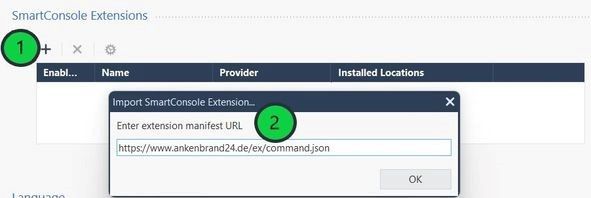
1) On SmartConsole, go to Manage & Settings > Preferences > SmartConsole Extensions > +.
2) Enter the web-service manifest URL
https://www.ankenbrand24.de/ex/command.json
and click OK.
| Execute "Expert Mode" command on selected gateways simultaneously |
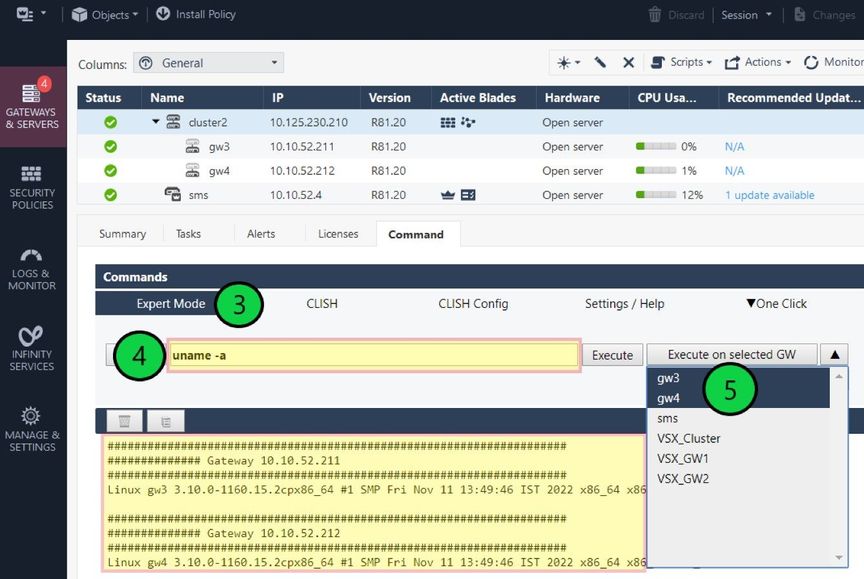
3) Open the menu item "Expert Mode". The same works with CLISH commands in the menu "CLISH".
4) Enter the command you want to execute on the selected gateways.for example "uname -a"
5) Select the gateways on which the command should be executed and click "Execute on selected GW".
| More about the Extension |
SmartConsole extension to execute commands on all gateways and the SMS.
Here you can find the original article with the extention:
Execute Commands ➜ SmartConsole Extension
| Install SmartConsole Extension |
|---|
To install SmartConsole Extensions, you can watch this video:
About CheckMates
Learn Check Point
Advanced Learning

YOU DESERVE THE BEST SECURITY