- Products
- Learn
- Local User Groups
- Partners
- More

AI Security Masters E7:
How CPR Broke ChatGPT's Isolation and What It Means for You
Blueprint Architecture for Securing
The AI Factory & AI Data Center
Call For Papers
Your Expertise. Our Stage
Good, Better, Best:
Prioritizing Defenses Against Credential Abuse
Ink Dragon: A Major Nation-State Campaign
Watch HereCheckMates Go:
CheckMates Fest
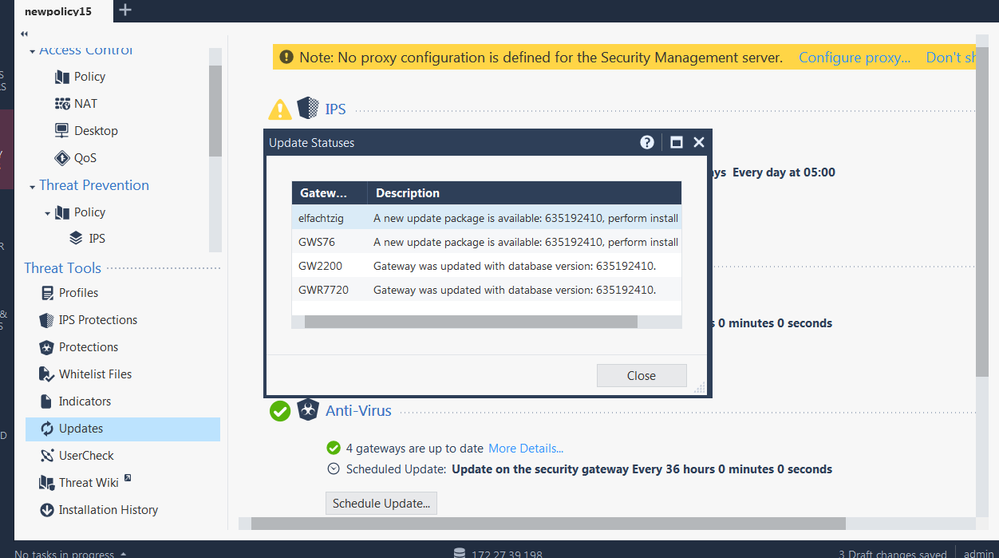
The R80.20 Dashboard has a valuable interface to confirm that the latest IPS update version is installed on the managed Gateways. It can happen that the SMS has already updated to the current IPS version, but some Gateways not; a policy install will update them, too.
But not with R77.30 and R77.20.80 - after a policy install, GWs are updated, but look here:
Still we see that two GWs do not have the current version - except in CLI:
Installing the policy again, quitting Dashboard and opening it again as well as GW reboot does not change the displayed status. Anyone else experiencing this issue ? SMS is R80.20 JT 73, Dashboard B046.
This issue seems to be fixed now with Jumbo Take 80 installed ! After policy install, all is green...
I usually do not open TAC cases for my Lab environment, so i thought i ask around if other users can confirm the behaviour. I only stumbled upon it when the IPS update status did not chenge regardless of several policy installs...
Make sure you have the latest build of the SmartConsole software installed, had a mysterious problem editing a cluster object at a customer site just today that was solved by updating the SmartConsole software.
I am using the newest SmartConsole 992000046 = Check_Point_SmartConsole_R80_20_jumbo_HF_B046_Win.exe
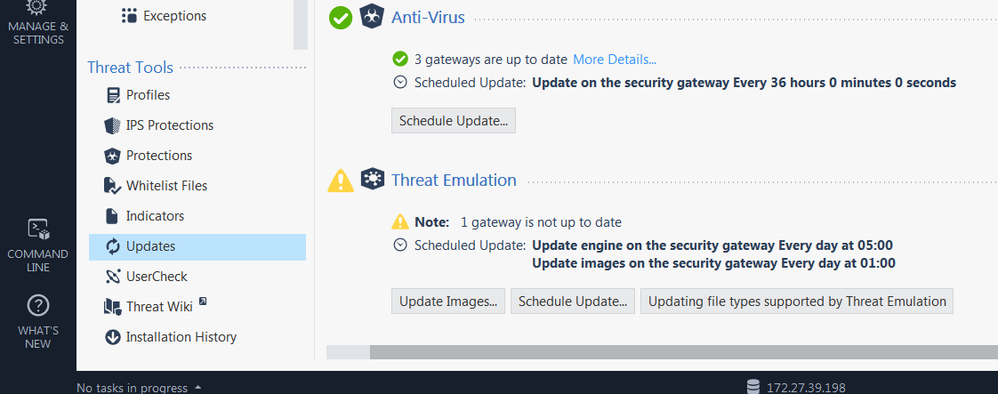
Same issue with TE Updates - the SMS displays the following update status:
But in CLI we see something completely different :
# cpstat threat-emulation
Status: 0
Status short description: ok
Status long description:
Engine Major Version: 58
Engine Minor Version: 990000492
# cpstat threat-emulation -f update_status
TE Update Status: up-to-date
TE Update Description: Gateway is up to date.
So whom to believe ???
This issue seems to be fixed now with Jumbo Take 80 installed ! After policy install, all is green...
Now SMS R80.30 JT 50 Dashboard 993000008 again shows the issue: IPS - One GW is not up to date for a R77.30 GW. According to Update Status in More Details..., a new update packet must be installed. Using CLI ips stat, we can see that this version is already installed on R77.30 GW.
Issue is with Security Policy > IPS Updates page only, Gateways and Servers show Green. Also in this view, the Device & License Information for R77.30 GW shows no IPS Blade information, only FW, VPN, APLC, URLF and ABOT / AV infos are shown !
Leaderboard
Epsum factorial non deposit quid pro quo hic escorol.
| User | Count |
|---|---|
| 66 | |
| 19 | |
| 13 | |
| 12 | |
| 11 | |
| 10 | |
| 9 | |
| 7 | |
| 7 | |
| 7 |
Tue 28 Apr 2026 @ 06:00 PM (IDT)
Under the Hood: Securing your GenAI-enabled Web Applications with Check Point WAFThu 30 Apr 2026 @ 03:00 PM (PDT)
Hillsboro, OR: Securing The AI Transformation and Exposure ManagementTue 28 Apr 2026 @ 06:00 PM (IDT)
Under the Hood: Securing your GenAI-enabled Web Applications with Check Point WAFTue 12 May 2026 @ 10:00 AM (CEST)
The Cloud Architects Series: Check Point Cloud Firewall delivered as a serviceThu 30 Apr 2026 @ 03:00 PM (PDT)
Hillsboro, OR: Securing The AI Transformation and Exposure ManagementAbout CheckMates
Learn Check Point
Advanced Learning
YOU DESERVE THE BEST SECURITY