- Products
- Learn
- Local User Groups
- Partners
- More
AI Security Masters E7:
How CPR Broke ChatGPT's Isolation and What It Means for You
Blueprint Architecture for Securing
The AI Factory & AI Data Center
Call For Papers
Your Expertise. Our Stage
Good, Better, Best:
Prioritizing Defenses Against Credential Abuse
Ink Dragon: A Major Nation-State Campaign
Watch HereCheckMates Go:
CheckMates Fest
Hi all,
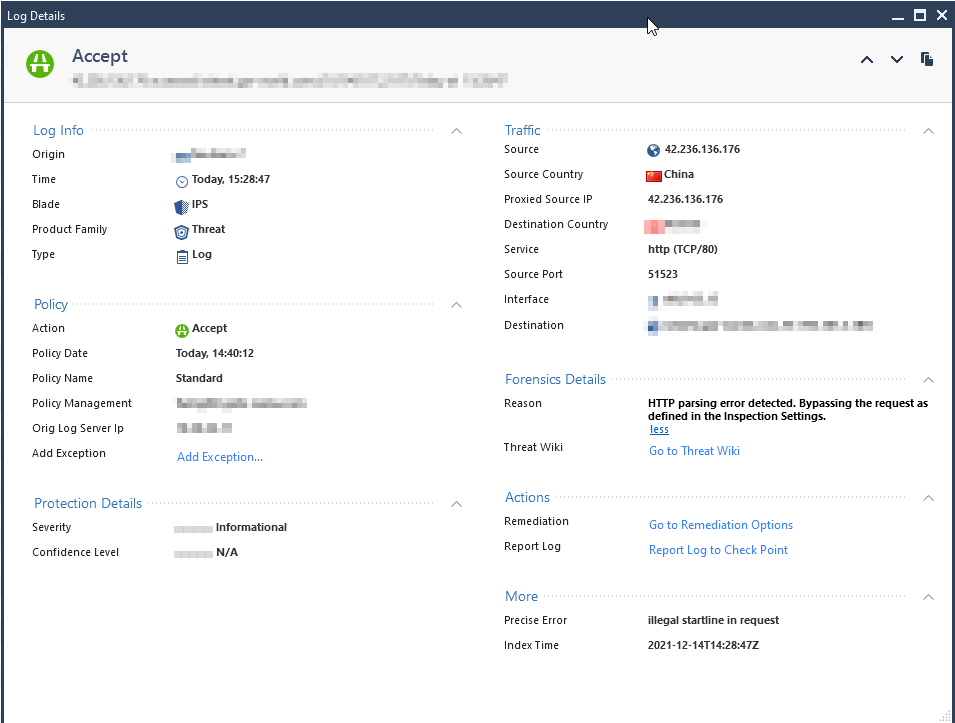
I'm trying to find out why the connection below is accepted. Forensic reason is "HTTP parsing error detected. Bypassing the request as defined in the Inspection Settings." Precise Error is "illegal startline in request"
I'm not able to add an exception -> "This protection does not support exceptions"
The inspection setting "Non compliant HTTP" is set to inactive.
Thread Prevention blade is set to Fail-open. Could this be the cause?
Running on 80.40
Any ideas welcome
Kind regards
Oliver
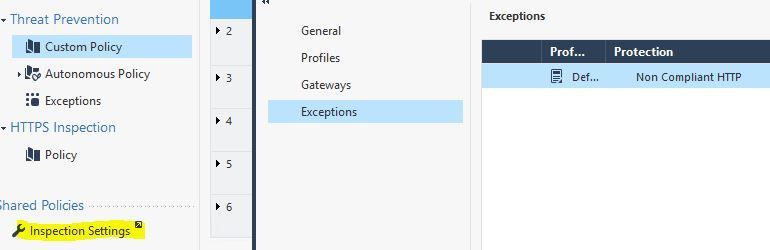
It's a bit confusing but this protection isn't directly from the IPS protections but from the general "Inspection Settings". You can add exceptions there. But keep in mind that you would have to enable this protection first and add exception for the connections you might need:
We also have it disabled as it is standard in the default profile.
Hello Marcel,
confusing is the right word 🙂 As I've already mentioned in my post: Non compliant HTTP is already set to inactive. So why should this setting generate the log entry?
Inactive actually doesn't mean it won't be logged - this is the same behavior with regular IPS exceptions. I honestly don't know what's the difference between detect and inactive but normally you have to also set the log column no "none" in order to do nothing. As you cannot do that with those inspection settings you would have to live with that I assume.
There are four overall types of IPS-related protections that all used to be part of the IPS blade prior to R80 but got (mostly) split out separately in R80+:
1) IPS ThreatCloud Protections (shield icon)
2) Inspection Settings (wrench icon)
3) Core Activations/Protections (only 39 of these - shield w/ firewall icon)
4) Geo Policy (legacy in R81+)
Regardless of type, exceptions are processed after the actual inspection occurs looking for that protection and simply changes the final decision (Prevent/Detect/etc.). As such exceptions don't improve performance at all. The ability to specify "Inactive" in an exception is indeed misleading, it probably should be "Ignore" which would be a bit more clear and slightly different than Detect. For Inspection Settings specifically, hits against an exception there will always be logged and you can't change it. Some Inspection Settings protections are inherent to the stateful inspection process and cannot directly be set to Inactive on the protection itself, let alone an exception.
The specific log you are seeing is related to an internal inspection failure and what to do when that happens (fail open or fail closed); in your case it failed open (bypass). There is not a separate setting for Inspection Settings controlling this I'm aware of, I imagine it is keying off the Manage & Settings...Blades...Threat Prevention...Fail Mode option, even though Inspection Settings is supposed to be part of the Access Control policy. See my commentary at the start of this article.
Hi Timothy,
thank you for clearing this up. I've already assumed that this logs are caused because of the fail-open setting. Will switch the Thread blade to fail-close and keep on monitoring.
Definitely keep an eye on things for awhile when changing from fail-open to fail-close, you may be surprised what gets broken as a result.
Seems we've been too optimistic with Fail-open / Fail-close. I've set the Thread Prevention Blade to Fail-close but these kind of logs are still being generated. Any other ideas what protection or setting causes this issue?
Probably will need a TAC case for this, as I don't see where the fail mode is controlled from for Inspection Settings, it must not be using the TP Setting.
Leaderboard
Epsum factorial non deposit quid pro quo hic escorol.
| User | Count |
|---|---|
| 66 | |
| 19 | |
| 13 | |
| 12 | |
| 11 | |
| 9 | |
| 9 | |
| 7 | |
| 7 | |
| 7 |
Tue 28 Apr 2026 @ 06:00 PM (IDT)
Under the Hood: Securing your GenAI-enabled Web Applications with Check Point WAFThu 30 Apr 2026 @ 03:00 PM (PDT)
Hillsboro, OR: Securing The AI Transformation and Exposure ManagementTue 28 Apr 2026 @ 06:00 PM (IDT)
Under the Hood: Securing your GenAI-enabled Web Applications with Check Point WAFTue 12 May 2026 @ 10:00 AM (CEST)
The Cloud Architects Series: Check Point Cloud Firewall delivered as a serviceThu 30 Apr 2026 @ 03:00 PM (PDT)
Hillsboro, OR: Securing The AI Transformation and Exposure ManagementAbout CheckMates
Learn Check Point
Advanced Learning
YOU DESERVE THE BEST SECURITY