- Products
- Learn
- Local User Groups
- Partners
- More

What's New in R82.10?
Watch HereWhen the Agents Attack
A Live Look at Agentic Exposure Validation
AI Security Masters E8:
Claude Mythos: New Era in Cyber Security
CheckMates Go:
CheckMates Fest
Hello CheckMates,
This days I try to do some reports to our customer which have more SMB devices. Some of them are 14xx series and some 15xx. All the devices are Centrally managed.
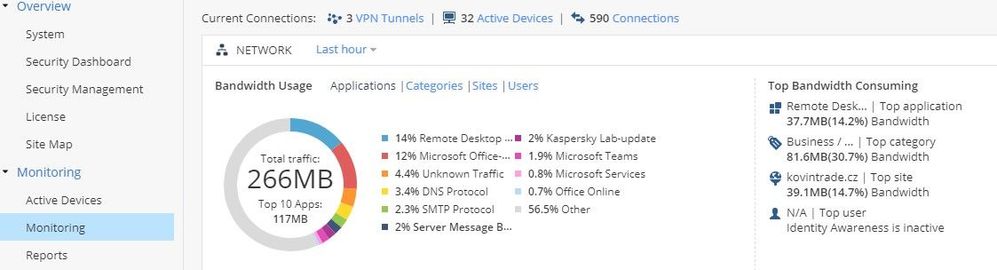
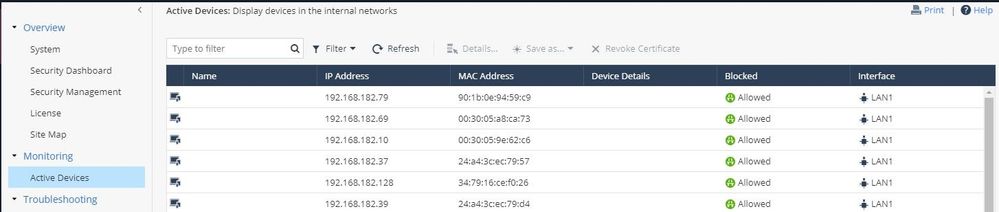
On 14xx device I can go to Home > Monitoring > Monitoring. From this page I can see Active devices.
If I try the same on 15xx devices there no more Home > Monitoring > Monitoring page.
Looks like that this changes. How can I get the information regarding the Active devices without device count under the Home > Monitoring > Active Device ? If I check this on locally managed devices there is the Monitoring tab.
Best regards,
Why use the local WebGUI monitoring page if the units are centrally managed and show in Dashboard/SmartView a.o.?
Hello Albrecht,
And where can I see the active device in the Dashboard/SmartView ?
Best regards,
This should not be - 1550 with R80.20.10 shows Monitoring and Report page in all deployments, including centrally managed. Make sure you use R80.20.10 Build 992001491 for 1500 appliances and consult TAC for resolving this issue !
Another way to potentially see the same screen is Logs & Monitoring > Status > Monitoring.
I don't have a centrally managed 1500 handy to confirm it's there.
I have option to upgrade the appliance on the last version R80.20.10 (992001491). But the problem is the same. There not Monitoring tab. I also check the screen Logs & Monitoring > Status. There no Monitoring tab.
I know that this tab not shown on the centrally managed devices but on the locally managed I can see the Monitoring tab.
The page is only relevant when the device is locally managed and thus must run reports locally.
For a centrally managed device, no logs are stored locally, and thus no reporting can happen locally.
You must use SmartEvent to generate reports in this case.
What precise information are you looking for?
One the 14xx device, we can see the active devices (locally or centrally managed). We can caount all the devices but if you have a lot of device behind the device this is little hard.
On SmartEvent I don't know how can generate such report. We have customer that have at more remote location, and If I can cenerate the monthly report (or yearly) regading the active device in this remote location this will be nice.
Active Devices is a real-time view that can't be reported on over time.
What SmartEvent can generate is based on information generated from traffic logged.
There are several default reports in SmartEvent that will show you different kinds of activity, which can be customized.
Leaderboard
Epsum factorial non deposit quid pro quo hic escorol.
| User | Count |
|---|---|
| 6 | |
| 3 | |
| 2 | |
| 1 | |
| 1 | |
| 1 | |
| 1 | |
| 1 | |
| 1 | |
| 1 |
Thu 09 Jul 2026 @ 10:00 AM (CEST)
Schutz souveräner Workloads: Check Point & die AWS European Sovereign CloudThu 09 Jul 2026 @ 11:00 AM (CEST)
The Cloud Architects Series: Check Point Edge Protection SD-WAN & SASEThu 09 Jul 2026 @ 11:00 AM (EDT)
Tips and Tricks 2026 #9 - What's New with Check Point Email SecurityFri 10 Jul 2026 @ 11:00 AM (IDT)
CheckMates Live Netherlands - Sessie 48: Nieuwe Check Point Workspace SecurityTue 14 Jul 2026 @ 10:00 AM (PDT)
AI Security Masters E11: READY OR NOT: Securing the AI Enterprise 3/5 - AI Workforce SecurityThu 30 Jul 2026 @ 10:00 AM (PDT)
AI Security Masters E12: READY OR NOT: Securing the AI Enterprise 4/5 - AI GatewayThu 09 Jul 2026 @ 11:00 AM (EDT)
Tips and Tricks 2026 #9 - What's New with Check Point Email SecurityFri 10 Jul 2026 @ 11:00 AM (IDT)
CheckMates Live Netherlands - Sessie 48: Nieuwe Check Point Workspace SecurityTue 14 Jul 2026 @ 10:00 AM (PDT)
AI Security Masters E11: READY OR NOT: Securing the AI Enterprise 3/5 - AI Workforce SecurityThu 30 Jul 2026 @ 10:00 AM (PDT)
AI Security Masters E12: READY OR NOT: Securing the AI Enterprise 4/5 - AI GatewayThu 20 Aug 2026 @ 10:00 AM (PDT)
AI Security Masters E13: READY OR NOT: Securing the AI Ent 5/5 - AI Research & Threat LandscapeAbout CheckMates
Learn Check Point
Advanced Learning
YOU DESERVE THE BEST SECURITY