- Products
- Learn
- Local User Groups
- Partners
- More

Step Into the Future of
AI-Powered Cyber Security
The State of Ransomware Q1 2026
Key Trends and Their Impact
AI Security Masters E8:
Claude Mythos: New Era in Cyber Security
Blueprint Architecture for Securing
The AI Factory & AI Data Center
Call For Papers
Your Expertise. Our Stage
CheckMates Go:
CheckMates Fest
Hi,
I have a question about setting up NAT on checkpoint 450.
So after I used the wizard on "Active Devices", save as a machine to "server". I was able to connect to the server from external network. However, from within the network, I am unable to.
Here's some more of the settings I set:
Access - All Zones
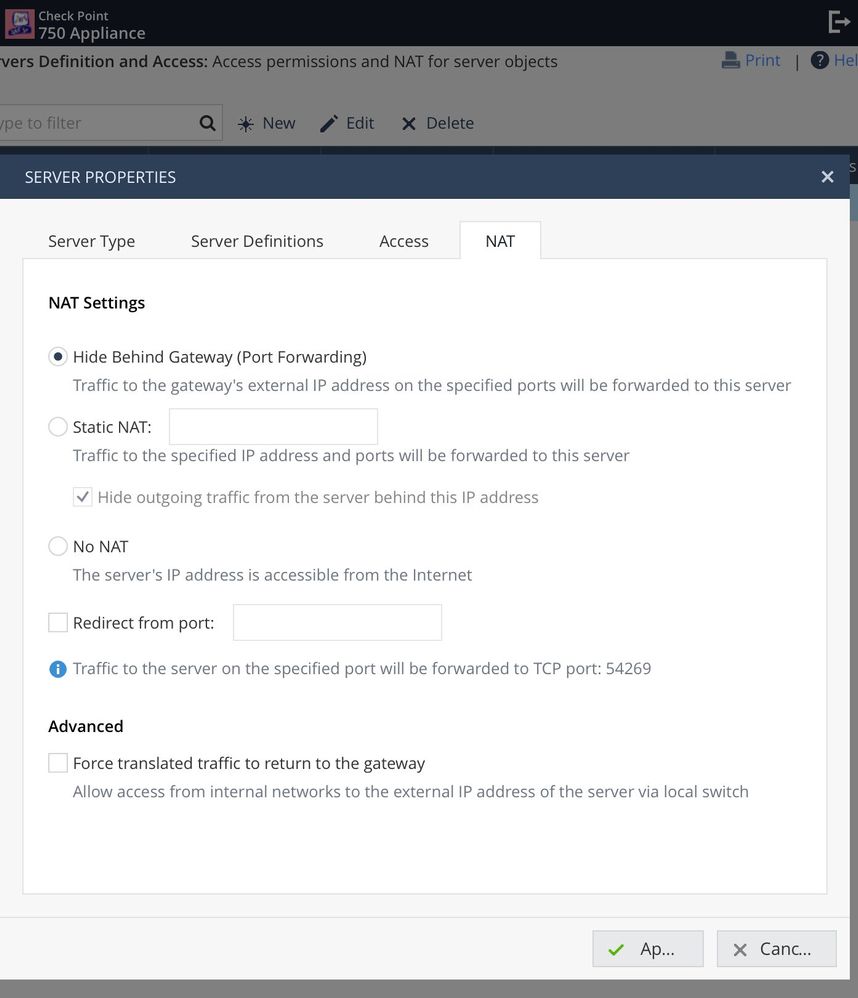
NAT - Hide behind gateway.
Any pointers?
Thanks!
I assume you mean a 750, which is an SMB appliance.
In your server object, did you check the option under Advanced?
Yes that was checked but still didn't work
Have you done a tcpdump to see what the traffic looks like?
I suspect you'll have to get the TAC involved.
Hi,
I think i figured it out. I think there's a UI bug somewhere.
If you create your server node from the "active device" page, I believe the routes are configured differently when you create the server node from the actual server page. After multiple attempts, if I create the server object from the actual server page, it works.
Bug?
How could you do that ? On my 730, Home > Monitoring > Active Devices has no option to add a server, and neither has Logs & Monitoring > Status > Active Devices ...
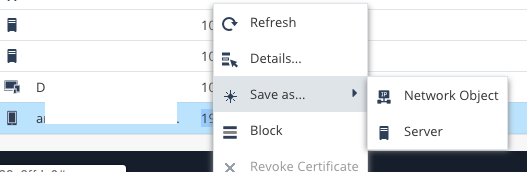
Right-click on the object in the Active Devices view, choose Save-As > Server.
@PhoneBoy wrote:
Right-click on the object in the Active Devices view, choose Save-As > Server.
I see - i can not do that, also not from menue, as this is only possible for IPs without defined objects. Definitely a bug, this feature should make defining servers more handy but actually makes servers partly unusable...
Do you have a response from TAC yet ?
Leaderboard
Epsum factorial non deposit quid pro quo hic escorol.
| User | Count |
|---|---|
| 4 | |
| 4 | |
| 3 | |
| 3 | |
| 2 | |
| 2 | |
| 2 | |
| 1 | |
| 1 | |
| 1 |
Fri 29 May 2026 @ 09:00 AM (EDT)
Caracas: Executive Breakfast: Innovación en Ciberseguridad – IA y Threat IntelligenceTue 02 Jun 2026 @ 06:00 PM (IDT)
Under the Hood | Check Point SASE: Identity Integration & Access Policy Design Best PracticesThu 04 Jun 2026 @ 02:00 PM (CEST)
Deep Dive Webinar: New CloudGuard GWLB Deployment Without NAT Gateways - EuropeTue 02 Jun 2026 @ 06:00 PM (IDT)
Under the Hood | Check Point SASE: Identity Integration & Access Policy Design Best PracticesThu 04 Jun 2026 @ 02:00 PM (CEST)
Deep Dive Webinar: New CloudGuard GWLB Deployment Without NAT Gateways - EuropeThu 04 Jun 2026 @ 07:00 PM (IDT)
Deep Dive Webinar: New CloudGuard GWLB Deployment Without NAT Gateways - AmericaFri 12 Jun 2026 @ 10:00 AM (CEST)
CheckMates Live Netherlands - Sessie 47: Continuous Threat Exposure ManagementThu 18 Jun 2026 @ 10:00 AM (CEST)
The Cloud Architects Series: Check Point WAF - The Next Generation of AI powered protectionFri 29 May 2026 @ 09:00 AM (EDT)
Caracas: Executive Breakfast: Innovación en Ciberseguridad – IA y Threat IntelligenceAbout CheckMates
Learn Check Point
Advanced Learning
YOU DESERVE THE BEST SECURITY