Create a Post
cancel
Showing results for 
Search instead for 
Did you mean: 
Stephan_Kremer
Participant

IPSEC compression

Hi,

I established a site-to-site VPN between a 600 appliance and an old UTM-1 edge. Both devices support IPSEC compression related to their datasheets, but the tunnel is established without. 

I find no options at all to check this. Any help is welcome.

Best regards,

Stephan

0 Kudos
5 Replies
PhoneBoy
Admin
Admin

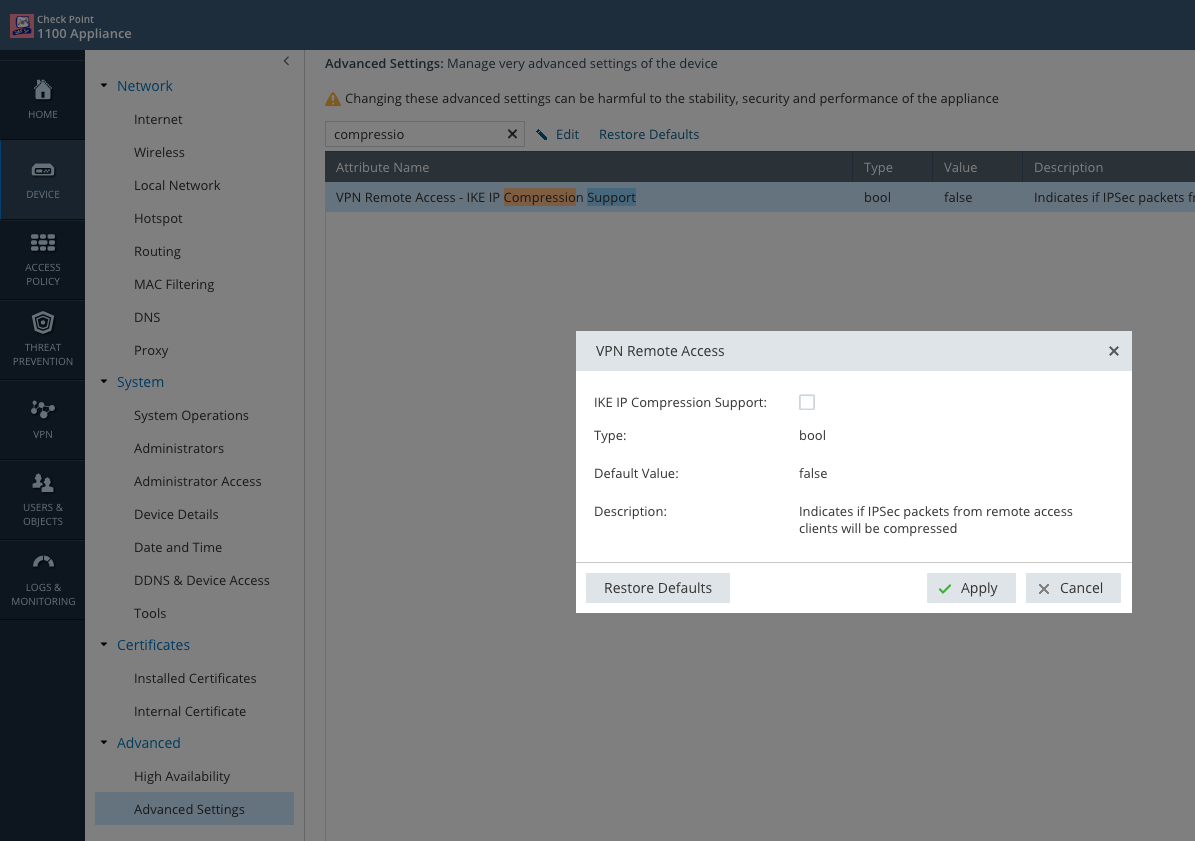
Here's where you set it on the 600 Series:

I don't believe there is a specific setting on the UTM-1 EDGE appliance to enable it, but the way I understand it, if the other side is configured to support it, the UTM-1 EDGE will use it.

0 Kudos
Stephan_Kremer
Participant

I found that advanced setting, but it does not change the behaviour. Still no compression with the tunnel...

0 Kudos
PhoneBoy
Admin
Admin

It looks like it's a setting for VPN clients (i.e. what Remote Access means), not site-to-site VPN.

I know with centrally managed SMB appliances, you can configure IP Compression in the VPN Community.

There does not appear to be a way to enable this option for local management.

0 Kudos
Stephan_Kremer
Participant

Okay, thanks a lot for your answers. Not a big issue for me, I just wanted to make sure that I don‘t overlook the place of configuration.

0 Kudos
HristoGrigorov
MVP Gold
MVP Gold

Compression should really only be enabled for slow connections (e.g. Remote Access). On high speed site-to-site VPNs it will more likely cause performance issues, especially on SMB.

Leaderboard

Epsum factorial non deposit quid pro quo hic escorol.

Upcoming Events

    Thu 29 Oct 2026 @ 06:00 PM (COT)

    CheckMates El Salvador

    Tue 03 Nov 2026 @ 09:00 AM (CET)

    Cloud Security Workshop, Paris

    Fri 13 Nov 2026 @ 10:00 AM (CET)

    50x CheckMates Live Netherlands

    Thu 26 Nov 2026 @ 10:00 AM (EET)

    CheckMates Live AI Workshop Helsinki
    CheckMates Events